Want to get Lullabot article, videocast, and podcast announcements delivered right to your in-box? Let us know your email address (we won't share it) and we'll let you know when anything exciting happens.

Image and Image Exact Sizes vs. Imagefield and ImageCache

Introduction

Suppose you have a site such as an e-commerce site, and you want to upload an image for each product. Suppose further that you have several sizes you want that image to be displayed in, depending on where you are in the site. For example, you might want to have a thumbnail displayed in a product listing, a larger version on the product page itself, and a middle size for displaying in a custom View. And finally, suppose that you'd really rather have Drupal take care of this resizing for you and not have to upload 3+ images for each product you create, so you can spend more time slacking off at work and less time clicking buttons. ;)

There essentially are two different ways to have Drupal do this:

1. Use the Image and Image Exact Sizes modules.

2. Use the imagefield and imagecache modules.

This article will compare and contrast these methods, so you can pick the one most appropriate to your needs (or both!). Read on to find out more!

Image and Image Exact Sizes

The main difference between Image and imagefield module is that Image module stores images as nodes. That means that each product you create will have two nodes created for it: the product itself and the image attached to the product.

The first step (after enabling the image, image_attach, and image_exact modules is to go to administer >> settings >> image and enter the sizes you want for each image:
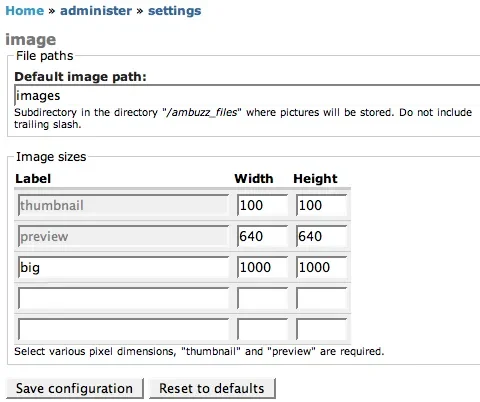
Image sizes settings

Next, you'll want to go to administer >> settings >> image_exact and check off the options for which sizes you wish image_exact to enforce:
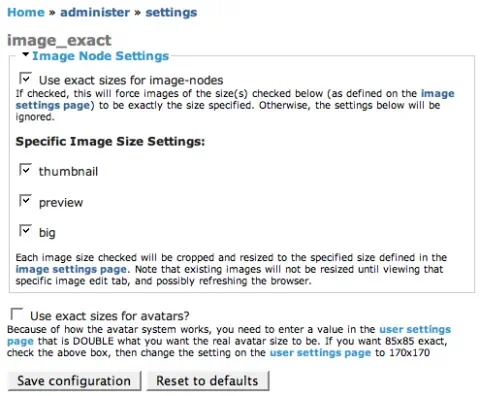
Image exact settings

Note that these settings will apply to each image that you create, regardless if they belong to a product or not.

Creating images first and then creating the product and then linking the two together would be a tedious process. Fortunately, Image module comes with a great little helper module, image_attach which allows you to attach an image to any existing node type. Here's a screenshot from a CCK "product" node's configuration page when image_attach is enabled:
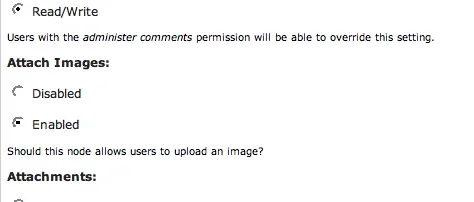
Content settings

When enabled, this causes an upload field to appear when you create a node:
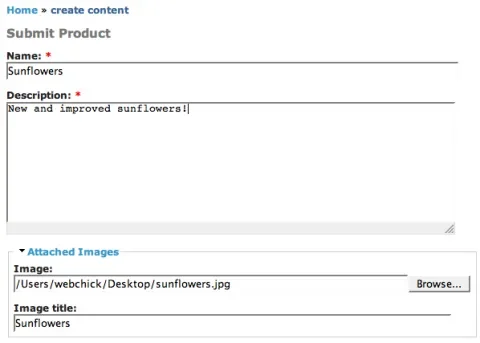
Image attach field

After you submit the node, the system will automatically create your image node and resize the images appropriately in the background for you. This will create a number of images:

  • example.png - the original image
  • example.thumbnail.png - the thumbnail-size image
  • example.preview.png - the preview-size image
  • example.XXX.png - an additional image for each size you have defined.

Note that currently, image_attach only supports attaching one image per node.

Finally, Image module's Views integration allows you to display the image at whatever size:
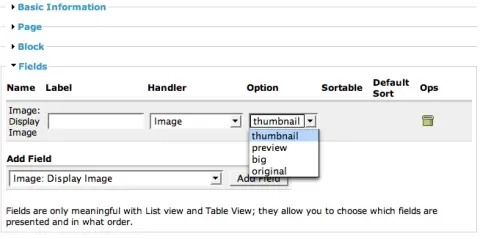
Image View options

imagefield and imagecache

imagefield module is different, in that it allows you to add an "image" type field to any CCK node type:

imagefield add field

This aspect gives imagefield two important advantages:

1. As many different images can be attached to the node as you want; you could create an image field for product image, another one for "action shot," etc.
2. Each image field may also have multiple images attached to it. So instead of being limited to one image per product, you may now attach 3-4 images that show different views of the product.

The disadvantage is that this module may only be used with CCK types, unlike image module which may be used for any node type.

Unlike Image Exact Sizes which supports resize action only, imagecache supports cropping, scaling, and resizing, so its interface is a bit more complex than that of Image Exact Sizes.

The action starts at administer >> imagecache, where you create a namespace for a set of rules, and then apply one or more actions to each namespace. Actions may be weighted, so for example you could crop an image to 500x500 before resizing it to 200x200.

Here's a screenshot of some actions as an example:
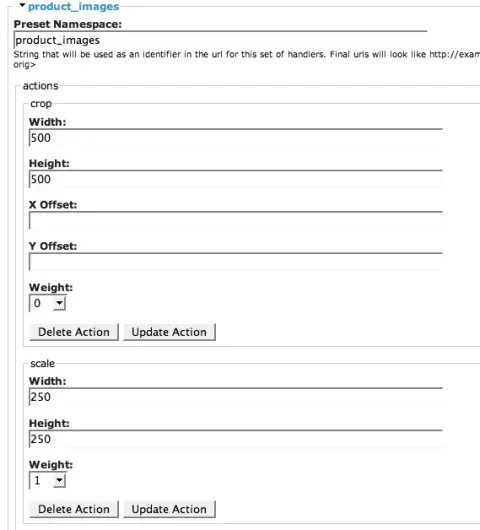
imagecache settings

And here's a screenshot of the node/add/content_product page:
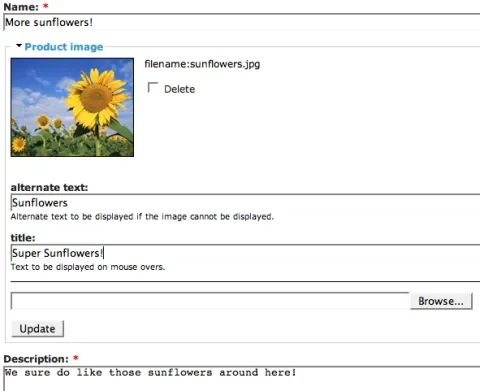
imagefield preview

Now. The thing to watch is that by default, the original sized image is shown when you view a product node. This can be HUGE. ;) The answer is to put some custom code in your theme to take advantage of the resizing. Here's a sample node-content_product.tpl.php:

  <div class="node<?php if ($sticky) { print " sticky"; } ?><?php if (!$status) { print " node-unpublished"; } ?>">
    <?php if ($picture) {
      print
$picture;
    }
?>

    <?php if ($page == 0) { ?><h2 class="title"><a href="<?php print $node_url?>"><?php print $title?></a></h2><?php }; ?>
    <span class="submitted"><?php print $submitted?></span>
    <span class="taxonomy"><?php print $terms?></span>
    <div class="content">
<?php
// Rather than printing $content, we can print fields individually.
print '<p>'. $node->field_description[0]['view'] .'</p>';
// Here we're printing out the imagecache-manipulated image.
print theme('image', 'files/imagecache/product_images/'. $node->field_product_image[0]['filepath']);
?>

    </div>
    <?php if ($links) { ?><div class="links">&raquo; <?php print $links?></div><?php }; ?>
  </div>

For the most part, this is copy/pasted from Bluemarine's node.tpl.php. Let's inspect the following line more closely:

<?php
print theme('image', 'files/imagecache/product_images/'. $node->field_product_image[0]['filepath']);
?>

this is a normal theme_image call, but we're dynamically passing in the path to the imagecache-altered image:

  • files/imagecache: the menu path to imagecache's processing function.
  • product_images: This should correspond with the namespace (defined back at administer >> imagecache) of the imagecache rule you want to apply to the image.
  • $node->field_product_image[0]['filepath']: this prints the path to the image file itself, relative to Druapl root (ex: files/sunflowers.jpg).

And finally, like Image module, you may select the size of the image from the Views interface:

imagefield views

Note that "Product Image" is the name of the field; "product_images" is the name of the imagecache namespace for product images that was defined earlier. If other imagecache rules were created (ex: action_shots), they would also show up here.

Summary

Here's a summary of the information in this article:

Image, Image Attach & Image Exact Sizes imagefield & imagecache
Stores each image as a node. Stores images as files.
Works with any node type. Only works with CCK node types.
One image per node. Multiple images per node.
Sizes apply to image nodes site-wide. You may choose which rules to apply to which images.
One file created for each size, in addition to the original size. Sizes created on-the-fly.
Supports resizing actions. Supports scale, resize, and crop actions.
Easy to use; all work done for you automatically. Requires custom theming.
Works with private files, files directory located outside of web root. Requires public files, web-accessible files folder.
Views integration; select the size of image you want to display. Views integration; select the size of image you want to display.

So there you have it! :)

Comments on this post will automatically be closed three months from the original post date.

Comments

so do i win?

just kidding ;) - that's a *great* writeup angie!! I think there's growing confusion about the multitude of image handling options - this should help folks find the one right for their implementation. I'll definitely be pointing people this way.

hopefully in time we'll get some better convergence on some of the underlying bits.... but we're workin on it :)

Thanks, James!

To be honest, there isn't quite a clear winner here; it kind of depends on how complicated your business logic is, and what other features you need.

But don't worry, you're always a winner in my book! ;)

pageroute, nodefamily & image module

Great article!

Another possible option is to use the image module together with the pageroute & nodefamily modules.

Pageroute's page type "node management" together with the image module allows one to upload multiple image nodes. Then image-attach or nodefamily may be used to tie the images to your product. Of course Views integration would also work.. :)

So you could have multiple images with the image module and you are not forced to use CCK. Another thing that imagefield still does better, is that you can include the image upload in a CCK product node form.

Now the drawbacks:
* Currently nodefamilies only works per user. So this way would only work for profile like content types (maximum node population per user = 1).
However I'm planning to extend the nodefamily module to set node relations per pageroute. Then, this would fit perfectly to your product example. Hopefully I have time for this soon...

* Image module does offer only one content type. So it's not possible to use two different types of images like it is with imagefield. However instead of using image module you could use pageroute with cck imagefield nodes too..

Regarding the views integration:
In my opinion it's really important that it's possible to list the images associated with their product. This is no problem for the imagefield approach.
For the image + image-attach approach you need the image attach views integration, which isn't committed yet, but there is an issue in the queue: http://drupal.org/node/86031

By using nodefamily you could achieve proper views integration by using the views fusion module.

Hi fago, I read your comment

Hi fago,

I read your comment above and I think I might use your idea about "image module together with the pageroute & nodefamily modules". However since I am a Drupal newbie I find it difficult to implement.

Can you point me to a tutorial or something on how to build those wizard-like page routes? The part I don't really understand is the arguments that are being passed over to the route pages.

The reason I want to use this idea is because I (as many other) am struggling how to attach multiple images to a node.

Another question: suppose I create the pageroute and it allows me to create a node and add a few images to it.
How can I get those images displayed WITH the main node, let's say as thumbnails?

Thank you very much!

Don't Forget Image and Image Assist combination

With Image Assist you put image nodes into the body text of any node. Image Assist helps you create the image node if it doesn't exist already.

For a while it seemed as though Image Assist wasn't being maintained all that well, but in the last six months it has gotten a lot of attention. It has some problems, but I have a site full of nodes with multiple images and it's all powered by Image and Image Assist. The site has 1200 total nodes of which about 450 are images: http://www4.jrf.org.

Shai

worked

hi, this worked for me: check it out: http://www.airlinestars.com.
all the airline logo's are simply node images that can be reviewed/rated

some confusion

1. says option 2 only works with cck nodes but cck nodes can be products too right?

2. image of selecting image size with views on option 2 is unclear... explain that product image is the field and product_images is the namespace for the imagecache setting which points to a size..

3. theme code is unclear.. give more examples and explain a bit more... where does this code go?

4. Can both options be used on the same site without interfering? maybe make that clear.. so i can allow users to attach a photo to their blogs.. or create custom cck nodes with multiple images for a site...

Thanks for the feedback!

1. says option 2 only works with cck nodes but cck nodes can be products too right?

Correct. CCK nodes can be pretty much anything nowadays. However, if you're still using "legacy" node types for something (for example, any 4.7 core node module), then imagefield isn't an option for you on those types.

2. image of selecting image size with views on option 2 is unclear… explain that product image is the field and product_images is the namespace for the imagecache setting which points to a size..

Done.

3. theme code is unclear.. give more examples and explain a bit more… where does this code go?

Done.

4. Can both options be used on the same site without interfering? maybe make that clear.. so i can allow users to attach a photo to their blogs.. or create custom cck nodes with multiple images for a site…

Correct. They're not mutually exclusive.

I couldn't find a good way to indicate that in the text, so I added an "or both!" to the teaser. :)

thanks!

wow.!
why are you so "on it"?

now.. can you force someone to get an amazon s3 module working?

thanks!

I think that was directed at me... you knew I'd find my way here

now didn't you.

one more thing

for some reason i couldnt get your template code to work.. the only thing that worked for me was

<?php
foreach ($node->field_image as $image) {
  print
'<dd>'. imagefield_field_formatter('', $image, ($page ? 'preview' : '150')) .'</dd>';
}
?>

in the content_type.tpl.php

where preview is my 500 wide namespace for full node view and 150 is my thumbnail namespace for teasers.. its nice to be able to differentiate for node versus teasers...

what are the downsides to my method?
ryan.

Another revision

Thank you all *SO MUCH* for the code examples - I have definitely learned something tonight. I think I've got what I want now by modifying ryan's code. I have a multiple-value-allowing image field named "resource_image" which I want to show up in the "resource" node as a bunch of thumbnails, each of which links to the actual image file. Here's the code I used in my "node-resource.tpl.php" file:

<?php foreach ($node->field_resource_image as $image) {
print
'<a href="/'. $image[filepath] .'" alt="'. $image[alt] .'">';
print
imagefield_field_formatter('', $image, 'tn');
print
'</a>';
}
?>

I am a total php newbie - I haven't even figured out how to get this to display on a page but not on a teaser - but this *looks* like it works for my issue, so if I'm doing anything totally wrong please let me know.

Oh, if you want to see the page, it's here!
http://howard-colby-ives.com/library/1916-06-21-abdul-baha-howard-colby-...

about that theme snippet

Angie, could you explain just a bit more about how that theme snippet gives you control over the image size for the imagefield? It's not immediately clear to me how you'd choose one size or another. Thanks!

Expanded on the theme section a bit...

Hopefully that makes it a bit more clear.

Go Lullabot

Just wanted to post a note for the simple reason of saying thanks in general to the Lullabot team.
You've done a number of comparative write-ups like these that really help me understand the different modules; you do the podcasts; and you do some very useful and interesting articles.
Team Lullabot is such a great contributor to the drupal community.
From someone who is learning drupal, thanks very much!
Steve

That’s a nice summary, I

That's a nice summary, I think. I still haven't decided which is the best approach in the long term for handling images: image nodes or CCK. Here's my dilemma: http://hublog.hubmed.org/archives/001393.html

What a great run-down!

Fabulous detail. Well done! Thank you!

e-Commerce and images

Hi,

First the honey, nice article.

Second the sting, (forgive me for asking - I'm one of Jeff Robbins f*cking newbies at Drupalcon Brussels) can I combine cck type node with the e-commerce module?

Any node can be a product

Hi Bock,

Yes. Any node-type (including those defined by CCK) can be "ecommerce enabled" by visiting its settings page (admin/settings/content-types in 4.7). After this, when you visit a node of this type, you will get a new tab called "product" and you can enter pricing and other information there. The ecommerce package has so many features, that it can certainly be a bit difficult to understand. Hope that helps!

-Jeff

One further solution "in between"

Heya all! Lullabot: as always a GREAT article!!! - I recently discovered one further image in node option that I started to like a lot and that, especially for my customers, seems to be a very good alternative if they have regular text nodes (story or page type) and want some images along their text:

This is through the use of TinyMCE as WYSIWYG editor in combination of the rather new module IMCE for TinyMCE (http://drupal.org/project/imce). This is a cute little thingy that integrates with no extra effort into the image button of TinyMCE.

There is already the image.module integration for TinyMCE, but that will create single nodes with images alongside your actual article which needs to have these images embedded, too. Not always the most practical way, especially if you have a site where you would like to have true image nodes alongside articles that have some added article images in them.

So what IMCE does: you have your TinyMCE and enable the standard image button of TinyMCE. By default, this allows you to enter an URL to an image you have already uploaded to your server. IMCE now adds an extra button right next to the URL field. If you click on that, you will see another pop-up that acts like a file browser. You can now easily upload images to your server (no images nodes are create!), view images (or even files, like .pdf, .doc, etc.) delete images or add them to the URL-field of the previous image pop-up of TinyMCE.

What IMCE currently does NOT do: resize images! Also, since no image nodes are created this way, the Image Exact Sise won't work. It might be considered if imagecache could be made to work with IMCE, currently there is no support however inside IMCE.

Nontheless, a good and easy alternative which I would put some place between image.module or cck's imagefiled - however without the ability currently to resize images.

imagecache

Hi,

I installed the imagecache and the imagefield module. It works fine on my localhost test server but not on the live server. When I update the namespace and/or the actions a get a "Page not found".

Much needed clarity, but...

Great article Angie! It seems like there are a lot of thumbnail/image/resize options, but finding the right solution is not very cut and dry. Articles/tutorials like these are extremely helpful (and much needed).

Having said that, I've never been successful when it comes to actually getting the 'imagefield/imagecache' combo to work. When I try to create an action (imagecache Administration), I'm prompted with a 'No input file specified.' message. I think it may have something to do me mucking up the commenting/uncommenting the .htaccess file? For non-programmers, figuring out a file like that, is a bit daunting.

Regardless, thanks again for the great article!

Gus

Very clear & usefull article

Very clear & usefull article Angie, well done!

Let me suggest a little change to the tpl snippet i made myself to make it work when different file directory path is in use:

<?php
     
...
      print
theme('imagecache', $my_preset_namespace, $node->field_imagen[0]['filepath']);
      ...
?>

--Patricio

Your suggestion is correct

Following the article above did not work for me.

Patricio is right:

instead of

<?php
print theme('image', 'files/imagecache/product_images/'. $node->field_product_image[0]['filepath']);
?>

it should be

<?php
   
print theme('imagecache', 'product_image', $field_product_image[0]['filepath']);
?>

(see http://drupal.org/node/84958)

Another issue:
Adding a field to a view may result in some kind of warning message, containing the hint, that adding fields is only usefull with list views and table views.
Ignore it and use the view you like. I use it with Teaser List view and everything works fine.

suit4

Rewrite engine off??

To bad that clean UL's disagree with the imagecache module.
This is in the Imagecache's README.
"
with drupal 4.7.1 and later drupal creates a .htaccess
in the files directory. It has two stanza's which disagree with imagecache
and file previews in general. They are.

1) Options None
2) RewriteEngine off.
"

To bad, this makes imagecache unusable for my purpose...

Are you sure?

I use imagecache with clean URLS without problem.

I think you haven't read the README properly.

Its a little trickier that some other modules to setup, but it IS worth it.

Alan

If you go individually

Great article angie! But my question is, if you call each field individually instead of calling $content, how can you retain voting. For instance i have nodevote and if i theme it by putting $node->field_description[0]['view'] in my tpl, then i no longer see the voting field. come up.

Is there some sort of work around?

what about upload_image

Anyone have experience with or thoughts on using upload_image module?

http://drupal.org/project/upload_image

The project description makes it sound like this may be an ideal solution in some situations... Images are stored as nodes, and multiple images can be attached to a (non-image) node...

Seems like the main issue with this might be controlling the size of the thumbnails that are generated...

Article above did not work for me. Too

Following the article above did not work for me. Too

I made some considerations in

http://drupal.org/node/94087#comment-170960

I made a new installation of drupal with only imagecache, ckk and view modules and this article did not work for me. (after I enable image module) and still failing

CCK and views need special kung-fu

Angie

When using views of type List view, it is not obvious what to use as a field, since not everything in $node gets returned in the view, and one needs to call _imagefield_file_load() explicitly, then theme('imagecache', ...) after it.

Please see my article on CCK and views with imagecache for more details.

nice article, thank you + a wish -a combined image module

nice article, thank you.
i wish all those modules rolled an combined image or media module which is part of a core, its seldom that an average website that does not need an image or/and media management functionality -imo

Where are images stored?

For imagecache/imagefield are the images supposed to be stored in:
files/imagecache/ ??

When I try to upload an image, the mini image preview is trying to access the files in the root 'files' directory. Plus there is NO imagecache subdir in the 'files' directory. When is this directory created? When the module is installed?

Not For Sure, but I Think...

I'm not certain, as I am just now starting to use imagecache, but I think imagecache does not really make a folder inside your files directory. If I understand correctly imagecache uses mod_rewrite to activate the image transformation. So just think of it as a "virtual" link to this file that doesn't exist until you request it. That is how I understood what is happening but again I just installed imagecache and have not produced anything yet.

-Matt
www.paretech.com

On-Demand File Creation

Justin is correct, imagecache stores files in files/imagecache/name_of_preset/path/to/image.jpg

So the original is stored at files/path/to/image.jpg.

Imagecache DOES create actual files and save them to the disk (that's the whole 'cache' part). On the first request to a non-existing file, Drupal is loaded and imagecache creates the file and saves it. The next time the file is requested it is returned directly so Drupal doesn't need to recreate the thumbnail.

Big Thanks - Works great but...

Big thanks to Angie and the Lullabot team for documenting alternative approaches and for all your tutorials!
This happened to be the exact application that I needed and I wound up using imagefield & imagecache (after a little fussing to get it all to work)
However, if I did not include an image for some products, I wound up getting the little red x (image not found), sign in IE. (Firefox displayed nothing as I had hoped)
I'm a newbie but I figured out that overriding the theme_imagecache function to check for a .jpg fixed the issue with IE. (probably not too elegant, but it seems to work)
Thanks again - and I'm looking forward to more articles like this one.

This is great, but it

This is great, but it doesn't seem to apply to Drupal 5. Image_exact is no longer maintained. Its project page says to use imagecache instead, but I don't know how to make that work with this tutorial. Could you do an updated version of this article for Drupal 5 users? Keep up the great work.

Yeah, Image_exact is not

Yeah, Image_exact is not working, but Imagecache is (as they say on http://drupal.org/project/image_exact ...

There will be no 5.0 version of this module, as all it's functionality is present in the generally superior imagecache module. I will be posting documentation to show you how to achieve the same effects as image_exact with imagecache.

So, you should try with Imagecache -> http://drupal.org/project/imagecache

imagecache doesnt work

i like imagecache too..somehow it doesnt work..after installing the imagecache folder doesnt get created by itself in files..however other folders do get created by themselves...
why is this ?

i have two websites on the same host..one works with imagecache..the other doesnt..

yes clean urls are on :(

pls help.
thanks

field_product_image[0]['filep

field_product_image[0]['filepath'] is not work for me under 5.x
field_product_image[0]['filename'] is good, but only after the image is downloaded once by typing the url image directly. solution?

Image Module's Integration only Works with Image Notes?

Hi,

I'm trying to get my head around this.

In your comparison chart, "Works with any node type" for Image Module is somewhat confusing. (I may in fact be confusing this.)

If you use Image Module, the only integration with Views that you'll get is with Image Nodes. Simply pointing to a node that has an attached image doesn't seem to work.

At least that's been my experience so far.

Something is wrong with the page.

Something is wrong with this page. The PHP markup is completely garbled. I hope you can fix this so that I can see the examples.

Imagecache not resizing node teaser images

Hello,
We have reviewed your settings with imagecache for a recent client of ours and the teaser node images were being resized perfectly on their previous dedicated server.

However, once they moved the site to another dedicated server the node teaser images are all the same size - they do not scale smaller within the node teasers as they were before. Could this be a server configuration issue related to GD library rather than an imagecache problem?

Thanks!

How to use with image galleries?

Hi,

On my 4.7-site I have been using image_exact to resize the thumbnails in my image galleries. I am now in the process of upgrading to 5.1, but am having trouble figuring out how to achieve the same result with Imagecache.

I have installed the imagescache module and set up a namespace with the rules (scale and crop) I want, and it works correctly.

But I am at a loss on what the next step is in getting these thumbails to automatically appear instead of the normal thumbnails created by the image-module?

I need to put some code in a template.php file to override the normal 'thumbnail-making-function' right?

If you could point me in the right direction, it will be greatly appreciated.

Thank,
Mikkel

Themeing CCK Node Types using only cck admin pages and css

It's been a while since this post, but perhaps this will still be of help. I'm just beginning with using imagecache instead of the image module but here's what's been working for me.

I'm using cck, imagefield, imagecache, and thickbox to give articles their images. I'm also using views to collect the cck based image nodes into galleries.

To change the way that CCK data types display, before creating a custom theme for the datatype, I like to use the cck admin screens to try to get the desired look and feel. It's faster and it will upgrade more easily.

  1. go to yoursite.com/admin/content/types and click edit next to the content type that you want to change the attributes for.
  2. Manage Fields - click on the Manage Fields tab.
    • Set the Field Order - set the order of the fields according to the order in which the items should be output in the html so that you can apply css rules to get the desired effect.
    • Create Field Groups - making groups for complex data types makes it much easier to specify the order and makes the editing screen much cleaner. It also gives you more html to apply css rules too. [perhaps too much for efficiency, but it's better than too little as a default in my opinion - defaults should lend favor to the novice who doesn't know how to modify the themeing functions responsible for this output - this will help the drupal community to be more accessible to designer minded people].
  3. Display Fields - click on the Display Fields tab. This will give you a screen with a list of the data types field and field groups. Settings on this page apply to the display of nodes in page display and in teaser display.
    • Set label display style - I hide most of these.
    • Set Field Styles - for each field set the display options you want. Options are seperate for teaser and full page display.
    • Imagefields w/ ImageCache (finally your answer) - the imagecache module has a cool hook in it that adds extra options here for imagefield types. It allows you to select from any of the presets (namespaces) that you've defined. You can set the thumbnail to display on the teaser and have the small version display in the body of the page. Either of them may be thickbox enabled.
    • Imagefields with Thickbox - the thickbox module has also has a hook in it that adds extra options for imagefield types. It allows you to select all the existing imagecache options with or without a thickbox [I wish it did the same thing for node-reference fields and view-reference fields, so you could display page contents in a thickbox - think videos, or images with full captions and an integrated thumbnail browser to navigate to other related image nodes all in a nice thickbox to get rid of the website while navigating rich media]
      • Customize Output of image - One thing I didn't like about the output from the theme function is that it didn't assign a class to the images to indicate which namespace they belonged to. I modified the theme_imagefield_image_imagecache_thickbox function found in thickbox.module - here's the modified function.
        function theme_imagefield_image_imagecache_thickbox($namespace, $field, $path, $alt = '', $title = '', $attributes = NULL) {
          $attributes = drupal_attributes($attributes);
          $imagecache_path = file_create_url(file_directory_path() .'/imagecache/'. $namespace .'/'. $path);
          $path_to_preview = file_directory_path() .'/imagecache/preview/'. $path;

          return '<a href="'. check_url(file_create_url($path_to_preview)) .'" class="thickbox img-'. $namespace .'" rel="'. $field['type_name'] .'"><img src="'. check_url($imagecache_path) .'" alt="'. check_plain($alt) .'" title="'. check_plain($title) .'" '. $attributes .' /></a>';
        }

        I added the namespace as a class to the anchor and modified the thickbox link so that it would link to the preview of the image instead of the full size image.

        I would love to do this without modifying the actual thickbox.css file. Can I redefine the theme_imagefield_image_imagecache_thickbox function in my theme? How would I go about doing that? Thanks

    • Set Group Styles - you can make field groups display in different ways. You can hide the entire group or remove all the styling so that you can make it your own with css. Or you can display them as fieldsets and they can be collapsible. I haven't used this feature, but it does offer some cool possibilities.

Update?

An update for Drupal 5 would be great! And pretty please if you could throw in Thickbox. I'm having a bit of a tussle with the image and thickbox at the moment, my current project being my first Drupal 5 site with heavy image content and galleries.

me too imagecache problem folders

I too have problems with imagecache & 5.1

My imagecache readme file in the 5.x-1.2 tar (downloaded 24hrs ago) says:
quote>>
Imagecache is a dynamic etc etc... the entire imagecache is flushed.
Usage:
goto Administer -> Site Configuration -> Image cache
create a ruleset,
add some actions to yoru ruleset,
add a
print theme('imagecache', $ruleset_namespace, $image['filepath'])
<<>>

This is most helpful - not!
I am guessing from lots of reading here that the code line should be added to my theme node.tpl.php file?
Where does it go and does it go in div tags?

Lighttpd

Hi,

Could you offer any advice how I might get imagecache working with Lighttpd?

I'm running a test and have Drupal running perfectly on Lighty but not imagecache.

Any advice much appreciated.

Perphaps the .htaccess of 4.7 version is still there

Erueka. I've just update from 4.7.3, that generates .htaccess file in the public files folder. Now I'm running version 5, but image doesn't work untill i've delete that file.

Now It works fine, using the settings from admin node types > Display fields, where I can choose the preset for any image field.

Could someone help me out

Could someone help me out here:

http://drupal.org/node/143135#comment-257290

Thanks!

How do I use this technique with ConTemplate?

This is very useful - thankyou very much. It will certainly solve a "list of products" type problem I am trying to solve. One question though: while you have shown how to use and theme the attached picture of different sizes in a View, I cannot work out how to do this in a CCK node displayed using ConTemplate - and the default size is the Thumbnail which I don't want (actually I want to use the thumbnail in the list and the preview size in the node view, which I arrange prettily usnig ConTemplate).

I would be grateful for any pointers on that.

Also, is there any code snippet anywhere that would allow me to extract an image from a random node (of this CCK type) so that I could display it in a block, a bit like the ads module does?

Angie, could you explain

Angie, could you explain just a bit more about how that theme snippet gives you control over the image size for the imagefield? It's not immediately clear to me how you'd choose one size or another. Thanks!
Best Regards, Gold Master

nothing i try works

iv looked at tutorials and help all over the web and nothing works..
why does it not show errors so we can see whats not working? thats the most annoying thing about drupal.

iv tried changing the code every which way and nothing works.. it does not create the files. im using apache with php 5 on a mac. all the bells and whistles installed...
folder permissions are set to full.

please help...

How to use the image in Contemplate

Thanks to some hints on drupal.org I have a solution to my problem, so here it is: Contemplate does give you access to the image node id, so it is not difficult to do the job yourself once you have worked out how. Here is some code in a Contemplate to print the "product" defined size for the picture:

<div>
<h3> picture stuff</h3>
<?php
$imageassoc
= node_load($node->iid);
print
'<img src="' . file_create_url($imageassoc->images[product]).'" />' ?>

</div>

A bit rudimentary of course - you might want to add titles and stuff - but basically this does the job

The above code does not work

The above code does not work when I place in contemplate.

Any ideas anyone?

I just want to input some code to display a 'small' image (namespace set up in imagecache)

Except that image_exact_size does not appear to work....

...because when you modify an image, the "exact sizes" get destroyed! See my issue raised on drupal.org

Err.... yes it does

...actually the problem came from an old version of the Image module. So this solution works fine!

a simple approach

There is another very simple approach to this. Basically, modify the CSS alone, or the CSS and a theme file, to change the size the image displays at. This doesn't change the size of the image on the server or what is passed to the browser, it only changes the appearance in the browser.

problem with imagefield

I'm not sure is it right place for this question but you are talking about imagefield. My problem is that imagefield using browser information to get mime type of file. So if i change extension of some .txt file to .jpg, when using IE7 upload will not be possible because real mime type is recognized as .txt, but unfortunately my favourite browser Mozilla Firefox failed and i was able to upload this file. How to fix this problem?
Thank you.

Assigning Multiple Existing Images to a contenttype

hi..

I am very clear with cck,imagefield and image cache modules for uploading multiple images for a node..
I need to upload multiple "existing " images (images that have been already uploaded to 'files' directory).....
Is there any way.. kindly help me...

Requiring Drupal Version in Posts

Is there a way to stringly encourage posters to include the Drupal
version to which they refer in their posts?

Even better would be to also include the PHP and MySql versions
as well since all three impact one another in terms of available
features and performance.

I am a Drupal-in-Diapers user ... uber-newbie if you will ... and
this need for Blog/Forum clarity is hardly limited to Drupal, it is a
general challenge when trying to filter the relevance of
technology-related discussions online.

e.g. I am learning/using Drupal 5.3 with PHP4x and MySql 4x
(temporary server limit soon to be overcome). Posts re. Drupal
4.x are probably more likely to confuse than enlighten me so I
would prefer to avoid reading them.

Just thought I'd ask ... Thanks! doc

Nice article Angie, Btw, how

Nice article Angie,
Btw, how how did u insert images in this very page?? There are couple of pages all nicely layed out in this article? I've been looking a lot for this kind of solution, may be not hard enough ;),
Pls explain?

Manually added

Hi Bibek, these images are inserted into the page old school style. :-) The images were uploaded using the Upload module (and "List" boxes unchecked) and then put on the page using the HTML img tag, e.g.:

<img src="/files/image-size-settings.png" alt="Image sizes settings" />

This is a wonderful post.

This is a wonderful post. That solved our problem at beatywee.com where are have to upload multiple images for each product and require those images to be resized.

One small error

$node->field_description[0]['view'] doesn't work (at least now).

I found and used this instead: $node->content['body']['#value']

Thanks.

Thanks for the write up. Sure wish the image attach module could generate cropped images at upload. Suppose the request isn't that far out. Suppose also that I should take the time to familiarize myself with module writing to just do it.

Positioning the image in the node

Excellent tutorial, thianks! I wonder how I can set my imagefield to float right, beside the body text, in my node. Any easy way to do this? Ideally, text wrap around the image would be great. As it is, the image appears below the body, which looks a bit odd.
thanks.

Requiring Drupal Version in Posts

I agree, that each post should be versioned. Spent a long time on this before realising its outdated information. doh!

Awesome...

This totally did what I needed. Hopefully the outside resize then crop will prevent my editor from having an aneurysm the next time she uploads an image and it isn't magically resized to fit with the template. Because now it kinda is.

ImageCache does not allow more than two presets

Hi,

I am working on my site which you can visit here : http://www.freeonlineserver.com

I have a wallpaper section which is generated by imagecache and cck. I want to have more than at least 5 imagecache presets for each wallpaper but the current module only allow me two imageprests to a single imagefield in a cck node.

Is there any solution to this. Though Image Exact Sizes has this feature where you can define more than two presets for a single image.

Nazir Ahmed

This is just like a little

This is just like a little tutorial to me and I can honestly say it's also perfect timing because I just got a job in brochure printing and your tips will provide a real help.

Image stored as a node vs. stored as file

Hi Angie,

I am a complete beginner with Drupal and CMS. At the moment I am evaluating Drupal 6.

As far as I can see both methods, Image as well as Imagefield store the uploaded images in the file system of server.
In the drupal database I only find references to the location of the files in the file system.

After what you've written, I would have expected, that with Image I would have the uploaded image somehow in the database and the file system would be used as file cache only. But when I have a closer look, I find also the uploaded image in the file system and only the scaled thumbs and others are rebuild when necessary. When I delete the original uploaded image in the file system everything is lost.

Is it possible with Drupal to bring pictures into the database as you bring the information of any cck textarea into the database?

Joerg

Getting ImageAPI and ImageCache working in Drupal 6

In Drupal 6, using ImageAPI and ImageCache causes a bit of trouble and you may need to introduce additional settings for it http://tekkie.flashbit.net/drupal/getting-imageapi-and-imagecache-cope-w...