---
title: "Speed up Drupal’s Front-end with WebP Images"
url: "/articles/speed-drupals-front-end-webp-images"
type: article
date: 2021-05-26
updated: 2021-05-26
---
# Speed up Drupal’s Front-end with WebP Images
# Speed up Drupal’s Front-end with WebP Images
WebP is a new(ish) image format that renders higher-quality images with drastically smaller file sizes and it can help you save millions of bytes per page load.
By
[ Mike Herchel ](/about/mike-herchel)
May 26, 2021
Enabling WebP images on your website can save millions of bytes per page load! That might sound like a bit of an exaggeration, or maybe a little tacky, but it’s true. On slower connections, that can be the difference between a visitor viewing your page or pressing the back button in frustration.
## What is WebP?
[WebP](https://web.dev/serve-images-webp/) is a new(ish) image format that renders higher-quality images with drastically smaller file sizes. It also supports several cool features such as transparency (generally handled with PNG images) and animations (generally handled with animated GIFs or videos).
## Browser support
All modern browsers support WebP, including Chrome, Edge, Safari, and Firefox. However, Safari support is limited to machines running macOS 11 Big Sur (released November 2020) or newer.
You can use WebP images just like a standard JPG, PNG, or GIF.
```xml
```
## Fallback support for older browsers
Do you still have to support older versions of Safari and/or Internet Explorer? You can automatically create JPG fallbacks using the HTML `` tag. If you’re not familiar with ``, it’s used for responsive images (serving different images based on your screen width), but you can also use it to serve different images based on what MIME type the user’s browser supports. It’ll look something like this.
```xml
```
Older browsers will look at the type attribute on the `` element and fallback to the `` element.
## Drupal core support
Drupal core 9.2 (due June 2021)[ supports WebP](https://www.drupal.org/node/3171135)! You can use Drupal core’s built-in image styles to convert your image easily.
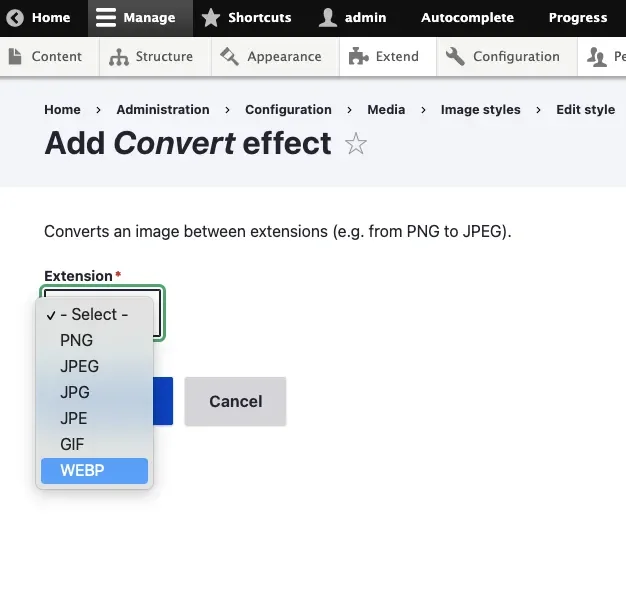
Unfortunately, the integration between core’s responsive images module and WebP is lacking. If you’re interested, [follow along](https://www.drupal.org/project/drupal/issues/3213491)[ in the issue queue](https://www.drupal.org/project/drupal/issues/3213491).
## Start using WebP today
However, you can use WebP today by using either the [WebP ](https://www.drupal.org/project/webp)or [ImageAPI Optimize WebP](https://www.drupal.org/project/imageapi_optimize_webp) modules. Both modules support Drupal 8 and 9, integrate with Drupal core’s Responsive Image module, and generate WebP derivative images for each image style.
*For the ImageAPI Optimize WebP module, note that only the dev version supports Drupal 9 integration with the Responsive Image module.*
### Support for the Stage File Proxy module
If you use the [Stage File Proxy](https://www.drupal.org/project/stage_file_proxy) module to pull production images to your local environments automatically, you’ll need to [download a patch to support WebP images](https://www.drupal.org/project/stage_file_proxy/issues/3171559). This issue was brought up at Lullabot’s weekly engineering roundtable, and we subsequently created and submitted the patch.
## WebP on Lullabot.com
We’re using the WebP module on Lullabot.com. You can see the difference yourself using Chrome Developer Tools.
On Lullabot’s [Our Work](https://www.lullabot.com/our-work) page, the WebP module saves over 1MB of data at wide viewports. Note that these images were already fairly optimized JPGs. In situations where users are uploading PNGs, the savings are even more substantial!
 1.7MB of images with WebP support.
 2.7MB of images when WebP support is disabled.
## WebP is only one piece of your site’s image serving strategy
Serving WebP images is not a panacea to speeding up images on your website, but it is a great start.
Other important best practices for serving images include
- [Using Responsive Images](https://www.lullabot.com/articles/fundamentals-of-responsive-images)
- Lazy loading images (Drupal 9.1 and newer does this by default)
- Ensuring that images contain width and height attributes to prevent content shifts
Remember, images are only one factor of your site’s overall performance. If you’re in doubt, defer to measurement tools rather than hard and fast rules.
Published in:
- [ Drupal Development ](/topics/drupal-development)
- [ Performance and Scalability ](/topics/performance-and-scalability)
You must have JavaScript enabled to use this form.
## Get in touch with us
### Tell us about your project or drop us a line. We'd love to hear from you!
Your full name
Your email address
Your organization
How you heard about us
Tell us more
Leave this field blank
