---
title: "How to Calculate Git Repository Growth Over Time"
url: "/articles/how-calculate-git-repository-growth-over-time"
type: article
date: 2024-10-07
updated: 2024-10-09
---
# How to Calculate Git Repository Growth Over Time
# How to Calculate Git Repository Growth Over Time
Git repositories begin to run into problems if they get too large. Learn how to calculate your repos growth trend over time so you can fix the problem before it bites you unexpectedly.
By
[ Andrew Berry ](/about/andrew-berry)
October 7, 2024
Work with Git long enough, and you’re likely to run into one or more challenges relating to the size of a repository.
Size can mean many different things, such as:
- How much disk space a repository takes to clone.
- How much disk space a repository takes to store (meaning, just the .git directory).
- How much disk space the .git directory takes up on a local where checkouts and pulls cause [packfiles](https://git-scm.com/book/en/v2/Git-Internals-Packfiles) to be extracted to more manageable chunks.
- How many [objects](https://git-scm.com/book/en/v2/Git-Internals-Git-Objects) and commits are in the repository (regardless of how big each one is).
[GitHub has repository size guidelines](https://docs.github.com/en/repositories/working-with-files/managing-large-files/about-large-files-on-github) along with soft limits on the total size of the repository and hard limits on the size of any individually stored file.
Repositories can accumulate a large amount of data for many reasons:
- All project dependencies are committed to a repository in a “binary†format, like how [Yarn’s zero-install option](https://github.com/yarnpkg/berry/discussions/4845) stores the zip files of each dependency. Even if a dependency only changes one line of code, the entire zip may change, and Git won’t remove duplicates of the data.
- Other compiled artifacts are committed to git, like a custom build of `ddev` used for testing in CI.
- When projects need to store large binary assets like 3D models used in game and media production.
Most recently, we wanted to understand the effect of storing [Playwright Visual Comparison](https://playwright.dev/docs/test-snapshots) images in Git. There are many advantages to storing snapshot images this way, including:
1. Updates to visual comparison baseline images are tied to corresponding code changes in a pull request.
2. Multiple developers can work on changes that affect the frontend and are not tied to the state of a staging server or preview site for the base snapshots.
3. Any content that drives the snapshots is also stored in the repository, ensuring that content changes don’t surprise developers and break tests.
4. [GitHub has a built-in image comparison tool](https://docs.github.com/en/repositories/working-with-files/using-files/working-with-non-code-files), allowing QA to approve visual diff changes easily.
However, we were concerned that this process may eventually lead to an unmanageable repository since any change in a snapshot will cause Git to store a whole new file. Since there would be no major design changes for this project, we hypothesized that overall snapshots would be stable and would not need to be changed much.
Were our assumptions accurate?
## Existing Tools
[git-sizer](https://github.com/github/git-sizer) is the most well-known tool in this space. When you have a large repository, git-sizer shows you where the large objects are, even if they aren’t in your currently checked-out branch.
```bash
$ git-sizer
Processing blobs: 25000
Processing trees: 64664
Processing commits: 15836
Matching commits to trees: 15836
Processing annotated tags: 202
Processing references: 1235
| Name | Value | Level of concern |
| ---------------------------- | --------- | ------------------------------ |
| Biggest objects | | |
| * Commits | | |
| * Maximum size [1] | 60.3 KiB | * |
| * Blobs | | |
| * Maximum size [2] | 18.9 MiB | * |
| | | |
| Biggest checkouts | | |
| * Maximum path depth [3] | 11 | * |
| * Maximum path length [4] | 219 B | ** |
[1] a23255d3705494a3746ccd512b3d9b8332b49536
[2] 2064ab55a213f2b7be97365e105ae1b65ed56757 (refs/heads/00--try-ddev-upgrade:ddev-1.22.4-localbuild)
[3] ceb231c71851e233ce56360c332ed159381a0c60 (365b05ed2169f56281357cde9e9d5991bf5f81f1^{tree})
[4] afd941bc0da7cac48a75eb67c938942114ee9b44 (73a48012f3cd14b3940435a78ec880f5b23458e3^{tree})
```
However, git-sizer doesn’t have any way to understand how a repository is changing over time.
There’s also [BFG Repo-Cleaner](https://rtyley.github.io/bfg-repo-cleaner/), which can help you rewrite git history if you need to remove troublesome files or commits. There’s no reporting on repository size or the like with this tool. You must first use something like git-sizer to find and identify large objects.
## Replaying Commits to build a CSV file
We really wanted a comma-separated values (CSV) file we could use to generate Pivot Tables and graphs with date, object ID, and size fields. With a bit of scripting, Git provides all the tools we need to replay commit activity and gather repository statistics after each commit.
To do this, we will:
1. Make sure we have a normal clone of the repository to analyze locally.
2. Create a new Git repository locally, which we will fetch commits from the repository to analyze.
3. One by one, fetch commits and get the size of the .git repository each time.
The key to this is the `--depth` option in git fetch. That allows us to specify how many commits back in history we want to fetch. It’s normally used to create a quick clone of a large repository and only get the most recent commit, with none of the history. However, we can also use it to fetch individual commits one at a time and increase the depth of each loop to match.
Here is the entire script.
```bash
#!/bin/bash
set -e
# Save the path of the current repository.
REPO=$(pwd)
# Generate a list of all commits on the current branch. We use
# --first-parent so we only analyze merge commits, and not individual commits
# in pull request branches.
COMMITS=$(git log --pretty=format:%H --reverse --first-parent)
# Create a temporary directory to run our analysis in.
cd /tmp
rm -rf working-clone
git init working-clone
cd working-clone
git remote add origin $REPO
# Disable automatic garbage collection. By default, this process runs in the
# background and can lead to errors when analyzing the repository. As well,
# we want to control this ourselves so we can analyze the best-case repository
# size.
git config gc.auto 0
# Keep track of how far back in history we want to fetch objects. This ensures
# that each commit is placed in the tree, and is not isolated from each other.
DEPTH=1
for COMMIT in $COMMITS; do
# Fetch the next commit.
git fetch --quiet --depth $DEPTH origin $COMMIT
# Make sure we have a branch pointing to the commit so it doesn't get
# garbage collected.
git reset --hard --quiet $COMMIT
# Run garbage collection so we are analyzing a best-case scenario.
git gc --quiet
# Save the commit ID as the first column.
echo -n $COMMIT, >> ../repository-size.csv
# Save the date of the commit as the second column.
git show -s --pretty=format:\"%as\", $COMMIT >> ../repository-size.csv
# Save the size of the git directory as kilobytes.
du -sk .git | cut -f1 >> ../repository-size.csv
# Show the last line we just saved.
tail -n 1 ../repository-size.csv
# Increase the depth for the next commit to fetch.
((DEPTH=$DEPTH+1))
done
```
For example, we ran this on the [lullabot/drainpipe](https://github.com/lullabot/drainpipe/) repository, which let us generate this chart.
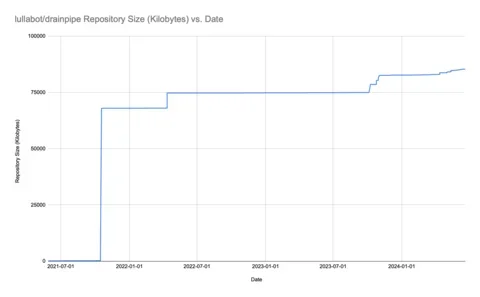
The big spike comes from when [Yarn’s zero-install feature was set up](https://github.com/lullabot/drainpipe/pull/45). Otherwise, we can see that the growth rate of the repository is pretty low, and there isn’t anything worth changing.
Here’s the graph for the project repository we mentioned above. Snapshot images were added just before January 2024.
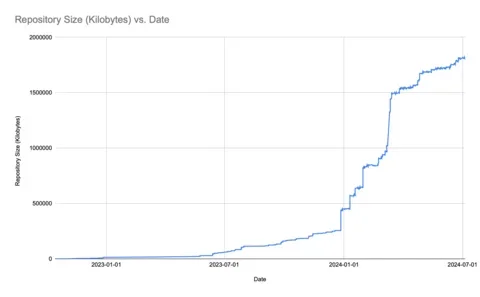
It’s clear from this chart that even with a stable project design, there’s enough churn to grow the repository over time. We’re still under 2GB total (and GitHub recommends keeping under 5GB), so we don’t need to take any immediate action. But, we can assume that if we’d started with this process earlier, especially when designs were changing, the repository size would now be an issue. For new projects, it’s clear that using Git Large File Storage or other tools is worth the investment.
## Other Applications
There are many other paths to having a git repository that’s larger than it should be:
- Team members could be committing Drupal database dumps.
- Developers could be committing high-resolution images, PSDs, or other graphic file types to a repository.
- Package managers such as Yarn could be configured to commit dependencies to the repository.
With that in mind, it’s worth running the above on your largest repositories to understand how much time you have before you are likely to hit problems. Otherwise, you risk hitting repository limits at an unfavorable time.
Published in:
- [ Drupal Development ](/topics/drupal-development)
- [ Performance and Scalability ](/topics/performance-and-scalability)
- [ System Administration ](/topics/system-administration)
You must have JavaScript enabled to use this form.
## Get in touch with us
### Tell us about your project or drop us a line. We'd love to hear from you!
Your full name
Your email address
Your organization
How you heard about us
Tell us more
Leave this field blank