---
title: "Deploying to Private Servers via WireGuard from GitHub Actions"
url: "/articles/deploying-private-servers-wireguard-github-actions"
type: article
date: 2026-03-12
updated: 2026-03-20
---
# Deploying to Private Servers via WireGuard from GitHub Actions
Image

## [Ezequiel "Zequi" Vázquez](/about/ezequiel-vazquez)

Senior DevOps Engineer
Zequi is a developer specialized on backend, with strong background on DevOps, love for automation and huge passion for information security.
## **The starting point**
Several of our internal tools run on a private server managed by our infrastructure team. These applications are publicly reachable. Apache handles TLS termination and routes traffic to the appropriate Docker Compose stack. Access is gated through our own SSO, so they are internal in terms of who can use them, not in terms of network topology. What is not public is the server itself: it is accessible only through WireGuard, and the deployment pipeline must operate within that constraint.
This setup works well for day-to-day access, but it creates an interesting challenge for automated deployments. GitHub Actions runners are ephemeral cloud machines. They have no persistent identity on our network and no way to reach a server that is not publicly accessible—at least not without some help.
This article explains how we solved that by combining WireGuard, a minimal and performant VPN built into the Linux kernel, with [adnanh/webhook](https://github.com/adnanh/webhook), a lightweight HTTP server that executes commands upon receiving authenticated requests. Deployments are centralized in a single infrastructure repository, and each application repository triggers its deploy workflow with a single API call. The result is a deployment pipeline in which the runner connects to the private network for exactly as long as the deployment takes, and authenticates using `HMAC-SHA256`, and the server executes a tightly scoped deploy script.
## **How applications are structured**
Each application on the server lives in its own directory under /etc/docker/. The directory contains the `docker-compose.yml` file, a `.env` file with runtime secrets, and any application-specific configuration or persistent data directories. The .env file is never committed to the repository—it is written to the server by a secrets manager and is the only file that GitHub Actions does not touch.
```bash
/etc/docker/
myapp/
docker-compose.yml
.env # secrets, never committed to git
config/ # application config files
data/ # persistent volume data
```
An important aspect of how these applications publish ports deserves explanation, because it shapes the `docker-compose.yml` structure in a way that might look unusual at first glance.
The server runs Apache on ports 80 and 443, serving as a reverse proxy for all internal applications. None of the applications is reachable directly from outside the server — Apache is the only entry point. Each application runs on a different internal port, and Apache proxies requests to that port through the Docker default bridge interface, whose IP address is typically 172.17.0.1.
The DOCKER\_BRIDGE\_IP environment variable in the ports section is what enforces this isolation. When set, Docker binds the published port only to that specific interface, rather than to 0.0.0.0 (all interfaces). This means the port is reachable through the bridge interface but not from the public network interface. If DOCKER\_BRIDGE\_IP is not set — such as in a local development environment — the variable expands to nothing, and Docker falls back to binding on all interfaces, which is fine locally.
The pattern looks like this:
```yaml
ports:
- "${DOCKER_BRIDGE_IP:-}${DOCKER_BRIDGE_IP:+:}8080:80"
```
When `DOCKER_BRIDGE_IP` is set to 172.17.0.1, this expands to 172.17.0.1:8080:80. When it is empty, it expands to 8080:80. The double-variable trick uses bash parameter expansion: the first part provides an empty default, and the second appends the colon separator only when the variable has a value.
## **Example: docker-compose.yml for a Drupal application**
The following example shows a minimal two-service stack running a Drupal site with a MariaDB database. This is representative of how our internal applications are configured.
```yaml
services:
db:
image: mariadb:11
restart: always
environment:
MYSQL_ROOT_PASSWORD: ${MYSQL_ROOT_PASSWORD}
MYSQL_DATABASE: ${MYSQL_DATABASE}
MYSQL_USER: ${MYSQL_USER}
MYSQL_PASSWORD: ${MYSQL_PASSWORD}
volumes:
- ./data/db:/var/lib/mysql
networks:
- myapp
web:
image: drupal:11-apache
restart: always
ports:
- "${DOCKER_BRIDGE_IP:-}${DOCKER_BRIDGE_IP:+:}8080:80"
environment:
DRUPAL_DB_HOST: db
DRUPAL_DB_NAME: ${MYSQL_DATABASE}
DRUPAL_DB_USER: ${MYSQL_USER}
DRUPAL_DB_PASSWORD: ${MYSQL_PASSWORD}
volumes:
- ./data/drupal:/var/www/html/sites
networks:
- myapp
depends_on:
- db
networks:
myapp:
```
**Note:** *The* `.env` *file provides DOCKER\_BRIDGE\_IP and all database credentials. It has mode 0440 and is owned by root. GitHub Actions only triggers container restarts—it never writes to this file.*
## **Apache as a reverse proxy**
With the application binding to the bridge interface only, Apache is responsible for receiving all external traffic and forwarding it inward. The virtual host configuration for the application proxies both HTTP and HTTPS traffic to the bridge IP and the port published by the container.
The HTTP virtual host redirects all non-HTTPS traffic to the SSL site, except for Let's Encrypt challenge requests, which must reach the server directly for certificate renewal. The HTTPS virtual host does the actual proxying, with SSL managed by [`mod_md`](https://httpd.apache.org/docs/2.4/mod/mod_md.html) (MDomain).
```apache
# /etc/apache2/sites-available/myapp.lullabot.com.conf
MDomain myapp.lullabot.com auto
ServerName myapp.lullabot.com
ErrorLog "/var/log/apache2/myapp.lullabot.com-ssl_error_ssl.log"
CustomLog "/var/log/apache2/myapp.lullabot.com-ssl_access_ssl.log" combined
ServerSignature Off
Require all denied
ProxyRequests Off
ProxyPreserveHost On
ProxyPass / http://172.17.0.1:8080/
ProxyPassReverse / http://172.17.0.1:8080/
SSLEngine on
ServerName myapp.lullabot.com
ErrorLog "/var/log/apache2/myapp.lullabot.com_error.log"
CustomLog "/var/log/apache2/myapp.lullabot.com_access.log" combined
ServerSignature Off
Require all denied
ProxyRequests Off
ProxyPreserveHost On
ProxyPass / http://172.17.0.1:8080/
ProxyPassReverse / http://172.17.0.1:8080/
RewriteEngine On
RewriteCond %{HTTPS} off
RewriteCond %{REQUEST_URI} !^/.well-known/acme-challenge
RewriteRule (.*) https://%{HTTP_HOST}%{REQUEST_URI}
```
Every application on the server follows this same pattern — a unique port in the `docker-compose.yml`, and a corresponding Apache virtual host proxying to that port via the bridge IP. Adding a new application is a matter of picking an unused port and following the same template.
## **Setting up the server**
WireGuard is a modern VPN built into the Linux kernel since version 5.6. It is significantly simpler to configure than OpenVPN or IPSec, operates over UDP, and has a minimal attack surface. For our purposes, it provides a private overlay network between the GitHub Actions runner and the deployment server—a temporary, authenticated tunnel that exists only for the duration of the deployment job.
The server acts as the WireGuard hub. All GitHub Actions runners share a single peer configuration with a fixed overlay IP address and the same WireGuard private key, stored as a repository secret. There is no need for per-runner registration—GitHub Actions runners are ephemeral and lack persistent identities, so treating them as a single logical peer is both simpler and more appropriate.
## **WireGuard installation and key generation**
```bash
sudo apt update && sudo apt install -y wireguard
# Generate server keys
wg genkey | sudo tee /etc/wireguard/server.key | wg pubkey | sudo tee /etc/wireguard/server.pub
sudo chmod 600 /etc/wireguard/server.key
# Generate runner keys (once per repository)
wg genkey > runner.key
wg pubkey < runner.key > runner.pub
```
The server's private key never leaves the server. The runner's private key is stored as a GitHub Actions secret in the infrastructure repository. The respective public keys are exchanged: the server’s public key goes into the GitHub Actions workflow; the runner’s public key goes into the server’s wg0.conf as a peer.
## **WireGuard server configuration**
The server listens on UDP port 51820\\. The overlay subnet used here is ``, with the server at `` and the GitHub Actions runner at ``.
```apache
# /etc/wireguard/wg0.conf
[Interface]
Address = /24
ListenPort = 51820
PrivateKey =
[Peer]
# GitHub Actions runner
PublicKey =
AllowedIPs = /32
PersistentKeepalive = 25
sudo chmod 600 /etc/wireguard/wg0.conf
sudo systemctl enable --now wg-quick@wg0
sudo wg show # Verify interface is up
```
## **Firewall rules**
Two rules are needed: one to allow traffic on the WireGuard UDP port from the internet, and one to allow webhook traffic only from connections arriving via the WireGuard network. This is the key security boundary — the webhook endpoint is not reachable from the public internet at all.
```bash
# Allow WireGuard from anywhere
sudo ufw allow 51820/udp comment "WireGuard"
# Allow the webhook port only from the WireGuard subnet
sudo ufw allow from to any port 19857 proto tcp comment "Webhook via WireGuard"
sudo ufw reload && sudo ufw status verbose
```
***Note:** The webhook on this server is only ever accessed through WireGuard. There is no public firewall rule for the webhook port, and there should not be one.*
## **The webhook server**
With the VPN tunnel providing network-level isolation, the next piece is a mechanism for the runner to trigger server deployments. We use [adnanh/webhook](https://github.com/adnanh/webhook), a lightweight daemon that listens for HTTP requests and executes scripts when a request passes its validation rules.
Each application has its own webhook endpoint, identified by an ID such as deploy-myapp. Requests are authenticated using `HMAC-SHA256`: the caller signs the request body with a shared secret, and the webhook daemon independently computes the same signature and compares the two. If they do not match, the request is rejected. This means that even if someone could reach the webhook port, they could not trigger a deployment without knowing the secret.
### Installation
On Debian, webhook is available from the default repositories:
```bash
sudo apt update && sudo apt install -y webhook
```
### Hook configuration
The webhook daemon reads its hook definitions from a JSON file. Each hook specifies the script to execute, the working directory (which determines which application the deploy operates on), and the authentication trigger rule.
```json
# /etc/webhook/hooks.json
[
{
"id": "deploy-myapp",
"execute-command": "/etc/webhook/scripts/deploy.sh",
"command-working-directory": "/etc/docker/myapp",
"response-message": "Deployment triggered",
"include-command-output-in-response": true,
"trigger-rule": {
"match": {
"type": "payload-hmac-sha256",
"secret": "",
"parameter": {
"source": "header",
"name": "X-Deploy-Signature"
}
}
}
}
]
```
`sudo chmod 600 /etc/webhook/hooks.json`
The hooks.json file is set to mode 0600 because it contains the HMAC secrets in plaintext. Only the root needs to read it.
To register additional applications, we just need to add another object to the array with a different ID and command-working-directory. The same `deploy.sh` script handles all of them - the working directory is what changes.
### The deploy script
The script that the webhook executes is deliberately simple. It runs in the application's directory (set by command-working-directory in the hook configuration), pulls the latest code, rebuilds containers if needed, and restarts the stack.
```bash
#!/bin/bash
set -euo pipefail
echo "[deploy] Starting deployment in $(pwd)"
git pull
docker compose pull
docker compose build
docker compose down
docker compose up -d
docker compose ps
echo "[deploy] Deployment complete"
```
The `set -euo pipefail` directive means the script stops at the first command that fails. If Docker Compose pull fails, the application is never taken down - it keeps running on the previous version. The final echo line serves as a success marker: because the webhook is configured with `include-command-output-in-response: true`. The caller can check the response body for this marker to confirm the deployment completed successfully.
`sudo install \-o root \-g root \-m 0700 deploy.sh /etc/webhook/scripts/deploy.sh`
### A note on repository trust
This pipeline assumes that the contents of each application repository—and in particular its `docker-compose.yml` files—are trustworthy. The deploy script runs git pull, then hands control directly to Docker Compose, meaning any change merged into main is executed on the server without further inspection. An attacker who gains the ability to push to main, or whose pull request is merged without adequate review, could introduce a malicious `docker-compose.yml`—for example, one that uses a bind mount to access host filesystem paths, overrides the image entrypoint, or mounts the Docker socket. Any of these would result in arbitrary code execution on the server under the context of the Docker daemon.
We are aware of this and accept the risk as a deliberate trade-off: we trust the contents of our repositories, and access to main is protected by branch protection rules and required code reviews. For scenarios where this is not an acceptable policy, consider deploying each application to its own VM or host, so a potential escape from Docker isolation would affect only its host.
## **Binding to the WireGuard interface**
By default, the Debian webhook package listens on all interfaces using a configuration file at `/etc/webhook.conf`. We override this with a systemd drop-in to bind the daemon to the server's internal IP address only, so the webhook is never accessible from the public network.
```ini
# /etc/systemd/system/webhook.service.d/override.conf
[Unit]
ConditionPathExists=
[Service]
ExecStart=
ExecStart=/usr/bin/webhook \
-hooks /etc/webhook/hooks.json \
-ip \
-port 19857 \
-verbose
```
The empty `ConditionPathExists=` clears a vendor-supplied condition that requires `/etc/webhook.conf` to exist, which we do not use. The empty `ExecStart=` is required by `systemd` before setting a new value in a drop-in file.
```bash
sudo systemctl daemon-reload
sudo systemctl enable --now webhook
sudo systemctl status webhook
```
## **The GitHub Actions workflow**
With the server configured, the GitHub Actions side consists of two components: a centralized deployment workflow in the infrastructure repository and a minimal trigger workflow in each application repository. This separation is deliberate—it keeps all VPN and deployment logic in one place and gives application repositories a simple, one-step deploy.
### **Why centralize?**
All GitHub Actions runners share a single WireGuard peer identity (the same IP address and private key). If two application repositories ran their own deployment workflows simultaneously, both runners would try to establish a WireGuard tunnel with the same peer IP, and the server would only maintain one handshake. The second runner would fail or steal the connection from the first.
By centralizing deployments in a single repository, we can use GitHub Actions' [concurrency groups](https://docs.github.com/en/actions/writing-workflows/choosing-what-your-workflow-runs/control-the-concurrency-of-workflows-and-jobs) to serialize them. Only one deployment runs at a time; others queue until the current one finishes. Since each deployment is short—typically under a minute—the queue rarely backs up.
### **Secrets and variables**
The infrastructure repository holds all sensitive material. Application repositories only need a single token to trigger a deployment.
### Infrastructure repository secrets:
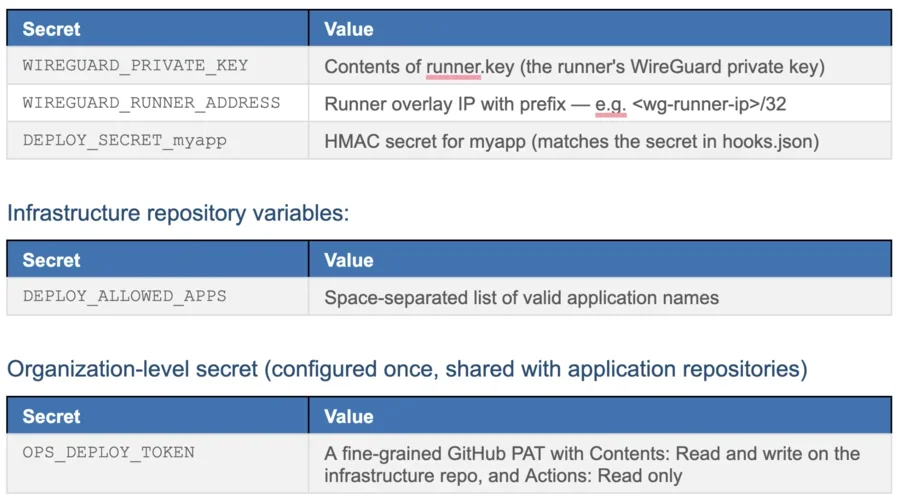
### **The WireGuard composite action**
This action lives at `.github/actions/wireguard-connect/action.yml` in the infrastructure repository. It installs WireGuard, writes the private key to a file rather than embedding it in the configuration (which keeps it out of process lists), writes the interface configuration, and brings the tunnel up.
```yaml
name: Connect to WireGuard VPN
description: Installs WireGuard and connects to private network
inputs:
private-key:
description: WireGuard private key for the runner
required: true
runner-address:
description: Runner overlay address with prefix (e.g. /32)
required: true
runs:
using: composite
steps:
- name: Install WireGuard
shell: bash
run: |
sudo apt-get update -qq
sudo apt-get install -y wireguard
- name: Write private key
shell: bash
run: |
echo "${{ inputs.private-key }}" | sudo tee /etc/wireguard/private.key > /dev/null
sudo chmod 600 /etc/wireguard/private.key
- name: Write configuration
shell: bash
run: |
sudo tee /etc/wireguard/wg0.conf > /dev/null << EOF
[Interface]
Address = ${{ inputs.runner-address }}
PostUp = wg set %i private-key /etc/wireguard/private.key
DNS =
[Peer]
PublicKey =
Endpoint = yourserver.example.com:51820
AllowedIPs = ,
EOF
sudo chmod 600 /etc/wireguard/wg0.conf
- name: Connect
shell: bash
run: sudo wg-quick up wg0
- name: Verify
shell: bash
run: |
sudo wg show
ip route | grep wg0
```
***Note:** The PostUp directive loads the private key from a file at interface startup rather than storing it inline in wg0.conf. This is a deliberate choice: the key does not appear in the configuration file in plaintext, and the file is deleted from the runner at the end of the workflow.*
### **The centralized deployment workflow**
This workflow lives in the infrastructure repository and handles all deployments. It is triggered by `repository_dispatch` events sent from application repositories.
```yaml
name: Deploy application
run-name: "Deploy ${{ github.event.client_payload.app }} (${{ github.event.client_payload.trigger_id }})"
on:
repository_dispatch:
types: [deploy]
concurrency:
group: wireguard-deploy
cancel-in-progress: false
jobs:
deploy:
runs-on: ubuntu-24.04
steps:
- name: Validate application name
env:
APP_NAME: ${{ github.event.client_payload.app }}
ALLOWED_APPS: ${{ vars.DEPLOY_ALLOWED_APPS }}
run: |
if [[ ! " ${ALLOWED_APPS} " =~ " ${APP_NAME} " ]]; then
echo "::error::Unknown application: ${APP_NAME}"
exit 1
fi
- name: Checkout infrastructure repository
uses: actions/checkout@v6
- name: Connect to WireGuard VPN
uses: ./.github/actions/wireguard-connect
with:
private-key: ${{ secrets.WIREGUARD_PRIVATE_KEY }}
runner-address: ${{ secrets.WIREGUARD_RUNNER_ADDRESS }}
- name: Resolve deploy secret
id: secret
env:
APP_NAME: ${{ github.event.client_payload.app }}
run: |
SECRET_KEY="DEPLOY_SECRET_${APP_NAME//-/_}"
echo "key=${SECRET_KEY}" >> "$GITHUB_OUTPUT"
- name: Trigger deployment via webhook
env:
APP_NAME: ${{ github.event.client_payload.app }}
DEPLOY_SECRET: ${{ secrets[steps.secret.outputs.key] }}
run: |
BODY='{"app":"'"${APP_NAME}"'"}'
SIGNATURE=$(echo -n "${BODY}" | openssl dgst -sha256 -hmac "${DEPLOY_SECRET}" | awk '{print $2}')
HTTP_CODE=$(curl -s -o /tmp/deploy-response.txt -w '%{http_code}' \
-X POST \
-H "Content-Type: application/json" \
-H "X-Deploy-Signature: sha256=${SIGNATURE}" \
-d "${BODY}" \
"http://:19857/hooks/deploy-${APP_NAME}")
cat /tmp/deploy-response.txt
if [[ "${HTTP_CODE}" -ne 200 ]]; then
echo "::error::Webhook returned HTTP ${HTTP_CODE}"
exit 1
fi
if ! grep -q "\[deploy\] Deployment complete" /tmp/deploy-response.txt; then
echo "::error::Deployment script did not complete successfully"
exit 1
fi
- name: Cleanup WireGuard
if: always()
run: |
sudo wg-quick down wg0 2>/dev/null || true
sudo rm -f /etc/wireguard/private.key /etc/wireguard/wg0.conf
```
The concurrency group wireguard-deploy, with cancel-in-progress set to false, ensures deployments are serialized: if a second application triggers a deploy while one is already running, it queues the new deployment rather than canceling the active one. Because all deployments run from the same repository, the concurrency group works as expected. GitHub Actions concurrency groups are scoped to the repository, so this serialization only works because all deployments originate from the same workflow.
The validation step checks the application name against an allowlist stored as a repository variable. This prevents unauthorized dispatch events from triggering arbitrary webhook endpoints, even if someone has a valid token.
The HMAC signature is computed over the JSON request body using the application's deploy secret and sent in the X-Deploy-Signature header. The webhook daemon on the server independently computes the same signature and rejects the request if they do not match.
The cleanup step runs with `if: always()`, ensuring the WireGuard tunnel is torn down, and key material is removed from the runner, even if an earlier step fails. An ephemeral runner does not persist between jobs, but there is no reason to leave sensitive files around any longer than necessary.
### **The application-side workflow**
Each application repository has a minimal workflow that fires a `repository_dispatch` event to the infrastructure repository. This is the only GitHub Actions file that application developers need to maintain.
```yaml
name: Deploy to Production
on:
push:
branches:
- main
jobs:
deploy:
runs-on: ubuntu-24.04
steps:
- name: Trigger deployment
env:
GH_TOKEN: ${{ secrets.OPS_DEPLOY_TOKEN }}
run: |
gh api \
--method POST \
/repos/YourOrg/infrastructure/dispatches \
-f "event_type=deploy" \
-f "client_payload[app]=myapp" \
-f "client_payload[trigger_id]=${{ github.run_id }}"
- name: Find deploy workflow run
env:
GH_TOKEN: ${{ secrets.OPS_DEPLOY_TOKEN }}
run: |
echo "Waiting for deploy workflow to start..."
for i in $(seq 1 30); do
RUN_URL=$(gh api \
"/repos/YourOrg/infrastructure/actions/runs?event=repository_dispatch&per_page=10" \
--jq ".workflow_runs[] | select(.name | contains(\"${{ github.run_id }}\")) | .html_url" \
)
if [[ -n "${RUN_URL}" ]]; then
echo "Deploy workflow: ${RUN_URL}"
echo "::notice::Deploy workflow: ${RUN_URL}"
exit 0
fi
sleep 2
done
echo "::warning::Could not find deploy workflow run."
```
The `trigger_id` in the dispatch payload is the application workflow's own run ID. The infrastructure workflow includes this in its run-name, making it discoverable via the API. The second step polls the infrastructure repository's workflow runs until it finds the one tagged with its run ID, then outputs the URL as a GitHub Actions notice—a clickable link in the workflow summary. This gives developers a direct path from their push to the deployment logs, even though the actual work happens in a different repository.
The combination of WireGuard, HMAC-authenticated webhooks, and centralized GitHub Actions workflows produces a deployment pipeline with a deliberately small attack surface at every layer. The server is not reachable from the public internet. The runner can only connect through an authenticated VPN tunnel. Even within that tunnel, deployments are authenticated with per-application HMAC secrets, and the deploy script is limited to a fixed sequence of operations.
Adding a new application to this setup involves registering it in the webhook configuration, adding an Apache virtual host, creating its HMAC secret, and following the same docker-compose.yml port binding pattern. The application-side workflow is a copy-and-paste template, with only the application name changing across repositories.
Several aspects not covered here are relevant for production use: rollback strategies if a deployment fails midway, notifications to Slack or similar on deployment success or failure, and handling `.env` file updates through a secrets manager rather than manually.
Automate deployments to an internal Debian server using WireGuard VPN, an HMAC-authenticated webhook, and a centralized GitHub Actions workflow without exposing your server to the public internet.