---
title: "Debugging Drush commands with Xdebug and PHPStorm"
url: "/articles/debugging-drush-commands-with-xdebug-and-phpstorm"
type: article
date: 2014-01-15
updated: 2014-05-15
---
# Debugging Drush commands with Xdebug and PHPStorm
# Debugging Drush commands with Xdebug and PHPStorm
By
[ Angus Mak ](/about/angus-mak)
January 15, 2014
Oftentimes, I run into issues with drush commands that needed more debugging power than dpm() provides. In search for a way to debug PHP scripts from the CLI, or drush commands more specifically, I stumbled upon PHPStorm’s Zero-configuration Debugging which turned out to be perfect for the job.
First, you will need Xdebug installed. has some excellent documentation on installing XDebug. For OSX users, I would recommend using homebrew with the formulae here .
In the CLI, we will need to set the XDEBUG\_CONFIG variable.
In bash,
```
export XDEBUG_CONFIG="idekey=PHPSTORM"
```
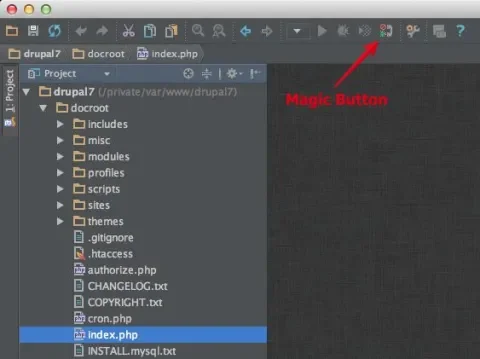
Once Xdebug is installed and the XDEBUG\_CONFIG variable set up, start a new project in PHPStorm. Click on the Magic Button to "Start Listen PHP Debug Connections"
In the CLI, we can then run any drush command inside the drupal docroot and a breakpoint should trigger on the first line of drush.php.
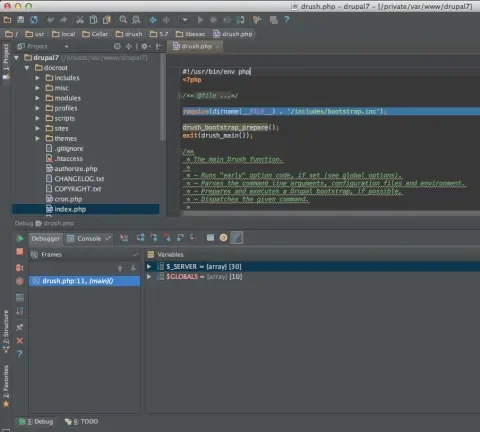
Set up breakpoints and debug like you normally would. As long as PHPStorm is listening for a connection and the XDEBUG\_CONFIG variable is set, any PHP script run on the CLI will trigger the debugger to break on the first line of the script. Once you are done with debugging, click the Magic Button again to "Stop Listen PHP Debug Connections".
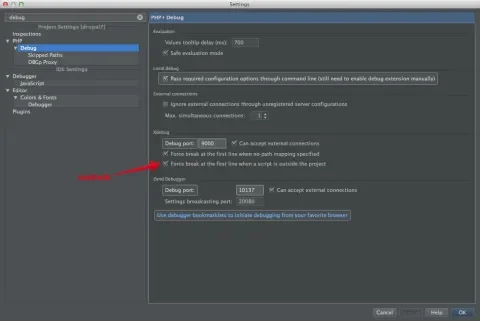
Drush commands always trigger a break at the first line, unless drush is included in the project. When that gets a little old, uncheck "Force break at the first line when a script is outside the project" to stop the break at the first line.
I am in the debugger so much I ended up with the xdebug.idekey set up in my php.ini permanently.
```
xdebug.idekey="PHPSTORM";
```
That way the XDEBUG\_CONFIG variable is not necessary anymore. In fact, this way any PHP activities including browsing a local site will pass through the debugging as long as PHPStorm is listening for a connection.
Published in:
- [ Drupal Development ](/topics/drupal-development)
You must have JavaScript enabled to use this form.
## Get in touch with us
### Tell us about your project or drop us a line. We'd love to hear from you!
Your full name
Your email address
Your organization
How you heard about us
Tell us more
Leave this field blank