Lullabot Ideas
We know stuff. We empower you to know stuff too.
Great Tool for Webshots
Blog by Karen StevensonAugust 14, 2009 - 6:59am
If you want to get screenshots of a web page, what do you do? You might want them to illustrate a new theme or to display in a gallery of your work.
Now that I've switched to using a Mac I was exploring Mac alternatives for this. One great one was Skitch, which lets you easily grab screen shots and mark them up. But what if you want to show more than you can see in your window, like to display a fairly tall web page?
I just found a great new tool, webkit2png. It works on any Mac with Mac OS X 10.5 Leopard or later. Just download the file, pull up a terminal window, and type something like:
python /Users/karen/screenshots/webkit2png http://www.drupal.org... and you end up with three screenshots of the site, a full size shot, a thumbnail, and a shot clipped to just show what you can normally see in a window. The results for Drupal are posted below (who knew the front page was that long!!)
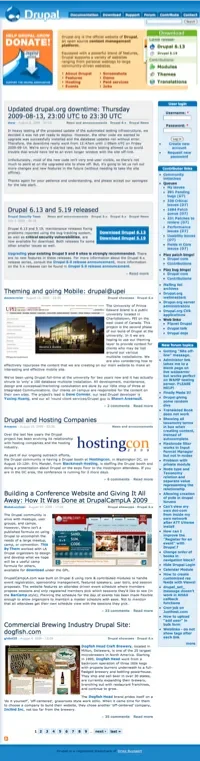
![]()
There are configuration options for the size of the window and the size of the result, like:
# screengrab google
webkit2png http://google.com/
# bigger screengrab of google
webkit2png -W 1000 -H 1000 http://google.com/
# just the thumbnail screengrab
webkit2png -T http://google.com/
# just thumbnail and fullsize grab
webkit2png -TF http://google.com/
# save images as "foo-thumb.png" etc
webkit2png -o foo http://google.com/
# full documentation
webkit2png -h | less Links
| Attachment | Size |
|---|---|
| wwwdrupalorg-clipped.png | 46.93 KB |
| wwwdrupalorg-full.png | 1.13 MB |
| wwwdrupalorg-thumb.png | 238.35 KB |

Comments
Batch captures under
Batch captures under Windows: Siteshoter : http://www.nirsoft.net/utils/web_site_screenshot.html
A much easier way.
A much easier way is to add the Evernote Safari Clipper to your Mac. The great thing about this is after I clip it I have it on all my machines and online.
http://evernote.tumblr.com/post/125975511/safari-clipper-hold-down-the-s...
Then I can right click edit and it too gets saved.
http://www.youtube.com/watch?v=EOUIz06X6F0&eurl=http%3A%2F%2Fblog.everno...
LittleSnapper
Another excellent app for taking webshots for OS X is LittleSnapper. Not as lightweight as the other alternatives as described here but very powerful when it comes to organizing and sharing your webshots. Give it a try, you'll love it.
Web Snapper for Safari
If you are a Safari user, you can use Web Snapper by Tasty Apps (http://www.tastyapps.com/). The free version puts a little footer on the bottom of the .png screenshot. The paid version is $15.
Aviary
How about just using aviary? Just append a url to aviary's and it will give you a webshot in an editing interface. It's the easiest I've found.
http://www.aviary.com/www.lullabot.com
Fireshot
is my screenshot tool in Firefox.
Can shoot the whole site, only the visible parts, edit, save, mail the screenshot with ease. really nice!
https://addons.mozilla.org/de/firefox/addon/5648
regards
roger
Let's keep it in the browser
As an OS agnostic, I love any browser based solution, so thanks for your FireShot FF extn recommendation Rodger, those text annotations look great! Can't wait till a bug report comes in that I need to illustrate.
:~john
Paparazzi
If you prefer a GUI frontent for webkit2png: Paparazzi is available. Mac OS X only too.
Paparazzi for mac
Paparazzi for mac (http://derailer.org/paparazzi/) will screen grab the entire page for you and you can crop it to any size pre-screengrab. Also can set a delay incase your trying to snap something in video/flash...nice script though!
I like paparazzi too! It has
I like paparazzi too! It has great options for sizing the screenshots, but the python alternative is geek enough for consider it :D
Jing works well too.
Jing works well too and has the ability to upload to jing's servers and copy out the URL for you. It's pretty handy for shuttling off quick screen captures.
there are a zillion firefox addons
https://addons.mozilla.org/en-US/firefox/addon/3408
and
https://addons.mozilla.org/en-US/firefox/addon/11587/
to name two. much easier imho
depends on purpose
If you want manual shots, sure a browser plugin works fine. But I could see using webkit2png to automatically create thumbnails of sites to use with the link module or something in a directory of sites. Or it would be great for QA of design changes on a site. Could be pretty useful to script up a bunch of these for different scenarios.
Thanks, Karen!
Perfect for script writers
Firefox plugins are nice, but this is scriptable. Much fun!
EXACTLY!
Yep, the fact that you can do this from the command line means you should be able to create scripts to do this automatically. That is actually what I was trying to accomplish here :)
ScreenGrad
I use a firefox plugin called ScreenGrab. It's really most perfect, you can choose between saving the image and copying it to clipboard, and it has the following dimensional options:
Complete Page/Frame
Visible Portion
Selection
Window
ScreenGrab is nice
I've used that too, and works great for many things, but it still won't show anything outside the window. This is the only one I've found that will show the whole page, no matter how long it is.
I've used that too, and
I've used that too, and works great for many things, but it still won't show anything outside the window. This is the only one I've found that will show the whole page, no matter how long it is.
_____________________________________
( wow leveling guide )
Ah, it has a 'complete page'
Ah, it has a 'complete page' option? I missed that!
ScreenGrab link
Gee, I thought I'd be nice and early and past about screengrab, but there has already been a whole conversation on it :-)
Well at least I can add a link to the conversation:
http://www.screengrab.org/