
A client that has a lot of physical locations asked me how to improve search engine optimization (SEO) for those locations. They have web pages for each of their locations and were concerned about making sure all those individual location pages are getting ranked well. This doesn't seem to be a very well documented subject, but I found a number of ways to make sure that Google and other search engines know more about the physical locations that are related to a web site.
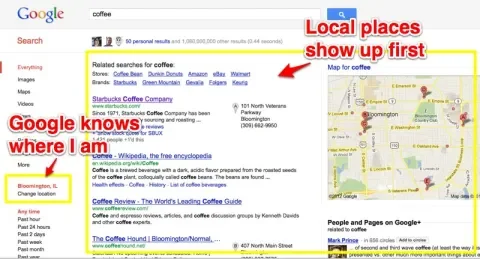
Google, in particular, has been making locative information more important than ever. If Google has any information about where I am located (and it usually does), it will push results in my location to the top of the search results list for any term I search for. For instance, if I search for 'Coffee' into a normal Google search, I get results like this, even though I didn't add anything about my location in my search terms. This makes it clear that having accurate location information in my web site must be very important.
Create a Location Page for Each Location
The obvious starting point is to have at least a page, and perhaps a section of your site, devoted to each location. Each location page should include as much information as possible about the location.
Add Microformats/RDF information
The next thing you can do is to make sure all the location pages (and for that matter, the other pages on the site) have been marked up with as much structured information as possible. There are various ways to do that, RDF, microformats, rich snippets. But the new method preferred by Google and other key search engines is to use the Schema.org standards.
I wrote an article about how to incorporate structured data into Drupal 7: How Does RDF Work in Drupal 7? In short, you need to enable the core RDF module along with the contributed Schema.org module, and set your locations up to comply with the right Schema.org standards. I believe you want to use the Organization standard for the main headquarters page and the LocalBusiness standard for the branch pages.
More information about Schema.org specifications is at:
Create a Geositemap
The next thing you can do is to create a geositemap and post it on the site. This is a specific form of XML sitemap that contains the geographic information for all your locations. There's not much written about this and it seems to be kind of a sleeper topic. But it makes sense, and it can't hurt.
A geositemap looks like the following:
<urlset xmlns="http://www.sitemaps.org/schemas/sitemap/0.9"
        xmlns:geo="http://www.google.com/geo/schemas/sitemap/1.0">
<url>
   <loc>http://www.example.com/download?format=kml</loc>
   <geo:geo>
       <geo:format>kml</geo:format>
   </geo:geo>
</url>

<url>
   <loc>http://www.example.com/download?format=georss</loc>
   <geo:geo>
       <geo:format>georss</geo:format>
   </geo:geo>
</url>
</urlset>
More information about geositemaps is at:
- Google Webmaster Tools: Creating Geo Sitemaps
- Local Search Recipe: Making KML Files and GEO Sitemaps Are a Piece of Cake
- Building a Geositemap and KML file
- KML and sitemaps for SEO – The definitive guide
Claim Your Google Places Listings
Google is hot at work trying to make all its searches more localized, and it is trying to create a comprehensive database of Places. Sites that have good Places information will rank better in Google than sites that do not.
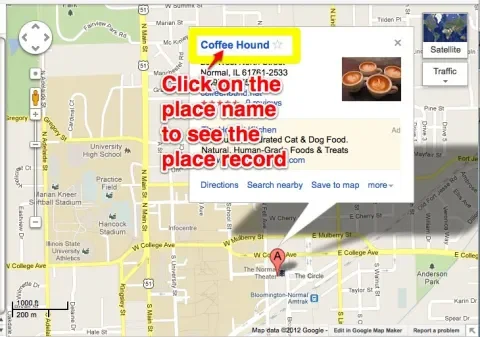
So another task is to work with the Google Places information, which actually has nothing to do with the web site. To see what Google is presenting to users for your physical locations, go to Google Maps, select a city where you have a location and do a search for that location.
When you find it, click on the name in the dialog box.
That should turn up a Google Place file. It might look like the following. You can see from this example that that the owner has not claimed this site, it has not been verified, and anyone can edit it. It has pictures they didn't put there and a list of categories that may or may not make any sense.
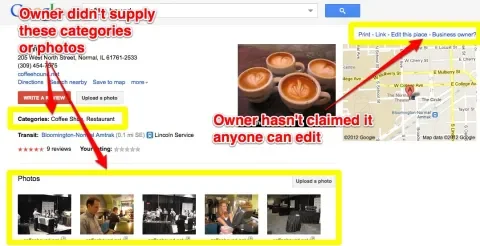
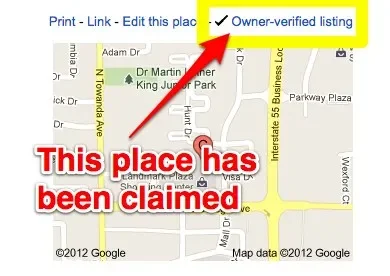
The difference between claimed and unclaimed sites is that the unclaimed sites say "Business owner?" and provide a form where you can claim the listing, and the claimed sites say "Owner-verified listing."
You should find and claim all your locations in Google. There are some bulk upload programs available, but some of the articles I read said you can't rely on them and that it is better to have someone manually make sure each individual Place has been claimed and is accurate and representative.
See Google Places' Personalized Dashboard for more ideas on optimizing those listings.
Some articles that explain this in more detail include:
- What Does Google’s New Layout Mean to Your Local SEO
- Google Local - Out of Date, Riddled with Spam But Absolutely Worth It
- How to improve rankings on google maps; Top 10 tips for Local SEO
Create Custom Maps
There is some speculation that creating a custom Google maps may help SEO (for example, see Google Custom Maps: A Goldmine For Local Businesses, which says that pages created with custom maps are displayed prominently in Google results). As with everything about SEO, it's hard to separate the speculation from the reality, so who knows if, or how much, this will help your search results, but it makes sense to add a map to any article that talks about locations.
In Summary
None of the tasks in this list are especially difficult to do, but it certainly seems that it is worth taking the time to do them. If you, or your clients, have physical locations, make sure the search engines know as much about them as possible!