
One of the things Drupal core does not do well at all is provide an easy way to switch on a WYSIWYG editor. There is no editor out of the box and setting it up requires some custom configuration of several Drupal core settings, installing and configuring several contributed modules, and also installing one or more external libraries, like the TinyMCE library. The Lullabot book, Using Drupal (O'Reilly), devotes a whole section to describing one way to configure a WYSIWYG editor.
The Problems
It's complicated because there are lots of inter-related parts:
- You need to set up one or more roles that can edit content.
- You need to create and configure 'Input formats' to create at least one format that allows users to add the html and css needed to create rich text content.
- You need to select and install a WYSIWYG editor: install the editor, download an appropriate javascript library and move it to the right location (which varies depending on which editor you are using), and then configure the editor to use the library.
And all of that gets you only to the point where you can edit text. If you want to allow users to upload images and insert them into their text, you also need to identify which of several possible methods of image handling you want to use, and install and configure the modules needed to manage that.
If you've never set a rich text editor up in Drupal before, it can take quite a long time to figure out what to do and do it. Even if you've done it before it typically involves lots of time to navigate to all the needed configuration pages and set each module up appropriately. And once you've done it on one site, there's no easy way to replicate the setup on another site.
So there is a real need for a way to pre-configure as much of this as possible to make it easier to set up and deploy this to other sites, something we can do using the Features module.
WYSIWYG Options
There are lots of possible ways to set something like this up. For the editor you could use a module like FCKEditor or TinyMCE, or do this the way many of us are doing it now, using the WYSIWYG module and configuring it to use the library of our choice.
For image handling there are numerous options: you could use the Image module to create nodes for each of the uploaded images, or you could use the Imagefield module along with helpers like the Insert module and Filefield Sources to attach images to nodes as CCK fields, or you could use the core Upload module to attach images to nodes without making them into fields or nodes, or use IMCE or Image Browser to create 'loose' images that are not attached to nodes at all. Most of these methods work nicely with the Imagecache module, which makes it possible to create a collection of preset sizes for your images.
Gathering the Modules and Files
An extensive discussion of all the possible kinds of image handling and all the other things you can do with Imagecache is an article (or two) in itself. So without delving into all the reasons for choosing one of these methods over another we're going to build a feature that uses the WYSIWYG module and the TinyMCE library as an editor, and the Image Browser and Imagecache for image handling.
And we're going to add a couple other handy additions: Image Resize Filter so we can grab the image that has been dropped into our text area to make it bigger or smaller, and Transliteration, a helper module that ensures that the names of the files that we create don't have spaces or other invalid characters in them. And Image Browser requires that we have Views and jQuery UI installed. Note that we want version 2 of Image Browser, not version 1.
We also need the modules that make Features work, Features, Strongarm, and CTools, along with a new module called Input Formats that lets us import and export input formats.
Finally we need the WYSIWYG module with a patch at http://drupal.org/node/624018 that makes it possible to import and export WYSIWYG configuration, and the TinyMCE library.
If we express this in a make file, it looks like this:
; DRUPAL VERSION
core = 6.x

; CORE MODULES
projects[] = drupal
projects[views][subdir] = "contrib"

; FILE HANDLING
projects[imagecache][subdir] = "contrib"
projects[imageapi][subdir] = "contrib"
projects[transliteration][subdir] = "contrib"
projects[image_resize_filter][subdir] = "contrib"
projects[imagebrowser][subdir] = "contrib"
projects[imagebrowser][version] = '2.x-dev'

; FEATURES
projects[features][subdir] = "contrib"
projects[strongarm][subdir] = "contrib"
projects[ctools][subdir] = "contrib"
projects[input_formats][subdir] = "contrib"

; WYSIWYG
projects[wysiwyg][subdir] = "contrib"
; Add a patch to make wysiwyg exportable.
projects[wysiwyg][patch][] = "http://drupal.org/files/issues/wysiwyg-624018-ctools-export-input-formats-2.patch"

; LIBRARIES
projects[libraries][subdir] = "contrib"
projects[jquery_ui][subdir] = "contrib"

; TinyMCE
libraries[tinymce][download][type] = "get"
libraries[tinymce][download][url] = "http://downloads.sourceforge.net/project/tinymce/TinyMCE/3.2.7/tinymce_3_2_7.zip"
libraries[tinymce][directory_name] = "tinymce"

; jQuery UI
libraries[jquery_ui][download][type] = "get"
;libraries[jquery_ui][download][url] = "http://jquery-ui.googlecode.com/files/jquery-ui-1.7.3.zip"
libraries[jquery_ui][download][url] = "http://jquery-ui.googlecode.com/files/jquery.ui-1.6.zip"
libraries[jquery_ui][directory_name] = "jquery.ui"
libraries[jquery_ui][destination] = "modules/contrib/jquery_ui"
Creating a Feature
After this we can set up a site the old-fashioned way, by installing all the necessary modules and libraries, creating the imagecache presets, creating the input filters, setting up user permissions (including permissions to view all the imagecache presets and to use them in the Image Browser), setting up the WYSIWYG editor and choosing all the buttons and options you want it to use.
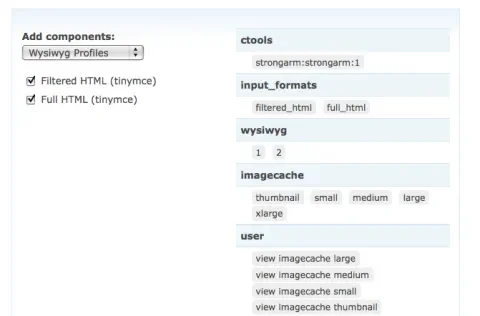
Now the magic happens. We go to the Features page and choose the option to create a new feature. Into the feature we add the WYSIWYG and input filter settings, the Imagecache presets, and all the related permissions and variables. Then we download the feature and add it to another site.
Viewing the Results
I have attached a copy of the feature this created. You should be able to try it out by creating a new Drupal installation that has all the required modules and libraries (you can create one with the make file and Drush Make). Then add the WYSIWYG Feature code to the site, go to the Features page, and enable it. You will need to clear the caches after enabling it and then you should be able to see that WYSIWYG and the input filters and the Imagecache presets and the permissions are all set up correctly. Try to create a new story and the WYSIWYG editor should appear.
Keep in mind that the WYSIWYG patch is brand new, as is Version 2 of Image Browser, so there are probably still a few hiccups in this process. But the take-away is that it is quickly becoming possible to lock WYSIWYG functionality in code and deploy it to other sites.