Get updates and news:
Want to get Lullabot article, videocast, and podcast announcements delivered right to your in-box? Let us know your email address (we won't share it) and we'll let you know when anything exciting happens.

Module-In-A-Box: We Built Admin Tools So You Don't Have To

Drupal version: 6.x

Building a Drupal module from scratch can be remarkably simple -- just create an .info file, create a .module file, then implement a few functions like hook_menu and hook_nodeapi. In no time, you've got a module up and running, leveraging Drupal's APIs and adding functionality to your site.

The problem

Unfortunately, things can get a bit more complicated if your module needs to store and maintain its own collection of data. The Custom Links module, for example, allows users to add clickable links to the bottom of each node on a Drupal site. While the code to actually add the links to each node is only a few dozen lines of PHP, it takes a few hundred lines of code to store and manage the information about those links. The module needs to create a database table to store its records, provide management pages so an admin can add new links, manage permissions, handle adding and editing records, request confirmation when administrators delete a record, and so on.
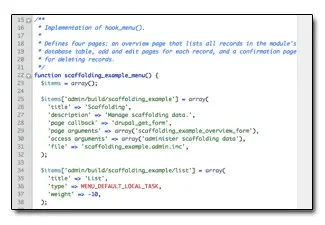
Screenshot of boring, repetitive codeThis pattern appears over and over in many Drupal modules. None of these tasks are horrible in and of themselves, but they add up to a lot of code, and a lot of special cases to overlook when you're busy focusing on the real functionality of a new module. And while Drupal.org provides a a large selection of example modules that demonstrate the use of various APIs, none of them provide skeleton code for these common, repetitive back-end maintenance tasks.

None, that is, until now. Inspired by yet another evening of copying-and-pasting administrative UI code and trying to remember all the special-cases, I decided to clean up the 'template' code that I keep lying around for these situations, comment it thoroughly, and bundle it up as a re-usable example module. Angie "Webchick" Byron helped pore over the resulting code and made improvements to the style and documentation... and the result -- Scaffolding Example Module -- is now available for download on Drupal.org.
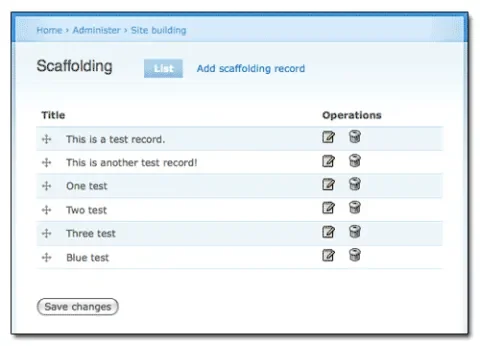
Screenshot of Scaffolding Module's administrative overview page

Who Shot Who In The What, Now?

What do you get when you download Scaffolding Example module?

  • CRUD
    • Uses Drupal's Schema API and an .install file to define a custom database table.
    • Provides an example update hook, to give users of your module an upgrade path if the database schema changes.
    • Implements load/save/delete functions for the module's data.
    • Demonstrates the use of Drupal 6's new drupal_write_record() function, to generate hassle-free insert and update SQL.
    • Demonstrates the use of a Menu API 'auto-load' function, new in Drupal 6.
    • Provides a 'batch' loading mechanism for all records, with notes on when and where to add caching if your module needs a performance boost.
  • Administration
    • Provides permissions and user access checks to keep out non-administrators.
    • Provides an overview form that uses Drupal 6's new drag-and-drop system to reorder records in a table.
    • Provides a dual-purpose add record/edit record form.
    • Provides a standard confirmation form to delete records.
    • Demonstrates Drupal 6's custom button callbacks, allowing each button on a form to trigger a different function when it's clicked.
    • Uses swanky little edit and delete icons -- GPL'd icons, at that.
  • Presentation
    • Provides a simple listing page to display all records.
    • Provides a simple themable function to render a single record..

In addition -- and this is the important part -- it does all of these things 'the Drupal way,' using standard API functions and presenting information in a way that's consistent with the rest of Drupal's core interface. An example is the confirmation form that's presented when an administrator deletes a record. I'm always forgetting the bits of syntax needed to use it properly, but using this Scaffolding module, the hard work is already done.
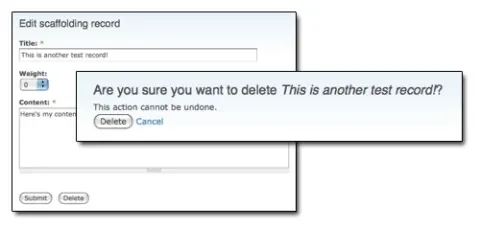
Screenshot of Scaffolding Example's edit and confirmation pages

Is there a catch?

Two caveats are in order. First, you'll still need to replace the 'example' portions of the module with your own code. Chances are, you want more than the 'title' and 'content' fields the module keeps track of. Changing hook_schema() to set up the columns you need, and changing the add/edit form to manipulate them, is still in your court. Second, Scaffolding Example doesn't do anything with the data that it manages. It's up to you to build something on top of it, whether that's spitting out XML files, changing the site's breadcrumbs, or curing cancer.

Finally, there are portions of the code that may be unnecessary for you -- if your module's data doesn't need a 'weight' field, for example, there's no need to add the Drupal table-dragging code. That's a small tweak to the theme function, though, and is clearly marked in code comments.

Go west, young coder!

Scaffolding Example module obviously can't solve every problem. But it does make it easy to fly through the 'grunt work' of building a simple administrative interface for your module. Download it, check it out, and if you can think of other improvements, post your ideas and your patches on Drupal.org!

Update: Shortly after publishing this article, several people jumped in and contributed code to make the Scaffolding module even better! Be sure to visit the Drupal Developer Examples collection for the latest version of Scaffolding module's code.

Comments

Thanks Eaton, and thanks

Thanks Eaton, and thanks Lullabot! :)

I have yet to write my first line of Drupal 6 code. University is to blame for the lack of time. But I'm sure this will be helpful in getting up to speed with Drupal 6's APIs fast!

The .install file doesn't

The .install file doesn't follow the new major/minor version numbering format for update functions. See http://drupal.org/node/114774#update-n.

Thanks!

The .install file has been updated in Drupal's CVS repository and in the .zip file attached to the article.

I don't see a zip file

I don't see a zip file anywhere attached to this article

Check out the Update

The update at the bottom of the article explains where the code's permanent home now is.

Thanks :-)

Thanks Eaton! What a great gift to get things moving for more Drupal creative goodness.

Thanks!!

You gave us the bread, now we put some meat into and we've got a del.icio.us Drupal sandwich.

Very nice idea!

Spooky

I was just thinking yesterday of creating some template modules to give away on my blog and you've beaten me to it! Admittedly, my templates would be very basic compared to this. Thanks a lot for sharing your super ninja skills.

Thanks for sharing this

Thanks for sharing this code. It does not only reduce the work for developing a new Drupal 6 module but also helps getting to know the API changes.

Object Driver overlap?

Hi Eaton,

I haven't updated this for 6.x yet, but there seems to be some overlap - my idea was to enable CRUD and some basic UI via having a second module that defines the scema and optionally some hooks, while the main module handles getting stuff into and out of the DB for any number of such add ons.

http://drupal.org/project/object_driver

Maybe we should put our heads togeter.

Zen module! Nicely done

Zen module! Nicely done Jeff.

Time for a template

Sweet! I just did Eclipse code templates for Drupal modules/stub code and I will be taking this module code and making a new set of templates. Shall I share?

Absolutely!

That would be fabulous. I'm in the process of converting the module to a Komodo template, too. One important note, though -- the file that I originally attached to this article is already out of date. Since the module was uploaded to Drupal.org, folks have already started improving it. http://cvs.drupal.org/viewvc.py/drupal/contributions/docs/developer/exam... is the place to get the latest and greatest version. Thanks!

getting an error on install

This looks fantastic! I need a way to dynamically integrate items of content from an external source, and this looks like it will save a whole bunch of time for me and learning curve. Unfortunately, after uploading the module files to site/all/modules and then going into Module Admin and enabling it, there's a long pause and then I get a 500 error. Any idea what might be happening?

mystery solved

One of the module files I downloaded got entity-encoded somehow, so less-than/greater-than signs and ampersands were throwing parse errors. I discovered this after coming across a post that suggested checking the Apache error logs, which spelled it out pretty clearly. Yes, I'm a newbie. :-)

Paged List tab

Great module, downloaded and runs OK. Just what I need.

Except for paged list tab. (Drupal 6.3)

Is reporting an error as below

warning: Invalid argument supplied for foreach() in C:\Apache229\htdocs\drupal63\includes\theme.inc on line 1289.

Have reduced limit to 2 for testing, entered say 10 records and still develops error. Header block and paging navigation does work OK, but where listed themed content shows the above error.

Any ideas what could be causing this please?

Paged List tab

Thanks for this module, it's a great way to reduce the time it takes to develop this pattern. Found this because I was looking for something similar to the scaffolding system used in Ruby on Rails for Drupal.

As for the bug, I found that it's due to the way the rows are added. It's not using the 'data' keyword.. here's the code and I commented out the old method and added my own.

<?php
 
while ($record = db_fetch_array($result)) {
   
$rows[] = array( 'data' => array(
     
check_plain($record['title']),
     
check_plain($record['weight']),
     
_scaffolding_example_record_links($record)
    ));
   
//$rows[] = check_plain($record['title']);
    //$rows[] = check_plain($record['weight']);
    //$rows[] = _scaffolding_example_record_links($record);
 
}
?>

Thank you so much!

Just want to say thanks I ton. I am currently upgrading my Visual Basic Source site to Drupal 6.0 and I need to create some custom modules to display my tutorials and source samples. Your sample module has helped me a ton as I enter into this development endeavor. Thank you so much and keep it up!

Post new comment

The content of this field is kept private and will not be shown publicly.
  • Allowed HTML tags: <a> <em> <strong> <cite> <code> <ul> <ol> <li> <dl> <dt> <dd> <blockquote> <h2> <h3>
  • Lines and paragraphs break automatically.
  • Use <!--pagebreak--> to create page breaks.
  • You may post code using <code>...</code> (generic) or <?php ... ?> (highlighted PHP) tags.
  • Web page addresses and e-mail addresses turn into links automatically.

More information about formatting options