Want to get Lullabot article, videocast, and podcast announcements delivered right to your in-box?
Let us know your email address (we won't share it) and we'll let you know when anything exciting happens.
Installing Memcached on RedHat or CentOS
Memcached is a service that allows entire database tables to be stored in memory, drastically speeding up queries to those tables and alleviating database load. In Drupal, the Memcached module allows you to store all cache tables in memory.
We've covered how to install Memcached before on Debian and on Mac OS X. But server software can vary significantly between sites, and this guide can be used to set up Memcached on Red Hat Enterprise Linux (RHEL) or CentOS, which are architecturally the same.
Install memcached through RPM
The easiest way to install Memcached is through a package manager such as yum or apt. However, Memcached is not available from the default collection of packages, so the first thing we need to do is add a new RPM (Red Hat Package Manager) server so that we can install Memcached through yum.
One of the best 3rd-party RPM servers is provided by Dag Wieers, which will provide us with up-to-date packages that are not provided by Red Hat directly. The one tricky part of setting up an RPM server is making sure you get the repository that matches your server version and architecture (32-bit or 64-bit). So we need to collect that information first.
From a shell prompt, get the CentOS/RedHat version number:
$ cat /etc/redhat-release
CentOS release 5.3 (Final)Then get the server architecture information. This is a typical response for a 32-bit machine:
$ uname -a
Linux server1.example.com 2.6.18-92.1.13.el5 #1 SMP Wed Sep 24 19:33:52 EDT 2008 i686 i686 i386 GNU/LinuxOr if you have a 64-bit machine you will probably get something like this:
$ uname -a
Linux server.example.com 2.6.18-53.1.21.el5 #1 SMP Tue May 20 09:35:07 EDT 2008 x86_64 x86_64 x86_64 GNU/LinuxNow install the RPM server that matches your architecture and CentOS version from http://dag.wieers.com/rpm/FAQ.php#B2.
The server I was using when I wrote this was a 32-bit machine running CentOS version 5.x. So my particular server was:
http://apt.sw.be/redhat/el5/en/i386/rpmforge/RPMS/rpmforge-release-0.3.6-1.el5.rf.i386.rpm
To install a new RPM server, we can just use the rpm command. Note that you must find the RPM server string that matches your architecture and software. Do not use the URL unless you have a 32-bit machine running CentOS 5.x, instead get the server that's appropriate from http://dag.wieers.com/rpm/FAQ.php#B2.
$ rpm -Uhv http://apt.sw.be/redhat/el5/en/i386/rpmforge/RPMS/rpmforge-release-0.3.6-1.el5.rf.i386.rpmNow we can simply use yum (or apt) to install Memcached:
$ yum install memcachedAfterwards you can confirm memcached is up and running by calling it.
$ memcached -h
memcached 1.2.6Install the Memcache PECL Extension
Even though memcached is happily running on the server, it's not accessible from PHP without the PECL extension. Fortunately this is a very easy process, just use the pecl command.
$ pecl install memcacheThen add the memcache extension to your php.ini file, usually at /etc/php.ini.
extension=memcache.soAnd finally restart Apache so that it will pick up the new extension:
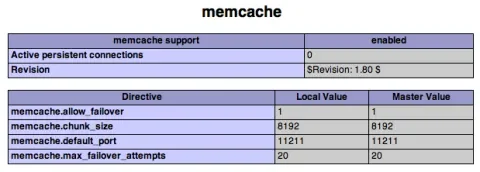
$ /etc/init.d/apache2 restartRunning phpinfo() on your webserver should now confirm that memcache is installed:
Set up Memcached as a service
Just having memcache installed will not do anything by itself, we need to actually start up some instances of it for our web server to connect to, and we need memcached to automatically start up when the server restarts.
For this we need to install a new script at /etc/init.d/memcached. For this I usually use a custom script that's a bit crude, since it assumes that memcached is being used exclusively for our web server. However, most of the time this is true and it works just fine.
Download the memcached script (rename to just "memcached").
So simply load this script into /etc/init.d. Then set the permissions on it to make it executable:
$ chmod 755 memcachedThen register the script to start up with the server:
$ chkconfig --add memcachedNow you can start up memcached as a service.
$ service memcached startAnd you can confirm that memcached has fired up several instances by checking ps.
$ ps -e | grep memcached
22805 ? 00:00:59 memcached
22807 ? 00:00:58 memcached
22809 ? 00:01:16 memcached
22811 ? 00:00:55 memcached
22813 ? 00:00:01 memcached
22815 ? 00:01:02 memcached
22817 ? 00:00:27 memcached
22819 ? 00:00:35 memcached
22821 ? 00:00:01 memcached
22823 ? 00:00:01 memcached
22825 ? 00:00:01 memcachedAnd that's it! You may need to change the /etc/init.d/memcached file to match your needs depending on what you're using Memcached for. If you're using Memcached with Drupal, you can follow the instructions for changing your settings.php file by following the instructions provided with the Memcache module. Also make sure you configure your Firewall to prevent access to Memcache from external URLs.
Comments on this post will automatically be closed three months from the original post date.


RSS Feed


Comments
Memcached module or CacheRouter?
Is there a specific reason (advantages/disadvantages) for choosing Memcached over the CacheRouter module? Not trying to start anything by this but just wondering since the Pro Drupal Dev 2nd ed book discusses CacheRouter - http://drupal.org/project/cacherouter
Whether you use Memcache or
Whether you use Memcache or CacheRouter depends on your needs. We usually use Memcache module because we don't need multiple cache systems. Generally the less code required to perform a task the better, so unless you need multiple caching mechanisms (like static files on disk for somethings but memcache for others), I'd stick with Memcache module. However, the authors of both modules collaborate regularly, so I don't think it's really a competition so much as two different options at accomplishing the same thing (making your site go fast). :-)
Looks like this article
Looks like this article changes your font on the articles listing age. It could be that the break is occurring just after a < pre > tag. Just thought I'd mention it. Feel free to delete this comment if you fix the problem.
Great tutorial!
Thanks again Nate for being so helpful. I've been meaning to get around to try and see how much memcache improves a Drupal site's performance, and this is the push I needed!
Just a note: I had a lot of grief (on Centos 5.2 with rpmforge'd PHP 5.2) with the command "sudo pecl install memcached". On the other hand, when I did "pecl install memcache" it just seemed to work. Any idea on which one is the right one to use?
PECL "memcache" (no "d"!!)
I had this exact trouble recently when describing the configuration to a new web host. Generally memcached is referred to with the "d" at the end, since that's it's proper name. However the PECL extension is just "memcache" (no "d"). To make everything super confusing the PECL project added "memcached" (with a "d") some time in the last several months. This project works completely differently than the traditional "memcache" extension and will not work AT ALL with the Drupal memcache module.
PECL "memcache" (no "d"!!)
sorry, is this correct?
$ pecl install memcachethanks,
Roberto
Yes "pecl install memcache"
Yes "pecl install memcache" is correct. See my comment above yours.
Nate, I think you made a
Nate, I think you made a typo in your tutorial then.
Yikes! You're right, I
Yikes! You're right, I definitely had the wrong command in the tutorial. It's been corrected and is now "pecl install memcache".
EPEL
If you happen to use the EPEL repository at https://fedoraproject.org/wiki/EPEL you can just run..
yum install memcached
yum install php-pecl-memcache
and then setup the Memcache module. Just don't install the memcached-selinux module as the policies for memcached is included in the default selinux policies now. There is some discussion about removing it from the repository.
Make sure you have zlib-devel!
If you're getting an error like
configure: error: memcache support requires ZLIB. Use --with-zlib-dir=<DIR> to specify prefix where ZLIB include and library are locatedERROR: `/var/cache/php-pear/memcache-2.2.5/configure --enable-memcache-session=yes' failed
make sure you have zlib-devel installed
yum install zlib-develThis is exactly what I was
This is exactly what I was trying to figure out. Thanks!
How to reach Memcached from external URLs
This is a great tutorial; thanks for sharing it.
I have a CentOS server and followed your instructions to install MemCached on it.
My question is: how can I change the settings on CentOS to make MemCached accesible to other machines on my network?
I'm running a windows console application that uses Enyim.Caching and it seems that it can't get to the Memcached instance.
How can I tell from a Windows machine if Memcached is up and running?
Thanks in advance.
-Raul
caching more than cache_* tables
Great article. Many thanks to you I got memcached running on my site today.
In the memcached script available for download above (that goes inside /etc/init.d) you have references to tables such as session, user as well. How that works?
Wouldn't you need additional code to cache the user data in memcached somewhere and also invildate the data later? Are you already aware of any patches for this?
What should I do if
What should I do if memcached is only starting one instance?
this is slowing our website down instead of making it faster..
Can any body help?
Great Help
Hey,
Id just like to say thanks :) Have been looking for hours how to get memcache working since our latest upgrade.
I have seen nothing but PHP Warning: PHP Startup: memcache: Unable to initialize module.
Thanks