Want to get Lullabot article, videocast, and podcast announcements delivered right to your in-box? Let us know your email address (we won't share it) and we'll let you know when anything exciting happens.

Imagecache Example: User Profile Pictures

User profile pictures (or avatars) have been around for about as long as online bulletin board systems themselves. Drupal has included this ability for several versions, but we've found it lacking in both user friendliness and consistency.

If you're using the default Drupal user pictures. Your site's users must upload an image exactly to the dimension specifications. The default is 85x85 pixels, and often that will mean a special trip to the GiMP or Photoshop just to make such an image. Additionally, some users might upload a photo which isn't even that big, like a 16x16 icon. Your designers probably aren't going to like creating a design that needs to support an image from 1x1 pixel up to 85x85 pixels.

We've found that we implementing the following system in the community sites we develop solves these problems. Using imagecache and hook_form_alter(), we can make beautifully consistent and easy user profile pictures.

Getting Started
The first thing you need to do is enable user pictures. Head on over to admin/user/settings (in Drupal 5) and you should have the following options at the bottom of the screen.
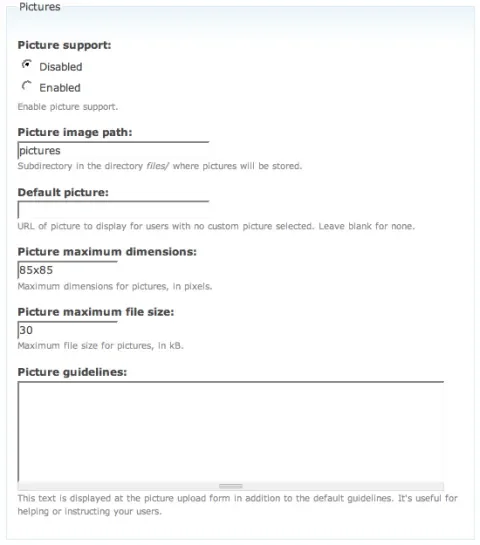
settings page

Configure your screen so that it is similar to the following.
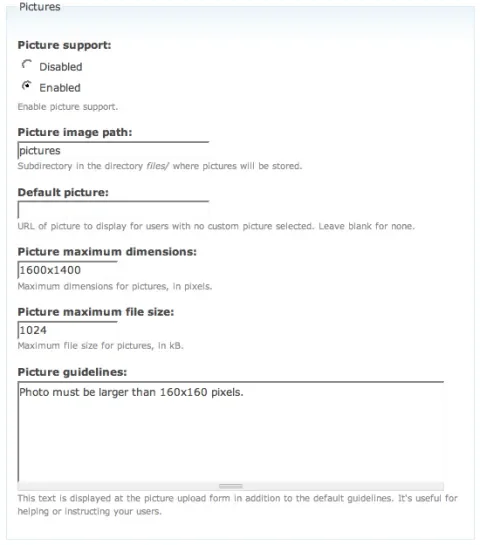
settings page after

Now if you go to your user account configuration (such as user/1/edit), you should have a photo section such as this. If you don't see anything, make sure that you changed the admin/user/settings Picture support to 'Enabled'.
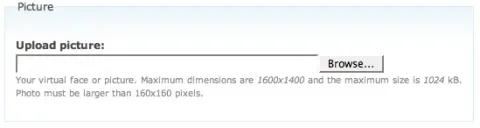
picture upload

Now we get down to the fun stuff. You'll need to download the imagecache.module and install it. Imagecache module has some steep requirements, so be sure all these things are also setup:

  • You have GD2 installed with JPEG, GIF, and PNG support
  • Clean URLs are Enabled (admin/settings/clean-urls)
  • Open the .htaccess file in you files directory and make sure it is exactly like the following:

    SetHandler Drupal_Security_Do_Not_Remove_See_SA_2006_006
    Options None
    Options +FollowSymLinks

    If you have mod_rewrite_engine disabled in the files directory (a default in some versions of Drupal 4.7) imagecache will not work.

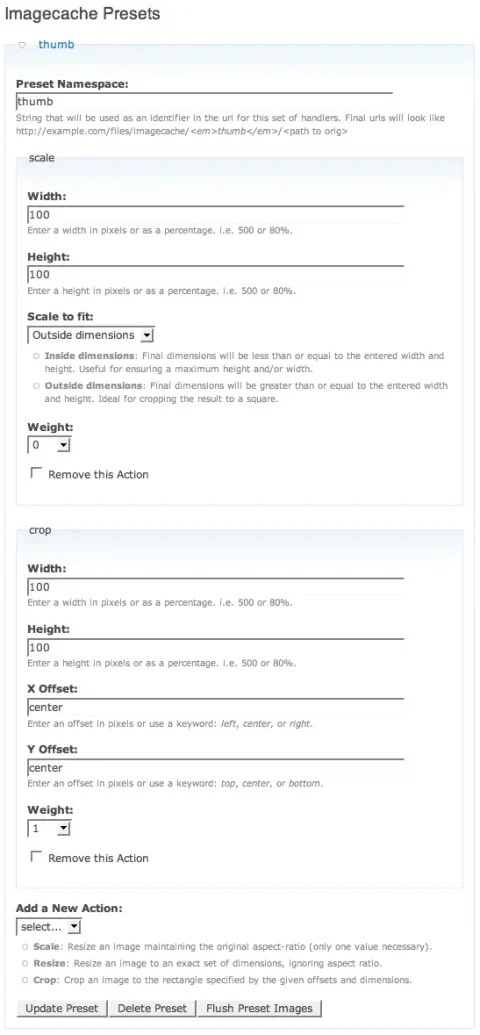
Enable the imagecache module, then open up the imagecache settings page (admin/settings/imagecache). Create a new imagecache preset called 'thumb'. Then setup two actions so your screen looks like this.
imagecache settings

Make sure you 'Scale to fit' the Outside dimensions. Now the resulting image is at least the entered dimensions, so when you crop you'll always remove the larger side. You can play with the settings as you like to get the right display for your website.

Cool, now we've got an imagecache preset configured. Try it out by uploading a photo for your user on the site (at least 100x100 pixels!), then accessing the URL to the cached image directly. Let's say you're user #1 and you've already uploaded a picture using the default location of /files/pictures/picture-1.jpg. Then try accessing the cached image at: /files/imagecache/thumb/files/pictures/picture-1.jpg.

If you don't see an image exactly 100x100 pixels, then review all the steps above.

Okay, now we can really start some coding! The first thing we want to do is actually make Drupal use our new thumbnails for profile pictures.

Open up your template.php file in your theme's directory. If you don't have a template.php file, just create one and open up a php tag (<?php) at the beginning of the file.

We're going to override the default theme_user_picture function. You can just paste in the code below if you like:

<?php
/**
*
* Insert into your theme's template.php file:
*
* Theme override for user.module
* Utilized imagecache module to scale down large uploaded profile pictures
* @param $size
*   Image size to scale to. Options: thumb (default) and large
*/
function phptemplate_user_picture($account, $size = 'thumb') {
  if (
variable_get('user_pictures', 0)) {
   
// Display the user's photo if available
   
if ($account->picture && file_exists($account->picture)) {
     
$picture = theme('imagecache', $size, $account->picture);
    }
    return
'<div class="picture">'.$picture.'</div>';
  }
}
?>

You might notice that we're doing something a little tricky here. Checkout the original specification for theme_user_picture(). We've cut out a lot of code for simplicity's sake, but we've also added another parameter to the function: $size. We've set its default to 'thumb', so all modules which use the user picture will default to using that imagecache preset. If you desired, you could now create different imagecache presets and use different size images for various places on your site! The user profile page is a page where Lullabot often uses a larger profile picture, such as 250x250 pixels. Wherever you want a larger image, just pass in the imagecache preset as the second parameter, such as theme('user_picture', $user, 'large');.

Let's checkout the before and after pictures!

Before:
profile before

After (much better!)
profile before

Pretty cool, huh? But wait, what if the user wants to change their profile picture? If you upload a new photo now for yourself, you'll notice that the profile picture displayed doesn't change. This is because imagecache isn't smart enough to know that the image has changed, so it doesn't update the thumbnail. Now we get into custom module development (yay!). If you're scared now, don't give up! We're almost there and we're going to do a lot of cool stuff! If you don't want to do the programming, you can just skip to the bottom and download the zip file (imagecache_profiles.zip) containing this module.

Okay, rather than split up the code I'll paste it all right here. Create a new module directory called 'imagecache_profiles'. Then create a new text file, 'imagecache_profiles.module' in that directory. Paste in the code below:

<?php
/**
* Implementation of hook_help().
*/
function imagecache_profiles_help($section) {
  switch(
$section) {
    case
'admin/modules#description':
      return
t('utilizes imagecache presets for user profile pictures');
  }
}

/**
* Implementation of hook_form_alter().
*/
function imagecache_profiles_form_alter($form_id, &$form) {
  switch(
$form_id) {
    case
'user_edit':
     
$form['#validate']['imagecache_profiles_user_edit_validate'] = array();
     
$form['#submit']['imagecache_profiles_user_edit_submit'] = array();
      break;
  }
}

/**
* Additional form validation for the user_edit form
*/
function imagecache_profiles_user_edit_validate($form_id, $form_values) {
 
// Add a minimum size requirement to the image upload form
 
if ($info = file_check_upload('picture_upload')) {
   
$image_info = image_get_info($form_values['picture']);
    if (
$image_info['width'] < 160 || $image_info['height'] < 160) {
     
form_set_error('picture_upload',t('Your profile image must be at least 160 pixels wide and tall (your image was @width x @height pixels).',array('@width' => $image_info['width'], '@height' => $image_info['height'])));
    }
  }
}

/**
* Check for new or deleted uploads and clear the imagecache if necessary
*/
function imagecache_profiles_user_edit_submit($form_id, $form_values) {
  if (
file_check_upload('picture_upload') || $form_values['picture_delete']) {
   
imagecache_image_flush($form_values['picture']);
  }
}
?>

Note that this is made to work with Drupal 4.7 also (hence the hook_help implementation). If you're running Drupal 5, you'll also need to create imagecache_profiles.info file and paste this code:

; $Id$
name = Imagecache Profile Pictures
description = Utilizes imagecache presets for user profile pictures.

Save and enable your module, now we can upload new photos and they will automatically be updated by imagecache! Let's review our code piece by piece.

hook_form_alter

<?php
/**
* Implementation of hook_form_alter().
*/
function imagecache_profiles_form_alter($form_id, &$form) {
  switch(
$form_id) {
    case
'user_edit':
     
$form['#validate']['imagecache_profiles_user_edit_validate'] = array();
     
$form['#submit']['imagecache_profiles_user_edit_submit'] = array();
      break;
  }
}
?>

This is a very powerful piece of code. hook_form_alter() allows you to edit the behavior of any form in all Drupal. What we're doing here is adding two additional properties to the form, additional validation and additional submit handling. The name of the function is the second key in the array (such as 'imagecache_profiles_user_edit_validate') and we're passing in an empty array, meaning we don't need to send any additional parameters.

imagecache_profiles_user_edit_validate

<?php
/**
* Additional form validation for the user_edit form
*/
function imagecache_profiles_user_edit_validate($form_id, $form_values) {
 
// Add a minimum size requirement to the image upload form
 
if ($info = file_check_upload('picture_upload')) {
   
$image_info = image_get_info($form_values['picture']);
    if (
$image_info['width'] < 160 || $image_info['height'] < 160) {
     
form_set_error('picture_upload',t('Your profile image must be at least 160 pixels wide and tall (your image was @width x @height pixels).',array('@width' => $image_info['width'], '@height' => $image_info['height'])));
    }
  }
}
?>

This is the first function we added to the user_edit form. Remember way back when we set the user profile picture settings? We required that all user photos are at least 160 pixels before upload. This small function ensures that minimum size is actually enforced.

imagecache_profiles_user_edit_submit

<?php
/**
* Check for new or deleted uploads and clear the imagecache if necessary
*/
function imagecache_profiles_user_edit_submit($form_id, $form_values) {
  if (
file_check_upload('picture_upload') || $form_values['picture_delete']) {
   
imagecache_image_flush($form_values['picture']);
  }
}
?>

Finally, this last piece of code performs the necessary magic to make sure our cached images are always up-to-date. Imagecache.module provides a mechanism for clearing the cache of any particular file it has saved in all presets. Just pass in the file path the original, and it deletes all the cached versions. They'll automatically be recreated next time the image is requested.

Phew, we covered a lot of code. I hope everyone enjoyed and happy imagecaching!

Download the Code (imagecache_profiles.zip)

Comments on this post will automatically be closed three months from the original post date.

Comments

uh....avatars have been getting resized since 4.7...

The default is 85x85 pixels, and often that will mean a special trip to the GiMP or Photoshop just to make such an image.

Uhh...no. Try uploading a big image. It gets re-sized automatically. The pixels are what size it gets resized to, and the size limit is the max size that a custom image.

The magic, though...

...Is the ability to cleanly crop to create square images, in addition to simply resizing.

Yes, but there's even

Yes, but there's even more!

I think what Nate didn't clarify, is that by using this technique, you can generate multiple sized thumbnails/images for the user based off of on.

Relying on *just* Drupal and you end up with your 85x85.

This way above, you have a full 1600x1200 to generate as many additional sizes as you need--think forums, image galleries, etc..

Sure...

...it's just that the way it reads, it seems like Drupal doesn't do any resizing at all.

It's also not super clear from the article the other things you've said in the comments here. It is an excellent primer on imagecache.

Doh

Yes, more clarification is needed. Drupal DOES resize images down to the at most the specified dimensions. However it does not scale to exactly those dimensions. most users will upload a photo, say something 1600x1200 pixels. The scaled down result is 85x63 pixels.

Drupal will also not let you later resize the images. Once you've decided on 400x400 pixel images for instance, you can't go back in later and change it to 100x100 pixels.

Cool tip Nate! I implemented

Cool tip Nate!

I implemented this a few weeks ago on a community site and it's great to be able to have different avatar sizes depending on the context (f.e. I extend theme_username with a tiny version of it). However, I ran into the problem with imagecache not noticing when users upload new pictures, so you just saved me a couple of hours by figuring out the user_edit form stuff for me - Thanks!

The zipped module contains an error though...
PHP Parse error: syntax error, unexpected '}' in /var/www/html/sites/all/modules/imagecache_profiles/imagecache_profiles.module on line 24,

Corrected

Thanks, I fixed the contents of the zipped module!

Awesome, this is some great

Awesome, this is some great stuff. Ive used imagecache recently and just love it, but knowing about hook_form_alter seems even better!

*runs off to the handbook*

Thanks.

Dzoned

Fantastic stuff! I threw this on DZone (a Digg-like site for developers). If those care to promote the page there, the link is: http://www.dzone.com/links/drupal_and_imagecache.html .

Bryan

What about CSS?

People forget that they can use CSS to resize one image for several uses in different places. For instance, I have a fairly large user picture size, but I resize the image for the user pictures in comments and nodes. The image sizes are already small enough that I don't see any performance hit.

The bonus is that you don't end up with a pile of the same images all in different sizes.

Um, no...

a) Erm, well CSS can't crop, for a start. At least not easily, and certainly not consistently.

b) If stacks of users look at all different areas of the site, with one large image, that will incur:

traffic = number of visits * size of enormous picture

If you use separate, smaller images, the cost:

traffic = (visits to "small image" section) * size of small image) + (visits to "medium image" section * size of medium image) + etc

The work done to create the image, and the space used to store extra images is nothing compared to the load generated by using one larger image everywhere, IMO. Also, the same goes for the client side, in terms of caching, I would imagine?

thanks

thanks

scale to fit

i installed imagecache by putting the .module and the .install - file into the module directory. i ran the update-script.

when opening the settings (not admin/settings/imagecache but only admin/imagecache) and creating the preset the there is no dropdown-menu "scale to fit" to find on the screen. it´s only "width", "height" and then "weight" - nothing in between.

probably due to this the size of the uploaded images in the user-edit section are shown in their original size.

thx in advance for help
karl from austria

Use Development Version

You'll need to use the 4.7.x-1.x-dev version from Drupal.org. It looks like the 5.x-1.0 version was just released today, but in fact it is very different from the 4.7.x-1.0 version.

first part works - second (new picture) doesn't

thx guys, you are doing a great job. wish i could come to one of your workshops (which is not really necessary if you support me like you´re just doing it).

well: i did what you said (downloaded the updated imagecache.module) and deleted the first user-picture and uploaded another - after implementing your imagecache_profile.module.

but still the first (and deleted) picture showed up - and not the new one. what could be the mistake?

i am just working an an dev-site - if you like, i can provide you admin access.

thx
karl

uninstall 5.x imagecache version

Hello all. I had already installed the 5.x version of imagecache (running Drupal 5.0) and now want to go back to 4.7.x-1.1 to try this code. I uncheckmarked the imagecache module in admin/build/modules, uploaded the 4.7.x-1.1 version to sites/all/modules/imagecache. The imagecache module did not show up to activate on the modules page. I then dropped the two imagecache tables in my database and ran php update. Imagecache still doesn't show up in the modules page to enable it. Any suggestions? Thank you!

4.7.x Install Locations Notice

Drupal 4.7 doesn't support the '/sites/all/....' convention. You'll have to put the module in the site-specific directory (i.e. /sites/default/modules/imagecache) or in the /modules directory.

Wow... This would be awesome in the imagecache repository.

*wink* *wink*

And now there should be a 4.7.x-1.1 and a 5.0.x-1.1 release on drupal.org. :) Awesome tutorial.

Your downloadable is also

Your downloadable is also missing a close "?>" at the end of the imagecache_profiles.module…

But cool, thanks for the tip!

Coding Standards

You should checkup the coding standards for Drupal :D

http://drupal.org/node/318
and
http://drupal.org/node/545

Leaving the ?> tags off of php files is completely optional, and in the case of Drupal is the suggested implementation.

Soon to be Contrib!

Dopry and I talked in #drupal tonight about the module used in this article. We'll probably see this as a conrib module which implements all of this code soon. It's still a great learning experience to walk through it all!

Clean urls is not required for imagecache

I'm using imagecache without clean urls so I just wanted to clarify that its not required (unless something else in your example requires it). Imagecache themed links are direct links and independent of the clean url setting.

<?php
function theme_imagecache_display($node, $label, $url, $attributes) {
  return
'<img src="'. check_url($url) .'" alt="'.
check_plain($node->title) .'" title="'. check_plain($node->title)
.
'" '. drupal_attributes($attributes) .' />';
}
?>

Tricky URLs

Yes imagecache makes direct calls to files once they are created so mod_rewrite (Clean URLs) are not needed. However, the initial call to imagecache needs them so that Drupal will be loaded and the image file created. Here's a workflow:

First Request:
- example.com/files/imagecache/files/test.jpg
- The file does not exist. Drupal loads and the menu callback in imagecache (files/imagecache) gets control.
- The image is created and saved at the original location

Second Request:
- example.com/files/imagecache/files/text.jpg
- The file exists and is returned. Drupal is not loaded.

This assumes that mod_rewrite is available on your system. You can actually have Clean URLs disabled, but you still need mod_rewrite! To really fully disable Clean URLs in Drupal you'd need to comment out these lines in the .htaccess file in the root of Drupal:

  # Rewrite current-style URLs of the form 'index.php?q=x'.
  RewriteCond %{REQUEST_FILENAME} !-f
  RewriteCond %{REQUEST_FILENAME} !-d
  RewriteRule ^(.*)$ index.php?q=$1 [L,QSA]

These rules are applied even if Clean URLs is turned off. The only thing Clean URLs setting actually does is change the output of the url() function.

In order for imagecache to work without mod_rewrite at all, the workflow would have to be:

First Request
- example.com/?q=files/imagecache/files/test.jpg

Second Request
- example.com/files/imagecache/files/test.jpg

While this is entirely possible, it is not the current behavior of imagecache.

Yep, your right

I have mod_rewrite enabled but clean urls disabled. Thanks for pointing that out - I didn't think of that.

Great article all around - do you know if there are other filter/actions being developed - flips, grayscale, and so on...

Transformer is the Future for Imagecache

Dopry is working on the very ambitious transformer module. When that project stabilizes imagecache will simply become a front end for the transformer API. Transformer will support many more image actions in the future including rotate, borders, various filters and much more. It's a very exciting project.

Very cool

Don't forget the required Web 2.0 filter/iTunes reflection transformation :)

Easy

It's easy to add this to your images by changing the imagefield module (If you are using CCK) by uploading the popular JS and adding a field for an optional image class. You could do the same thing here.

I guess this never took

I guess this never took off...

another method?

Hi,
I was just looking into this. I came across this: http://drupal.org/node/59151. I like the solution presented at the end...seems clean. My question is which method would you guys use?

This is the method we use!

I came across this: http://drupal.org/node/59151.

We've used the above method for several sites and it's what we're recommending to clients. It adds the ability to include any size picture wherever you like.

I don't really like the big 'switch' statement in the theme function for different areas in the link above. Instead, when you wish to display different size pictures in different places, over ride the PHP template variable for that node type. For example (in your template.php file):

<?php
_phptemplate_variables
($hook, $vars = array()) {
  switch (
$hook) {
    case
'node':

    switch (
$vars['node']->type) {
     
$account = user_load($vars['node']->uid);
      case
'story':
       
$vars['picture'] = theme('imagecache', $account, 'thumb');
        break;
      case
'page':
       
$vars['picture'] = theme('imagecache', $account, 'medium');
        break;
      case
some_other_type:
       
// More code for other types
       
break;
    }
  }
}
?>

This change's the value of $picture in your node.tpl.php files. We usually use a different size thumbnail in theme_user_profile() function also.

Just where ever you want a different size thumbnail, create a new preset in imagecache.

can't get this to work

I copied this part:

   switch ($vars['node']->type):
      $account = user_load($vars['node']->uid);
      case 'story':
        $vars['picture'] = theme('imagecache', $account, 'thumb');
        break;
      case 'page':
        $vars['picture'] = theme('imagecache', $account, 'medium');
        break;
      case 'some_other_type:
        // More code for other types
        break;
    }

into the already existing _phptemplate_variables fucntion in my template.php, under switch($hook) and inside the case 'node': section but I keep getting the error:

Parse error: parse error, expecting `T_ENDSWITCH' or `T_CASE' or `T_DEFAULT' in /var/www/html/drupal/themes/zen/template.php on line 199

Should be switch

Should be

switch ($vars['node']->type) {

not

switch ($vars['node']->type):

Thanks RobRoy

Sorry about the typo; RobRoy found the problem! I fixed it in my comment above.

Drupal 5 - Confirmation

Just to confirm... are you saying that the updated ImageCache (5.x-1.1) should NOT be used with a Drupal 5 install and that the previous 4.7 release should be used instead? I just wanted to double check this before diving in.

Thanks!

Use the Latest

Whoa... no, always use the latest official release for the version of Drupal you're using. The 4.7 module won't do anything when installed on 5.0. There is no difference between the 4.7 and 5.0 releases functionality-wise.

Thanks!

Okay, I was confused by this comment:
http://www.lullabot.com/articles/imagecache_example_user_profile_picture...

I'll give this a whirl then.

Default picture

Oh, how does the default picture fit into this for users who don't upload an image? Is that functionality broken as a result of this or does the snippet added to template.php just need an Else?

Left out, put it back in!

Yes the default picture functionality was completely removed from the code to shorten up the theme function we inserted into template.php above.

You can open up the theme_user_picture() function from user.module and re-add the default picture code into your custom theme function (and add imagecache scaling to it also). Thanks for pointing this out!

You can open up the

You can open up the theme_user_picture() function from user.module and re-add the default picture code into your custom theme function (and add imagecache scaling to it also). Thanks for pointing this out!

Could you please paste the exakt code I need to re-add to get the default user picture and have it scaled with image cache?

Didn't quite get that php code :)

caching :S

First of all, thanks for the great tutorial!
I did ALL the steps on D5 with the 5-1 imagecache module, but for some reason the image is never refreshed when I upload a new one.

Anything I can check to make this work?
Thanks
jacauc

function name incorrect?

Shouldn't

function imagecache_profiles_hook_alter($form_id, &$form)

be named:

function imagecache_profiles_form_alter($form_id, &$form)

?

Yes it should, thanks

I've corrected it in the post and the zip will be updated momentarily. Thanks for catching this!

Images not being updated

After fixing the form_alter function I still could not get images to update. I tracked the problem to the imagecache flush function. See here: http://drupal.org/node/114873

Updating Images Problem in 4.7

Thanks jpsalter (again) for finding this. That explains the difficulty previous posters have been having with images updating with Drupal 4.7. I've corrected this in the 4.7.x-1.x version of imagecache.

crop colours

Thanks! That fixed it for me! :D

One more question.
It seems like when the aspect ratio is different for the pic, and it is cropped, the sides of the pic becomes black. Is it possible to make this white?

Hope this makes sense :P

change to black to white?

Did you solve this?
I would also like to have the "background" of small pictures to be white!
Thanks!
/Tim

change to black to white?

Did you solve this?
I would also like to have the "background" of small pictures to be white!
Thanks!
/Tim

I submitted a patch to fix the black background on cropping

I submitted a patch to imagecache to prevent an image from being cropped when it is too small - This may be useful to you.

http://drupal.org/node/199957

The downside is that you can't enforce an "exact" image size - but what are you gonna do when a user uploads an image that is too wide or narrow?

Hope this helps

Thanks for the article

Good stuff, thanks for all the great info Lullabots!

-Matt

to display the default user pics too.

function phptemplate_user_picture($account, $size = 'thumb') {
  if (variable_get('user_pictures', 0)) {
    // Display the user's photo if available
    if ($account->picture && file_exists($account->picture)) {
      $picture = theme('imagecache', $size, $account->picture);
    }
    else if (variable_get('user_picture_default', '')) {
      $picture = theme('imagecache', $size, variable_get('user_picture_default', ''));
    }
    return '<div class="picture">'.$picture.'</div>';
  }
}

Not playing nice with usernode?

I've got everything to work when displaying the user's own image, but when I add

<?php
print theme('user_picture', $user, 'thumb');
?>
in other places, like in my blog template file to show who wrote the blog post, the image is not showing up. Instead, only the default image is there.

I'm using usernode module, and I'm wondering if that's killing $picture, because I can't get

<?php
print $picture
?>
to show the image filename. That's the only thing I can't guess.

I realize this may be a usernode issue, but I'm wondering if anyone has an idea where I should look to track this down. It's been driving me crazy for several days.

answers

Did you ever figure this out? I'm having the same problem, but without the usernode module.

Lullabots Rock!

Thanks so much for this great tutorial!

Very great stuff and good

Very great stuff and good explanations. Thanks Nate!!

First, I have to tell That I am sorry for the wrong English
my question is written in: I'm French.

Your tutorial is pretty cool and all worked with my Drupal test site. It's really usefull. However it seems that if one upload a
horizontal rectangular image with a visage at the extreme
right (for exemple), the final render will sound like half a visage.
Does anyone know a way to let people choose where to crop
the image (of course keeping the ratio needed by my drupal
site for esthetical reasons)?
Is a module able to do such a thing ?
I know there are a phew SocialNetworking solutions where
people can define area to crop with their mouse (Phbizabi Alicia, Bonnex Dolphin etc...).
My mind is open to any ideas.

Thank you very much.

Will this speed up or slow things down?

will using this method affect performance either negatively or positively?
I have been experiencing problems with user-pictures really sucking all the CPU out of my server. will using this method speed things up, or slow it down even more?

Performance Effects

CPU: Increase. The original photo will need to be scaled down on the first request (but it is cached subsequently). So if you modify an imagecache preset and clear the cached images, you'll see a temporary spike in CPU as all the user images are being regenerated.

I don't know why user pictures could cause CPU sucking at all, there are no extra SQL queries involved and it's only returning one extra file. You should try using devel module and comparing the queries before and after enabling user pictures.

Overall though this method will have little affect on CPU, as once the images are cache, they are referenced directly.

If you had really large user images allowed, this method might lower bandwidth. As only smaller images would need to be transfered rather than the full size one.

if you are using GD, you

if you are using GD, you will experience MAD amounts of memory-eatage with the drupal avatar upload, because the drupal core (in 5.0) handles the pics somewhat improperly -- instead of discarding pictures over a particular size out of hand, it first tries to scale them to something smaller. Guess what: with GD this can EASILY take up all the memory you have on your server (uploading an under 2M pic with dimensions over 1600x1024 caused a PHP process with 64M of mem to fail).

I would highly recommend installing imagemagick and using that. One caveat, however: I am having some unsolved caching problems that i suspect are related to a race condition created by using imagemagick, but still -- a couple users seeing old pictures is much better than a couple users eating up all the memory on my server.

One side effect of this

One side effect of this method is that it pretty much kills any animated gifs and pngs since imagecache will only process the first frame. Not that you would want 160x160 animated images.

Which raises the question: Is it possible to have 2 separate fields in the user form? One for the user picture (mug shot) and another for an avatar?

Update for the .info file

You might want to add this to the info file too:

package = Image
dependencies = imagecache

which will put it in the Image group (where imagechache is) and show it is dependent on it.

Many thanks for the nice module, waiting to see it in drupal modules list.

Another way to get the theme function

Using the latest imagecache-5.x-1.x-dev I simply got the original theme_user_picture from the user.module and only changed 2 lines:
$picture = theme('image', $picture, $alt, $alt, '', FALSE);
to
$picture = theme('imagecache', $size, $picture, $alt, $alt, '', FALSE);
and
function theme_user_picture($account) {
to
function MyThemeName_user_picture($account, $size = 'avatar') {
and seems to work fine.

Thanks for the nice article and module

Profile Pictures and Views: module for imagecache views needed?

Does this User Profile Pictures module play with views? If not, how might it be made to?

I'm thinking it might be possible to write a simple module to expose selected imagecache versions (presets) of images to views.

Thoughts and pointers from those more knowledgeable hereby solicited.

I know how to theme imagecache in views and do all the time for CCK, but my immediate need is for a Views Bonus Pack grid view which does not generate its own theme template (in 4.7 incidentally and unfortunately).

Long term, such a module would give non-coders and themers the power of imagecache anywhere they use views.

Thoughts, encouragements, celebrity endorsements?

~ ben :: http://AgaricDesign.com/contact

Imagecache Views Support

Imagecache already provides views support when combined with Imagefield. A list of all presets is displayed under the formatters for an imagefield, allowing you to create view which operates like an imagegallery.

I'm guessing that you want to make a view of user pictures however, in which case this module partially supports views. Because you override the theme function for user pictures, it should display that default option in your view. It wouldn't be difficult to use the Views theming wizard to make it use other presets also.

The module doesn't provide any formatters. It sounds like a good idea though.

Views Support

FYI, the list view of Author Picture does not adopt the "thumb" imagecache format -- even with the template.php override. I'm going to uses a grid that shows 'teasers' and then theme the teasers to show 'thumb' and 'name' both linked to the usernode... i'll check back here from time to time to see if anything else has been posted on the subject.

Is there a contributed

Is there a contributed module for D5?

Where to add

Where do I have to add:

'user_picture', $user, 'profil'

in order to have bigger pics on profile pages? I tried profiles.module but nothing changed.

Arrgghh

So, I place

<?php print theme('user_picture', $user, 'avatar_icon'); ?>

into my node.tpl.php and nothing happens (I have configured an imagecache for avatar_icon). If I echo out $user I also get nothing. Maybe $user is not available in the template, I don't know, pretty new to this.

I know imagecache and the profilepicture module is working because if I just do

<?php print $picture ?>

I get the avatar_icon size (I specified this as a default in the template.php

Anyone able to help?

$user update

If I global $user then I get a result, but it then treats all avatars in nodes as the logged in user's avatar. How do I fetch the $user object for the node's author?

Fixed

Oh, I just had a revelation and leveled up in Drupal. In a node the object that contains all the user information for that node is funnily enough called $node, in a comment it is called $comment.

I imagine $user might be used more generically containing user information for the user of the logged in session?

How to display a bigger image on the profile

Hi there,

Thanks for writing this, it's been very helpful!

Here's a small modification in template.php to display a "medium" size image on user profile, while displaying a "thumb" size image everywhere else:

<?php
function phptemplate_user_picture($account, $size = 'thumb') {
  if (
variable_get('user_pictures', 0)) {
   
// Display a bigger picture on user's profiles
   
if (preg_match('/q\=user\/\w+/', $_SERVER['REDIRECT_QUERY_STRING'])) {
       
$size = 'medium';
    }
   
// Display the user's photo if available
   
if ($account->picture && file_exists($account->picture)) {
       
$picture = theme('imagecache', $size, $account->picture);
    }
    return
'<div class="picture">'.$picture.'</div>';
  }
}
?>

chmod issue

I got problems with the folder and file permissions in the imagechache folder. Everytime I upload a new picture it's set back to 744 and I have to manually change the permissions for the pictures to show up.
Is this an problem with the code or with my server.
If it is my server, is there a possibility to change the default permission for a folder, via .htaccess or so?

And thx for your addition with the profile images Anonymous!

link thumbs to user profile?

Hello,
In addition to showing the default image, could somebody help me include a statement that links the thumbnail image to the user's profile? I'm trying to work part of this original code from the user module into the template, I've tried changing things around a bit but I either get only an image or only alt text. (I am pretty new at this.)
original:

if (isset($picture)) {
      $alt = t("@user's picture", array('@user' => $account->name ? $account->name : variable_get('anonymous', t('Anonymous'))));
      $picture = theme('image', $picture, $alt, $alt, '', FALSE);
      if (!empty($account->uid) && user_access('access user profiles')) {
        $picture = l($picture, "user/$account->uid", array('title' => t('View user profile.')), NULL, NULL, FALSE, TRUE);
      }

      return "<div class=\"picture\">$picture</div>";
    }

Also, thanks to Lullabot and everyone commenting for the tutorial.

This would be great!

This is just what I need as well, code to make the thumbnail images clickable through to the main profile! Could someone please post the code here? Thanks!

Question about public vs private download method

As I understand it, to use imagecache the drupal download method must be set to public and not private. I think this leaves the /files/... directories open to viewing by non-authenticated users (users that aren't logged in). Any suggestions on tightening up the security on this subdirectory and still using imagecache? Excellent article, thank you for posting it Nate!

Thanks Nate!

Thanks for this piece of code, both to you, Nate, as well as to everyone on this site! The piece of code 'How to display a bigger image on the profile' has saved me a great deal of time and work! All of the discussions have given me an incredible amount of insight into the module and customizing my drupal site. Thanks all!

Corey

Users Can Not Change Avatar

Hi,
I am having a problem with users being unable to change their avatar pictures. The old one is deleted without problems. A new one is uploaded. Then, the old picture appears, not the new one! To solve the problem, I delete the user's avatar which from my files and files/imagecache... directories.

How can I change my setup so that users can change their profile pics without my intervention?

Similar issue

For reasons I've not yet been able to debug, the additional validate and submit functions do not seem to fire when a profile image exists, and a new one is uploaded in its place. They only fire when the profile image is unset, or if the delete checkbox is checked.

No issue queue or contrib module to post bugs or patches to. :(

Why 160?

Very nice tutorial Nate!

I was just wondering why the minimum picture size is set at 160x160 if (as it appears) you are scaling/cropping them down to 100x100?

In this case, couldn't the min pic size be set at 100x100 or am I missing something?

Thanks again,
Kevin

I have the same doubt

Wondering the same thing, what happen if someone had a picture smaller then 160x160.

Will it cause any problem? as i tried changing the imagecache_profiles.module minimum size validation, and tested but don't see any thing major problem.

picture update (imagecache_flush) fix? for drupal 5

Great tutorial.

One remark about the argument you are passing to the imagecache_image_flush function. For drupal 5, in my setup at least (but I messed around with the files directory a bit, so might be just my problem only), $form_values['picture'] returns something like 'files/pictures/picture-1.jpg'. The imagecache_image_flush function then tries to delete the file at 'files/imagecache/$presetname/files/pictures/picture-1.jpg'. This path doesn't exist, it should be 'files/imagecache/$presetname/pictures/picture-1.jpg' (no 'files/' before 'pictures'). So when a user update his/her picture, the imagecache is not flushed automatically. I fixed it like this:

<?php
function imagecache_profiles_user_edit_submit($form_id, $form_values) {
  if (
file_check_upload('picture_upload') || $form_values['picture_delete']) {
   
imagecache_image_flush(substr($form_values['picture'], strlen(file_directory_path()) +1));
  }
}
?>

This is in imagecache_profiles.module from the zip file, and should also work for other file directory paths like 'foo/bar'.

Never mind,

that is not needed, my mistake. You just might think about changing this sentence:
Then try accessing the cached image at: /files/imagecache/thumb/pictures/picture-1.jpg.
into:
Then try accessing the cached image at: /files/imagecache/thumb/files/pictures/picture-1.jpg.

It appears that imagecache will show you a picture at both paths, but the latter is the one it will use when using it's theme function.

Thanks again for the tutorial.

Updated path

Thanks for the catch!

Views and User images

Hi,

I was able to get this working on 4.7 it took a while tough, With the code on this site I was able to have:
Thumbnail user images on all pages,
Larger image of user in his profile page
Default pictures when user does not upload image.

I am not clear however on one thing how do call the resized user images from my Views. I can call the "standard" resized images that I use through the page but what if I want a size(tiny) specifically for views. How would I call that from my views template?

Any ideas?
Thanks

PS when useing this method make sure your user profile image size is not less then 160x160(Duh!). The image first resizes then checks for image size, thus returning an error every time

Thumb next to comment or post?

Hi all,

I am a drupal newbie and i am playing with drupal the last couple of days. This *hack /example really works.

But how or where can i add an image thumbnail so that an user thumbnail is shown when he comments or post a blogpost

if ($user->picture) {
print theme('user_picture', $user, 'xsmall');
}

i created a xsmall image for comments and posts

regards

imagecache on lighttpd server

Hi,

Imagecache was working on my Apache setup on my shared hosting before I moved to VPS, where I set up lighttpd web server... now imagecache is simply NOT creating any images, as it's supposed to.... I manually created all folders where images should be, I chmod folders to 777, and still it is not creating any images.

Clean URLs are enabled and working properly on this lighttpd web server.

Anybody have an idea? Are there any special rewrite rules for imagecache to be working properly?

p.s. Nice tutorial.

Thickbox

How to use Thickbox with this? :)

Lightbox

I made it with Lightbox (Thickbox creates album on the ?q=profile page)

function phptemplate_user_picture($account, $size = 'thumb') {
  if (variable_get('user_pictures', 0)) {
    // Display the user's photo if available
    if ($account->picture && file_exists($account->picture)) {
      $picture = theme('imagecache', $size, $account->picture);
    }
    return '<div class="picture"><a href="'.file_create_url(file_directory_path() .'/imagecache/large/'. $account->picture).'" rel="lightbox">'.$picture.'</a></div>';
  }
}

image replace

Hi everyone,

In 4.7 when I upload a user image initially it works fine however if then re upload a different image of the same file type JPG, gif what ever it does not update the imagecache thumbnails.

so
upload JPG then replace image with different JPG Does not work
upload JPG then replace image with different Gif Does work
upload GIF then replace image with different JPG Does work

Any ideas why this might be happening? for some reason thumbnail images are not flushed when it is the same file type

Link To User Profile

Using the following will have the image link back to the user's profile page:

<?php
function phptemplate_user_picture($account, $size = 'thumb') {
  if (
variable_get('user_pictures', 0)) {
   
// Display the user's photo if available
   
if ($account->picture && file_exists($account->picture)) {
     
$picture = l(theme('imagecache', $size, $account->picture), 'user/' . $account->uid, NULL, NULL, NULL, FALSE, TRUE);
    }
    return
'<div class="picture">'.$picture.'</div>';
  }
}
?>

Code for: Clickable user

Code for:
Clickable user thumbnail,
default user image if no image uploaded
Larger user image in user profile

<?php
Function phptemplate_user_picture($account, $size = 'userthumb') {
  if (
variable_get('user_pictures', 0)) {
   
// Display the user's photo if available
   
if (preg_match('/q\=user\/\w+/', $_SERVER['REDIRECT_QUERY_STRING'])) {
       
$size = 'userlarge';
    }
     if (
$account->picture && file_exists($account->picture)) {
     
$picture = l(theme('imagecache', $size, $account->picture), 'user/' . $account->uid, NULL, NULL, NULL, FALSE, TRUE);
    }
    else if (
variable_get('user_picture_default', '')) {
     
$picture = l(theme('imagecache', $size, variable_get('user_picture_default', '')), 'user/' . $account->uid, NULL, NULL, NULL, FALSE, TRUE);
      
             
    }
    return
'<div class="picture">'.$picture.'</div>';
  }
}
?>

Default Image Path Incorrect

Imagecache is appending the path I have set for my default image under user settings to the image storage directory under imagecache. So when the page gets generated, the path for the default image becomes mysite/files/imagecache/thumbs/files/pictures/default_picture_name. How can I get this path to be correct when I'm not actually uploading an image but just specifying a default image path? Is there some other way to set a default image?

Thanks, everyone! Great tutorial and additions.

The code for the larger user

The code for the larger user image in user profile only works if the url of the user profile is .../user/name_of_the_user ; but I have profile pages in .../name_of_the_user

What is the code for my case? Thanks!!!

Great, but replacing user-images doesn't work...

Hello, and first of all: Thank you for a great write-up!

I have implemented it on a site I'm developing, and it works perfectly... except:

Uploading new user-images doesn't work.. When check the 'delete' button in the form, find another image to replace it, and hit Submit, no image appears. When I go back to the form, find the image anew, and once again hit Submit, the original image reappears..

I've tried whatever I can think of, but nothing seems to help. If you could help me out, it would be much appreciated, as I would really hate to lose this function!

Thanks, and best regards,
joeboris

different sizes

Wherever you want a larger image, just pass in the imagecache preset as the second parameter, such as theme('user_picture', $user, 'large');.

I've made another preset called "xsmall" that I want to use for forums. I tried inserting the following code into my node-forum.tpl.php file:

<?php print theme('user_picture', $user, 'xsmall'); ?>

However, my HTML only prints out:

<div class="picture"></div>

I've checked the appropriate URL to ensure that the picture is being correctly resized. It's just not being inserted into the HTML correctly. I'm running 5.1. Any help would be greatly appreciated. Thanks.

prevent avatar caching

Here's a quick, albeit dirty change to prevent the avatar from being cached by browsers. Just add the current timestamp as a query on the image src:

<?php
function phptemplate_user_picture($account, $size = 'thumb') {
    if (
variable_get('user_pictures', 0)) {
       
// Display the user's photo if available
       
if ($account->picture && file_exists($account->picture)) {
           
$picture = theme('imagecache', $size, $account->picture . '?' . time());
        }
        return
'<div class="picture">'.$picture.'</div>';
    }
}
?>

Re: prevent avatar caching

This hack worked great in 4.7 (seems to be a problem of imagecache...)

Just FYI, to let the drupal use the cache effectively, we added a $do_refresh=FALSE flag parameter to theme_user_picture(), and we are calling it once from the submit hook on the imagecache_profiles module. Works in FF and IE so far. Thanks, and hope this helps too!

--mariano

Re: prevent avatar caching

This hack worked great in 4.7 (seems to be a problem of imagecache...)

Just FYI, to let the drupal use the cache effectively, we added a $do_refresh=FALSE flag parameter to theme_user_picture(), and we are calling it once from the submit hook on the imagecache_profiles module. Works in FF and IE so far. Thanks, and hope this helps too!

--mariano

Picture won't change

I'm having trouble with the user picture updating. You can delete your picture, but when you try to upload a new one, the one one shows up. Tried everything that was suggested

No directories being created

Hi, I tried everything you have stated above. But I just can't get this to work. No directories of sort "files/imagecache/*preset namespace*/files/pictures" are being created. Hell, even the imagecache directory is not being created. I am at my wit's ends. Do you know what the problem could be?

We Got Warnings

Hi, We got the following warnings on the 'My Acount' page and I was wondering if anyone had any ideas.

* warning: imagecopy(): supplied argument is not a valid Image resource in /opt/www/includes/image.inc on line 291.
* warning: imagedestroy(): supplied argument is not a valid Image resource in /opt/www/includes/image.inc on line 295.

We Got Warnings (Fixed)

We were able to fix these errors by going from GD2 to Imagemagick.

For some reason I can't

For some reason I can't print the picture larger smaller when i need to in tpl.php . I used
$img= theme( 'user_picture', $users, 'preset')
print $img

Could someone please Help!!! I

Location of "files" directory caused grief

Firstly, thanks for yet another truly wonderful lullabot article! This site is a fantastic resource for us new to drupal.

I had a problem whereby the new 100x100 images were not being created. I'm using Drupal 5.2.

Basically my problem was that I had placed my "files" directory outside my webroot and called it drupal_files. i.e. I had drupal_files at the same level as mysite.com.

This caused me lots of grief and my new images were not being created. Solved my moving my file system back to using a files directory inside my webroot e.g. mysite.com/files.

I had read in some article somewhere or heard in some podcast (maybe not lullabot!) that it was "more secure" to place your files directory outside your webroot directory. I duly followed this advise and all was well until I started trying to use imagecache and my new files were not being created.

As I can configure my files directory to be wherever I like in the admin interface is it perhaps a bug in imagecache that it will only work with the files directory at the default location? I pose this as a question as there is a good chance that I was simply doing something basic incorrectly... perhaps I didn't form the URL to the new image correctly... although no imagecache directory was created in my drupal_files....

Perhaps it might have worked with my drupal_files directory simply renamed to files and left one level above the webroot but I didn't test this.

Anyway, with my file system at mysite.com/files it all works.

Hope this info helps somebody else!

Thanks again to all the lullabot team for a most informative and most entertaining site!
Keep up the good work,
-Ben.

Have to access URL TWICE?!

I had to alter my user_profile override code and intergrate it with the current code, and I have it working... however when I access the URL to the image cache picture, this shows up "ÿØÿà"

Untill I press enter and access the same URL a second time, then the picture finally shows up?? it's weird. So although on the profile page I have the code working, an "image" link or the alt link for the image shows up for the person to click, then the image shows up... did I do something wrong or is there something wrong with my settings? i know the code is correct, its just accessing the URL for the first time is the issue.

image quality

Is there a way to set the image quality? The default gd image quality is very poor.

SWFupload module display on YouTube

Getting the profile pictures to resize properly is only half the trouble. The other half of the trouble is that it is not very intuitive for the user to go to My account>>Edit>>Account settings (I have received loads of comments from my users telling me this).

I have found this video, which seems to be perfect for Profile pictures.
http://www.youtube.com/watch?v=c4NLkLk-aE4

It uses SWFupload module, but I just cannot get it to work in this way.
Whoever posted this video has another 2 similar videos showing how he used SWFupload module for profile pictures.
You can see them here http://www.youtube.com/user/BoarK

This could be the ideal solution.

Any thoughts on how to get this SWFupload module to work for Profile pictures?

Larger images for user profiles

Hi, congratulations for this wonderful piece of advice and code :)

I did everything OK and everything is working fine. But the reason I followed this guide because I want larger pictures for the user profile and normal pictures for everywhere else [comments, nodes].

You say :

Wherever you want a larger image, just pass in the imagecache preset as the second parameter, such as theme('user_picture', $user, 'large');

What do I have to change or what code should I add, in order only for the user pictures to be larger?

Thanks in advance :-)

Larger images for user profiles

Hi, congratulations for this wonderful piece of advice and code :)

I did everything OK and everything is working fine. But the reason I followed this guide because I want larger pictures for the user profile and normal pictures for everywhere else [comments, nodes].

You say :

Wherever you want a larger image, just pass in the imagecache preset as the second parameter, such as theme('user_picture', $user, 'large');

What do I have to change or what code should I add, in order only for the user pictures to be larger?

Thanks in advance :-)

missing some important functionality in the end result

great tutorial and companion module. seems very cool...
this comment basically is what i'm wondering also:
http://www.lullabot.com/articles/imagecache_example_user_profile_picture...

I'd love to use this tutorial but unfortunately all the other nice things (alt tags, links, etc..) that come with the function_user_picture (taken from user.module) arent included when you add the code to template.php. I've messed around for almost a day but i cant accomplish the original user_picture additional functionality, i.e give up all the links and alts and pictures. additionally, my default user picture - when it gets run through imagecache loses the gif transparency i need.

seems like a stupid question: if i make my imagecache presets in my own way with out this tutorial, is the imagecache_profiles_user_edit_submit function (in particular) in the zipped module going to continue to work as it should and flush the images as necessary? this seems like a pretty nice little item you've created here.
thanks!
using drupal version 5.3 and all the very latest versions of the modules used here.

missing some important functionality in the end result

great tutorial and companion module. seems very cool...
this comment basically is what i'm wondering also:
http://www.lullabot.com/articles/imagecache_example_user_profile_picture...

I'd love to use this tutorial but unfortunately all the other nice things (alt tags, links, etc..) that come with the function_user_picture (taken from user.module) arent included when you add the code to template.php. I've messed around for almost a day but i cant accomplish the original user_picture additional functionality, i.e give up all the links and alts and pictures. additionally, my default user picture - when it gets run through imagecache loses the gif transparency i need.

seems like a stupid question: if i make my imagecache presets in my own way with out this tutorial, is the imagecache_profiles_user_edit_submit function (in particular) in the zipped module going to continue to work as it should and flush the images as necessary? this seems like a pretty nice little item you've created here.
thanks!
using drupal version 5.3 and all the very latest versions of the modules used here.

Flush Imagecache

Hi again, I solved every other problem and it works like a charm now.

My problem is that I cannot get imagecached to be flushed/cleared when someone uploads a new image. If I do a "ctrl+f5" in firefox then the 'thumb' gets cleared but the 'large' picture stays the same.

Is there a working way of flushing the imagecache? Any advice will be more than appreciated.

Thanks in advance

Flush Imagecache

Hi again, I solved every other problem and it works like a charm now.

My problem is that I cannot get imagecached to be flushed/cleared when someone uploads a new image. If I do a "ctrl+f5" in firefox then the 'thumb' gets cleared but the 'large' picture stays the same.

Is there a working way of flushing the imagecache? Any advice will be more than appreciated.

Thanks in advance

yah

http://www.lullabot.com/articles/imagecache_example_user_profile_picture...
Thanx Rain! altered it a little so my gif with transparency works for the default user. Imagecache makes the background black and ugly. I'm using the gif that i originally set up in the default user settings admin page.

// Theme override for user.module which retains original user settings picture and profile links
function phptemplate_user_picture($account, $size = 'thumb') {
  if (variable_get('user_pictures', 0)) {
    // Display the user's photo if available
    if (preg_match('/q\=user\/\w+/', $_SERVER['REDIRECT_QUERY_STRING'])) {
        $size = 'full';
    }
     if ($account->picture && file_exists($account->picture)) {
      $picture = l(theme('imagecache', $size, $account->picture), 'user/' . $account->uid, NULL, NULL, NULL, FALSE, TRUE);
    }
    else if (variable_get('user_picture_default', '')) {
      $picture = l(theme('image', variable_get('user_picture_default', '')), 'user/' . $account->uid, NULL, NULL, NULL, FALSE, TRUE);
     
    }
    return "<div class=\"picture\">$picture</div>";
  }
}

Using drupal 5.3
imagecache version 5.x-1.3
imagefield version 5.x 1-1

i just changed (from Rain's post):

  • the first size from 'userthumb' to my preset 'thumb' and 'userlarge' to my preset 'full'
  • in the user_picture_default line, changed 'imagecache' to 'image' so the gif wouldn't be processed by imagecache, and removed , $size,
  • 'return' line at end to match the current version of user.module for the sake of semantics, but it didn't really make a difference.
  • I wish Imagecache could process transparent gifs correctly. If anyone can help with that or offer a module i'm not aware of that makes the same kind of presets also, i'd love to know! If you have a site with public uploading users who don't know not to do that, the only fix you have is to provide help text saying 'Transparent GIFs may not display properly' or something.
    So to recap: This variation retains the clickable image that goes to the user's profile as well as locates the default user image that you set up originally in the user settings admin page.

    can not upload

    i am using 5.2 and i can not get past the part where i upload an image and chech the directories if they uploaded correctly.

    i select image to upload and click submit then i am brought to a preview/submit page where it looks like i might be tryng to preview the image but all i see is a big outlined area which seems to look like where ther image should show but it covers the submit button and if i click in the middle it moves to the side i click submit and it tells me unsupported file format

    heres a screeny of what i am talking about
    sorry im not great at explaining things

    http://i8.photobucket.com/albums/a42/TechhGod/screeny.jpg

    can not upload

    i am using 5.2 and i can not get past the part where i upload an image and chech the directories if they uploaded correctly.

    i select image to upload and click submit then i am brought to a preview/submit page where it looks like i might be tryng to preview the image but all i see is a big outlined area which seems to look like where ther image should show but it covers the submit button and if i click in the middle it moves to the side i click submit and it tells me unsupported file format

    heres a screeny of what i am talking about
    sorry im not great at explaining things

    http://i8.photobucket.com/albums/a42/TechhGod/screeny.jpg

    can not upload

    i am using 5.2 and i can not get past the part where i upload an image and chech the directories if they uploaded correctly.

    i select image to upload and click submit then i am brought to a preview/submit page where it looks like i might be tryng to preview the image but all i see is a big outlined area which seems to look like where ther image should show but it covers the submit button and if i click in the middle it moves to the side i click submit and it tells me unsupported file format

    heres a screeny of what i am talking about
    sorry im not great at explaining things

    http://i8.photobucket.com/albums/a42/TechhGod/screeny.jpg

    usernode and imagecache

    I am using Usernode for my user- profiles. Now I`ve tried to use this tutorial for the user- picture. it is working fine but any pictures on the profil- site have the same size. that means that i have the own- user- profil- picture with the size 160x160, the buddy- profil- picture and the guestbook- profil- picture, too. i have tried all ideas from the comment base but nothing works :-( can any one help me with this problem ?

    using three sized outputs - a further tutorial please

    Nate, Love that tutorial but...

    as a noobie i am having issues in taking it to the next stage. i would like to take the option of making three different sized outputs.

    1: The sized and cropped Main Avatar, say 100 x 100px
    2: A mini Avatar for forums / Guest books etcat sround 50x50px
    3: Finally a 450 x 450px (max) version of the origional user submitted photo that i would like to be available because those pesky little avatars are too small to see properly...

    so how about a revised / second tutorial Nate?

    many thanks

    use the current version

    for those of you having trouble updating profile pictures you should use the updated version which seems to have reconciled this issue - note that this module does not require alterations to the template.php file so remember to revert any modifications you may have made, per Nate's post.

    http://drupal.org/project/imagecache_profiles

    imagecache and guestbook

    Has anyone gotten imagecache profiles to work for the Guestbook module? it resizes all the others, but not the Guestbook module. I really need this functionality! thanks.

    nice way to automate that.

    nice way to automate that. brilliant.

    hvae you seen http://www.mypictr.com/ for cutting out the gimp step?

    Drupal 6

    Have anyone tried this on Drupal 6?

    Working on it

    Started working on it today at http://loungenouvelle.com it's going ok so far just patching the imagecache_profiles.module right now

    Drupal 6

    Wow! Great tutorial!

    I too would really love to have an update for Drupal 6 :)

    Drupal 6

    Hey, Anonymous who posted about regarding getting this working for Drupal 6... could you please post your solution? Thanks!

    Yes anyone got this working

    Yes anyone got this working on Drupal 6?

    Yeah, I too would like to

    Yeah, I too would like to know how to replicate this in D6. Anyone?

    D6

    Because i need this too, i have rewritten it.
    In addition you can use Lightbox2 or Thickbox for displaying the full user picture.

    You have to choose the presets under :
    /admin/settings/profile_imagecache

    I've just tested the module under a local xammp Installation.
    Drupal 6.6
    Imagecache 6.x-2.0-beta2

    profile_imagecache.info

    name = Profile Imagecache
    description = Makes use of imagecache for profile images
    core = 6.x
    dependencies[] = profile
    dependencies[] = imagecache

    profile_imagecache.module

    <?php
    // $Id:

    /**
    * @file
    * Profile Imagecache Modul
    */

    /**
    * Implementation of hook_help().
    */
    function profile_imagecache_help($path, $arg) {
      switch ($path) {
        case 'admin/settings/profile_imagecache':
          return t('This modules allows to use Imagecache and Thickbox or Lightbox with profiles.');
      }
    }

    /**
    * Implementation of hook_perm().
    */
    function profile_imagecache_perm() {
      return array('administer_profile_imagecache_settings');
    }

    /**
    * Implementation of hook_menu().
    */
    function profile_imagecache_menu() {
      $items = array();
      $admin_access = array('administer_profile_imagecache_settings');
      $items['admin/settings/profile_imagecache'] = array(
        'title'             => t('Profile Imagecache'),
        'description'       => t('Use imagecache for profiles'),
        'page callback'     => 'drupal_get_form',
        'page arguments'    => array('profile_imagecache_admin_settings'),
        'access arguments'  => $admin_access,
      );
      return $items;
    }

    function profile_imagecache_admin_settings() {
      $presets = imagecache_presets();
      foreach($presets as $preset) {
        $options[$preset['presetname']] = $preset['presetname'];
      }
      $form['profile_imagecache_preset'] = array(
        '#type'           => 'select',
        '#title'          => t('Select the imagecache preset.'),
        '#default_value'  => variable_get('profile_imagecache_preset', ''),
        '#options'        => $options,
        '#description'    => t('The Imagecache preset that should be used.'),
      );
      $options['0'] = t('none');
      $options['1'] = t('Original');
      $form['profile_imagecache_linkto'] = array(
        '#type'           => 'select',
        '#title'          => t('Imagecache preset linked.'),
        '#default_value'  => variable_get('profile_imagecache_linkto','0'),
        '#options'        => $options,
        '#description'    => t('The preset, to be shown when clicked on the image.'),
      ); 
      if (module_exists('thickbox') OR module_exists('lightbox2')) {
        $options    = array();
        $options[0] = t('none');
        if (module_exists('thickbox')) $options[1] = 'Thickbox';
        if (module_exists('lightbox2')) $options[2] = 'Lightbox2';
        $form['profile_imagecache_displaymodule'] = array(
          '#type'           => 'select',
          '#title'          => t('Use Thickbox or Lightbox2 for display.'),
          '#default_value'  => variable_get('profile_imagecache_displaymodule', 0),
          '#options'        => $options,
          '#description'    => t('Use Thickbox or Lightbox2 for Display.'),
        ); 
      } 
      return system_settings_form($form);
    }

    function phptemplate_user_picture($account, $size = NULL) {
      if ($account->picture && file_exists($account->picture)) {
        $preset = variable_get('profile_imagecache_preset', '');
        if($preset) {
          $out = theme_imagecache(  $preset,
                                    $account->picture,
                                    t('Picture of user ').$account->name, //alt
                                    t('Picture of user ').$account->name, //title
                                    NULL);                                //attributes   
          $linkto = variable_get('profile_imagecache_linkto', '0');
          if($linkto != '0') {
            $attributes = array();
            switch($displaymodule = variable_get('profile_imagecache_displaymodule', 0)) {
              case 1:
                if (module_exists('thickbox')) $attributes = array('class' => 'thickbox');
              break;
              case 2:
                if (module_exists('lightbox2')) $attributes = array('rel' => 'lightbox');
              break;
            }
            $target = ($linkto == 1) ? $account->picture : imagecache_create_url($linkto, $account->picture);
            $out = l($out, $target, array('html' => true, 'attributes' => $attributes));
          }
          return $out;
        } else {
          return theme_image($account->picture);
        }
      }
    }

    Thanks

    Thanks

    views2 template

    Thanks Nicolas. I like your module but it was a bit overkill for my situation. I also noticed that it didn't have an effect on user pictures in views. I found out that I can easily apply the imagecache to a view field in views2. I only needed to add a view field template file, in my case called views-view-field--blogs--picture.tpl.php.

    The code:

    <?php
    print theme_imagecache( 'user_thumb', $row->users_picture);
    ?>

    Simple, right?

    Nicolas: Thanks!

    You are awesome! Thanks for the code!

    Consistent image sizes on all nodes

    Hello
    I am excited about imagecache module and able to use it successfully for cck field to display the uploaded image as thumbnail in teaser.
    However is there a way i could display all the images uploaded using fckeditor and placed inline in the content (story) to be displayed in same size (for ex 200x200) when the node is rendered? and when the image is clicked a full size of that image will be displayed either in popup screen or in the same window.
    User upload images into their stories of different sizes but i want those inline images to be displayed in consistent size to make the node impressive.

    i m struggling for this feature for many days looking into all the forums everyday.
    appreciate your guidance
    thanks
    Surendra

    user picture in comments

    First off, thanks for this article and the resulting imagecache_profiles module. I appreciate its small footprint.

    There's one thing that escapes me though. How does one go about displaying the user avatar for each comment? The module provides a way to associate a preset for comment avatars, but nowhere does it describe how to output it. Perhaps this is so obvious that it doesn't need to be documented, but my assumption is that comment.tpl.php needs to include something like

    <?php print $picture ?>

    Drupal Profile for Merchant Site

    This was definitely a problem for drupal users as well as joomla too. thanks for the post as this helps my site when users upload an image and it does not have to be exactly to the dimension specifications

    Contributed Module

    There is an imagecache_profiles contributed module which implements this feature.

    This is outdated

    Hi,
    This tutorial is outdated imagechache does not work with file upload feature in drupal.
    You need to make your very own cck for it to work.

    user image in views with imagechache

    I want to know how to use imagechache in view module ? is there any way to use them
    thanks