
The 'Views' module is one of the mainstays of Drupal site building. It allows non-programmers to build highly customized listings of data that match certain criteria, then present that data in a variety of ways. A thumbnail gallery of photos, an alphabetized listing of site contributors, and a calendar display of upcoming events are all common applications of Views.
In this series of articles, we'll be taking a quick look at the architecture of the Views module and how its pieces work together; touring the different plug-in points that Views offers developers; and building a simple 'argument handler' for Views that demonstrates how the approach looks in the real world. A bit of knowledge about SQL will be useful for the article, as well as some understanding of object-oriented programming concepts like 'inheritance', but the code samples should be simple enough to tweak even if you're not a pro.
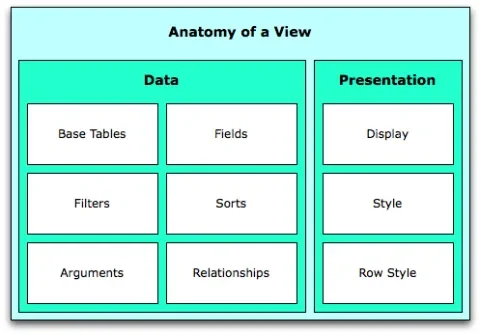
Under the hood, the pieces of a View can be divided into two different groups: the 'data' (stuff that affects the underlying database query that Drupal uses to retrieve the information for the View) and the 'presentation' (stuff that affects how that data is displayed to a user of the web site).
Buildin' SQL
The 'data' portions of the View are more numerous: they correspond roughly to the different pieces of a SQL 'SELECT' statement. That should come as no surprise -- at Views heart is a SQL query builder that turns all of your settings into a query against Drupal's database tables.
- 'Base Tables', like Node or Comment or User, are the underlying kind of data that you'll be displaying. They correspond to the main database table in a query, and a given view can only have one of them. A view of 'nodes and users' would result in monstrously complex SQL, and Views doesn't attempt to solve that particular problem.
- 'Fields' don't appear in every view: they correspond to the individual database columns in a SELECT query. If you're building a table of data, for example, you'd add one Field to the view for each column that you need to display. Some complex Views fields can correspond to multiple database columns -- the 'Node teaser' field, for example, requires both the 'teaser' and 'format' database columns in order to be displayed properly.
- 'Filters' correspond to the WHERE clauses in a SQL query. They filter down the giant pool of data in your Drupal database to a more manageable set. When building Views of nodes, for example, it's common to add a 'Published' filter to prevent unpublished or in-progress posts from appearing. Filters that restrict the results to nodes of a particular type, or nodes posted within a certain date range, are also common. Generally, whenever a Field is available for a given Base Table, a corresponding Filter is also available.
- 'Sorts' are straightfoward -- like Filters, they generally correspond to the existing Fields for a given Base Table. They change the order in which the final results will appear, and they correspond to SQL 'ORDER BY' clauses.
- 'Arguments' in Views are really a special case of Filters: they restrict what will appear in a given View. Hoewver, the specific value an Argument uses to filter the results can change based on the context in which the View is displayed. Adding a 'User ID' argument to a view living at http://example.com/blog, for example, would cause Views to look for a User ID after the word '/blog' in the current URL. http://example.com/blog/1 would show blog posts by User 1, http://example.com/blog/2 would show posts by User 2, and so on.
- 'Relationships' are not used as frequently, but are still important. When two Fields (or Sorts, Filters, etc) are selected that correspond to columns in different tables, Views is smart enough to construct JOINs between the tables automatically. Sometimes, though, a query is too ambiguous for Views to automatically build the connecting SQL. In those situations, defining a 'Relationship' for the view makes the correct connection between the two tables explicit. One example is a view that shows the titles of two nodes that are connected to each other via a Node Reference. You can add two 'Title' fields to the View, but you'll need to add an explicit Relationship to the View to let it know which of the nodes each Title field should come from.
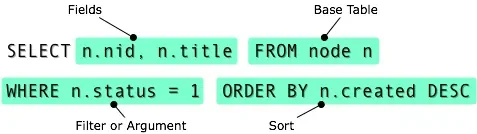
Using those six building blocks, the Views module is able to construct most SQL SELECT queries. Modules that maintain database tables can use hook_views_data() to announce what base tables, fields, sorts, filters, arguments, and relationships they offer, and Views will automatically add those options to the View-building UI.
Making it Pretty
While the Data portion of Views has what's needed to generate a SQL query, that only gets us part of the way. How should the resulting data be formatted into HTML and presented to someone visiting the site? For that matter, where should the information be displayed -- a sidebar block, a dedicated page, or perhaps an RSS feed? That's where the 'presentation' side of Views comes in.
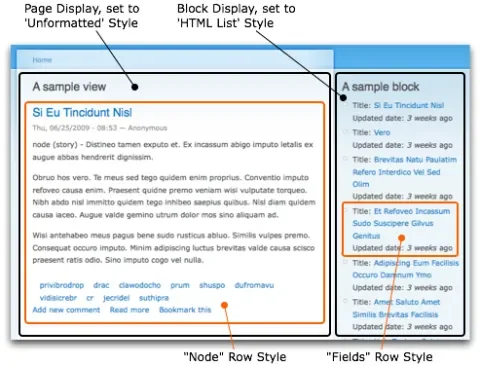
- 'Displays' are responsible for tying Views into the flow of a Drupal site: they control when a View's SQL query will actually be executed and how the information will ultimately be woven into the site's structure. Page displays are like any other Drupal page -- they show a View's contents at a particular URL, and can have an entry in the navigation menu. Block displays display a View's contents in a sidebar block, and Feed displays expose Views data as RSS feeds. Custom Display types are provided by some third-party modules: 'Views Attach,' for example, allows a View's data to be attached to the User Profile page or the Node view page. Every View can have multiple displays -- allowing the 'Latest blog posts' data to be reused as a block, a page, an RSS feed, and so on.
- 'Styles' control the appearance of a View, wrapping the data that's returned from the database in HTML markup and other presentation goodness. Tables, grid layouts, unordered lists, and so on are all examples of different View styles. More complex Styles can present data in Javascript-powered slideshows, raw XML, collapsing blocks, and so on.
- Some styles also rely on 'Row Styles' -- an additional component that handles formatting each row of data returned by the SQL query. The most common Row Style -- 'Fields' -- prints out each of the fields defined in the View's data settings. It's used when building lists of links or tables of data. The 'Node' row style, in contrast, ignores the Fields that were set up on the View and simply loads the entire node object, displaying its teaser. It's often used to create variations on Drupal's 'river of news' presentation.
Next Time... Adventures With Plugins
Whew. All that, and we've only just begun to scratch the surface! In the next installment, we're going to take a look at how Views' object-oriented architecture implements all of the pieces we've discussed, and how it provides points for customizing through its plugin architecture.