Want to get Lullabot article, videocast, and podcast announcements delivered right to your in-box?
Let us know your email address (we won't share it) and we'll let you know when anything exciting happens.
Drupal, duplicate content, and you
Does Google's "duplicate content penalty" harm Drupal sites? No! Here's why.
For years, Drupal has enjoyed a solid reputation as a search engine friendly CMS. It generates relatively clean, standards-compliant HTML out of the box; syncs up the important TITLE tag with semantically useful H1 and H2 tags in the body of each page; and provides short, human-readable URLs with plentiful options for customization. (Anecdotal evidence: several years back, I wrote a post on my Drupal-powered blog that mentioned the name of the company I worked for. Within two weeks, my blog post ranked higher than the company's own web site on Google.)
Recently, I've witnessed a number of discussions where people expressed concern about the way Drupal generates the human-readable URLs that help make it Google-friendly. In particular, they were worried about Google's dreaded Duplicate Content Penalty, a system designed to keep spammers from flooding Google with the same content at dozens (or hundreds!) of URLs. There's a lot of confusion floating around, so for the geeks in the crowd (and the not-so-geeky interested in learning how things work behind the scenes), I thought it would be useful to give a guided tour of how Drupal manages and generates URLs.
Ground Zero: index.php
Every page generated by Drupal has a unique "path" that's used to identify it internally. Individual pieces of content live at paths like node/1, node/2, and so on. Unique administration pages get paths like admin/settings/files or admin/content/comments. Other modules like Views, Poll, and so on can add other paths.
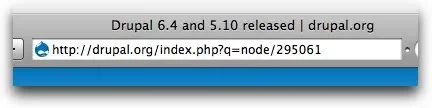
It's a good starting point, but at this point, Drupal's URL structure is still as ugly as any other PHP web-app. Why? All requests for pages are routed through the index.php script at Drupal's heart, and the "path" of the desired page is passed along as an additional bit at the end of the url: http://www.example.com/index.php?q=node/1 is one such example. In the screenshot below, I'm accessing an article on the Drupal.org web page using this basic URL structure.
Clean URLs to the rescue!
Fortunately, few Drupal sites use those ugly URLs. The vast majority of web servers (Apache, IIS, and many of the smaller players) can finesse incoming URLs, routing simple URLs like http://www.example.com/node/1 through the index.php script automatically. Drupal is configured to take advantage of it automatically, and Drupal 6.0 and later will double-check to ensure your web server supports the feature during installation.
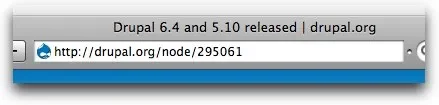
In the screenshot below, I'm accessing the same page on Drupal.org using the "clean" version of the URL: it's just the site's domain, followed by the path, without any of the ugly index.php business cluttering things up.
But wait, there's more!
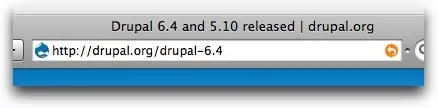
Eliminating the ugly cruft only gets us half-way there. We still have content at relatively meaningly paths like node/1 and node/2. That's where Drupal's path module comes in. It allows site administrators to define aliases for any path on the web site, turning URLs like http://www.example.com/node/1 into http://www.example.com/about-us. In the final screenshot, below, I'm accessing the same article on Drupal.org using its path alias.
Path aliasing is particularly useful when combined with the PathAuto module. It allows site administrators to set up rules that generate path aliases for content automatically. When I first moved my blog from Movable Type to Drupal, it allowed me to mirror my existing URL structure without any manual tweaking.
When path aliases for nodes are set up to include the node title, search engines are pleased, too. Most search algorithms pay extra attention to text that appears in a page's URL, in the page's title, and inside of important tags like H1 and H2.
Flies in the ointment
If you were paying attention during the explanation above, you noticed that content on a Drupal site can be given friendly URLs, but it stays available at the original, unfriendly URL as well. As far as most search engines are concerned, that means that you have multiple copies of the same content on your web site, and that raises all sorts of alarms. It's common knowledge that many search engines -- Google in particular -- penalize sites for putting duplicate pages at different URLs. Without that protection, unethical site owners could easily put thousands of copies of an article on their site and quickly become the "ultimate source for information" on a topic, even though they only have a tiny amount of unique content.
Does that mean that Drupal sites using path aliases are hurting themselves in the long run? Thankfully, the answer is no. First, Google's documentation for webmasters explains that the only "penalty" is that only one copy of the content will be listed in search results. In fact, a recent web post on the Google blog bent over backwards to clarify:
Let's put this to bed once and for all, folks: There's no such thing as a "duplicate content penalty." At least, not in the way most people mean when they say that.
In a related post, Deftly dealing with duplicate content, they explain that the only real concern is making sure that the right path for your page gets displayed when people search on Google.
One of the most important tips mentioned in that post is being consistent when you link to your site's pages. Because Google indexes your site by automatically following all of its links, you should always be sure that URLs on your pages point to the "proper" path rather than the default node/1 style.
Internally, Drupal does this automatically: all URLs are passed through the l() function before they're displayed. Internally, modules always deal with the standard path (node/1, user/1, and so on) for a page on the site. Before outputting any links to a browser, they hand the l() function the standard path, and it spits out the "best" possible version of a given path: a friendly alias if one is available, the default path if the web server supports clean URLs, and the "ugly" index.php style if no other options are available. All Drupal modules are expected to use this function rather than hard-coding URLs: in fact, code that doesn't use the l() function is considered buggy.
Covering all the bases
Thanks to the l() function, links generated by Drupal will always point to the "clean" version of the URL and Google will never see the duplicate versions. The unfriendly URLs, though, are still sitting there: what happens if other people link to them, and Google follows those links?
Google recommends using HTTP 301 redirects to solve this problem: they tell web browsers that the requested content actually lives at another URL. Web browsers will automatically jump to the correct URL, and search engine web-crawlers respect these redirects as well.
In Drupal, the Global Redirect module generates 301 redirects whenever a user visits a standard URL when a friendly path alias has been defined. It also generates a 301 redirect if someone visits an old-style "ugly" url like http://www.example.com/index.php?q=node/1. The end result? No more duplicate content, period. Google will always see your content at the best possible URL, regardless of how users link to it.
Recap
For everyone who's read this far (or those who skipped to the end for the "good parts"), a summary is in order.
- Drupal gives content friendly URLs with the Path module, and automates the process with the PathAuto module. However, content remains available at the old URLs as well.
- Thanks to the l() function, Drupal outputs the best possible version of the URL when generating links to internal content.
- If Google finds links to the "ugly" URLs, it will index them, but only one version of the page will be displayed in search results.
- To ensure the best version of every URL appears in Google search results, use the Global Redirect module.
Comments on this post will automatically be closed three months from the original post date.


RSS Feed


Comments
Great post
Nice post Jeff, it very clearly summarizes the confusion that many people have around Drupal URLs. On both the sites we've developed at my company, we use a combination of Pathauto, Global Redirect, and Path Redirect to help keep our URLs sane. For the most part they're very useful.
One thing I've found potentially aggravating is that the Views module lets you append pretty much anything to a View URL and it won't throw a 404. Based on what you've said here, that's not really a problem as Google won't give us a 'duplicate content penalty' for these obscure URLs - they just won't get indexed.
Not just views ;-)
One slight issue is that on any page you can spam the query string with all kinds of crap to produce dupe pages.
I could address this in GlobalRedirect by allowing admins to "whitelist" query string's or go one step further and whitelist per URL... But that's pretty hardcore and niche ;-)
On a plus point, at least Drupal doesn't allow "keyword stuffing" in the URL like certain websites (eg eBay and Amazon)... For example (should work)...
Nice post, but..
Jeff,
nice post indeed. But I think it is only fair to put up a warning that although PathAuto is a wonderful module and a nice solution for having clean URLs, it is resource intensive. That is if you have more than 10 nodes displayed on a page, the actual page generation increases quite a bit on relatively small servers. We cut up to 4 seconds of page generation time only by disabling the Path/Pathauto module on a recent project I helped with.
Performance considerations
Dan,
Thanks for the reply! Unfortunately, this is true of any software that dynamically generates pages and allows administrators to create arbitrary URLs. Somewhere, that list of URLs needs to be stored and retrieved.
A number of years ago, Drupal loaded ALL path aliases into memory in one fell swoop. That made lookups fast, but killed servers on sites with large numbers of aliases (dozens of thousands, say). Now, path aliases are looked up on an as-needed basis. That means that if modules jam thousands of links onto the page, thousands of queries need to be performed. It's rare that so many aliased links would be on a page, however.
If a server is brought to its knees by displaying 10-20 nodes, something other than the path system is going wrong. Worst case, on an unoptimized page, that would generate perhaps 50-60 extra SQL queries on a page -- a drop in the bucket when weighed against the queries generated by an otherwise untweaked Drupal page load. That's why turning on features like block and page caching for production sites are important; once HTML is generated and cached (even for a few minutes), Drupal doesn't have to do the work of looking up path aliases for that content again.
In addition, there are some proposals on Drupal.org to make the path system more intelligent when doing these lookups: http://drupal.org/node/223075 would pre-cache commonly requested path aliases, and http://drupal.org/node/169071 would allow developers to implement alternative caching "backends" the way we currently can with caching systems. That would make swapping out the "optimized for large sites" path lookups for ones that perform better on smaller sites very easy.
If you've got input on the issues, please hop onto those threads and weigh in!
numbers?
Great article Jeff. There are some points I'd niggle on (like whether we can really trust google, and that Global Redirect won't fix taxonomy/term/TID/0 unless you're running the latest dev version of 6.x) but overall it's great.
@Dan - I'd love to see some hard numbers on this like server specs and results from a tool like apachebench or jmeter from before and after you dropped all the aliases.
There's an issue in the queue to really test this out and identify some Pathauto configurations which make Path lookups slow ( http://drupal.org/node/202319 ) but really I have a hard time believing that you could cut 4 seconds from page loads with this single change (unless you are talking about early 4.6 which lacked an index on the url_alias table so this could happen...but that was ages ago which would make this concern outdated FUD).
Some path performance data on forum.module
I've been doing some performance tests on forum.module over the last few days (100,000 nodes and 800,000 comments), including a test with PathAuto enabled. On topic/thread listing pages there tend to be quite a lot of path look-ups (I count an average of around 60 per page, with very little enabled in Drupal besides forum module and Devel). Sounds like a lot, and it is a lot of queries just for paths, but each one takes about 0.35ms on average, totaling out to about 20-30ms per page load (on my C2D 2.33GHz test system at least). Definitely not in the full/multiple second range. Now the forum_get_forums query is a different matter haha (10 to 15+ full seconds for the main forum page at 100,000 nodes for logged in users. Pager queries can also be pretty scary at that many nodes/comments... paths are the least concern for me until I sort that out haha).
Anyhow, I'm putting together my results and posting some graphs on d.o hopefully tonight.
custom_url_rewrite to the rescue ...
http://api.drupal.org/api/function/custom_url_rewrite_inbound/6
So, we decided not to use path alias and instead use Drupal's little known custom_url_rewrite function which is lovely. By keeping the alias table empty, link doesn't do all the lookups from l(), but I still get SEO friendly URLs.
So, we don't get urls rewritten when the page is rendered, but if you visit a node like
http://www.educause.edu/node/36634
it gets redirected to
http://www.educause.edu/Community/MemDir/MIT/36634
We keep the friendly part, get nice looking URLs, but w/out the performance hit (simple redirect aside). I'd be interested in any feedback on this technique and whether it is good or bad. We've been pleased with the results so far, but haven't seen or heard any mentions of similar techniques.
What Google sais
Just yesterday I stumbled over an official Google document titled "Demystifying the duplicate content penalty"
What I read from this in general is: one should not get sloppy, but you can still sleep at night if your nodes are to be reached under /node/13 and /mybirthday-fotos-with-chx-and-eaton . Googlewise rather the following is interesting: if one publishes a blogpost and puts it into a feed (say Drupal planet) not as a teaser, but as a whole the site with the higher ranking gets the "Google points" for that. That will be no doubt drupal.org in this case.
So if you are interested to improve ranking and SERPS by blogging: watch out to feed teasers.
Sometimes, yes...
Sometimes yes, sometimes no. ;-) According to the demystifying article, the problem can be reduced when sites provide a backlink to your site from the syndicated version. Drupal.org does this, and it does not add rel=nofollow tags to the links in its feed aggregator. In the case of my blog, the incoming "Google juice" from being linked to by Drupal.org greatly outweighed any confusion about duplicate content.
In many cases, though, it is something to be concerned about -- I don't think there's any easy solution to it.
On various Drupal sites I
On various Drupal sites I created, I enabled clean URLs during installation and set up meaningful paths for every piece of content before the sites were linked from external sources. Still I could find occurrences of URLs like
index.php?q/node/123in the Google index.The reason is that Googlebot also crawls URLs that are not linked from anywhere. Googlebot obviously tries to make assumptions on what underlying system you are using and is certainly able to detect Drupal installations. You can find examples of Googlebot's guesses in your server's access log.
Even if URLs like
node/123are never ever linked to from within your site or external pages, they still may exist for Google. So the Global Redirect module is really a must, if you use clean URLs and path aliases.Link to PathAuto module in summary is broken
Hi Jeff,
The link you provide to the PathAuto module in the summary is broken. It should be http://drupal.org/project/pathauto.
Thanks for a great article on this duplicate content topic. I've been reading up on SEO for drupal sites, getting ready to deploy a couple more drupal-based sites in the next month, and was wondering what the story was really all about with the supposed duplicate content "problem" on drupal sites.
Thanks for the clarification!
Tom
Fixed
Thanks Tom, fixed the link.
The role of Path Redirect
This is all well and good, but what do you do when 3-days after posting, you realize that you've misspelled a word in the title of your post or that PathAuto has created a less-than-appropriate path for the node?
[www.lullabot.com/articles/dooplacate-countent-and-yoo]
(BTW, you really should stop drunk-blogging!)
Well you could change the title of the post and leave the old path. This would ensure that Google and the RSS links would still find the post. However, this could leave the old path with misspellings.
Path Redirect to the rescue! Path Redirect can work on its own, or it can be set up to create automated redirects when paths get regenerated by PathAuto. This means that when you change the title of the content, a new path will be created for the node. All links on your site will go to the new path. However, when Google or another external site links to the old content on your site, the user will be redirected to the new path.
We have this installed on this site and you can see it in effect if you click on the "old" link to my bio:
http://www.lullabot.com/about/jeffrobbins
this automatically redirects to:
http://www.lullabot.com/about/jeff-robbins
Since it's a redirect, there's only one page. No duplication whatsoever.
Penalty vs Poor Ranking
There's a big difference between a penalty and poor performance.
If you want a page to rank for a specific term, you need to be sure everybody is linking to the same thing. If you've got 2 pages with the same content, and the links are split between them, you're losing out.
Here's what Google says:
"Having this type of duplicate content on your site can potentially affect your site's performance, but it doesn't cause penalties."
In other words, Google isn't intentionally knocking you out of the rankings for duplicate content, the other guys just outrank you because they know how to make the Pagerank flow to one URL.
I covered my methods in detail, back in early 2007, in an article called Drupal SEO: How Duplicate Content Hurts Drupal Site. At the time, Global Redirect was fairly new (and buggy), but these days it's probably the best solution for most people.
Quite right!
Your article also covers the use of Robots.txt to hide the 'default' paths Drupal uses. Thanks for posting the link, John, it's an excellent resource!
exactly, in order to keep
exactly, in order to keep your pages ranking as high as they should acccording to the PageRank algorythm you need to have all internal and external links pointing to the same exact url.
So there may not be an explicit penalty but there is an implicit penalty.
..Or use 301 redirects.
...Which is the point of the Global Redirect module.
Thanks
Thank you for clearing this up for us. A very useful article.
Another Tip
Jeff,
After a year of reluctance, I finally started using pathauto, so I've been researching the issues with duplicate content. This post is very timely for me and brings some confidence to how I've been reading Google's guidelines.
I would like to suggest the use of XML based Sitemaps as another option for helping the search crawlers out.
For those interested, check out the contributed module XML Sitemap at Drupal.org. Although the D6 version is still in development, I've been using it on my site for sometime now.
-Bryan
I had six months of hell
I had six months of hell sorting out multiple paths to same content issues on Drupal v4.7 (I think).
The problem was (is?) most profound on hierarchical site structures. Several modules also cracked the system (or introduced some quirk).
I stuck at it just out of sheer bloody-mindedness but the experience was one that ended my affair with Drupal, I'm afraid.
Good to see Greggles still on the case, though ;)
Thanks!
Thanks for sharing your study of this! It used to be on my list to check out, now I can cross it off. :-)
Drupal SEO modules
Few other modules that could also be useful for SEO purposes:
- Page Title - http://drupal.org/project/page_title
- Meta Tags - http://drupal.org/project/nodewords
- RobotsTxt - http://drupal.org/project/robotstxt
- Search 404 - http://drupal.org/project/search404
- Nofollow List - http://drupal.org/project/nofollowlist
and of course mentioned previously:
- Global Redirect - http://drupal.org/project/globalredirect
- Path Redirect - http://drupal.org/project/path_redirect
Two Weeks what took so long
I have a Drupal site at www.psrunner.com that I have been updating daily for a few years. I have noticed that I can write an article early in the morning and by afternoon it is front page in Google. I have the sitemap and SEO module.
i18n
Good article, however for these folks who use i18n module, known also as 'internationalization', there is an bad news. Global Redirect doesn't like i18n (and/or vice-versa ;) so if you need multilingual content on your page Global Redirect is not for you (so far...)
Nodewords and taxonomy
I haven't been able to get taxonomy working with nodewords...that is, i get only global and page specific keywords..not keywords related to taxonomy..yes i have given keywords for the taxonomy and/or the terms
Drupal duplicate content
I agree that Drupal is a perfect CMS for SEO. I think Google's blog post is a bit misleading though. Google is saying that there is no "penalty" -- there is a duplicate "filter" though. If your site can't be spidered cleanly, the end result is the same. Google's technology is smart, but often not as smart as they claim.
Points to consider:
Google says:
and:
They are saying, "We do a good job" (i.e., they don't do a perfect job).
If you read the wording on the summary of this post, it says that most webmasters "of beginner-to-intermediate savviness" don't have to deal with it, and "The remedies for duplicate content are entirely within your control." Duplicate content is an issue, but Google is just arguing over the choice of words. The result can be the same in worst case scenarios.
See also this post for some other places that Drupal creates duplicate content.
Making things as simple as possible for search engines is a key factor in SEO. Getting rid of duplicate content, especially on large sites can make a significant difference in rankings.
Great post. I heard that
Great post. I heard that there are also some more factors that are important like that age of a website or if it is located on a server with many other websites. I think a good example is wikipedia, they show up on the first page for almost everything even if their content is copied thousand times.
Thanks for writting this
Thanks for writting this article, I have duplicate issue problems with my wordpress blog and I have finally got on top of it. I have never used drupal before and after reading your post I think I'll give it a whirl.
problem solved
Thanks for the post, i was searching on google to fix my duplicated content and now half of it fixed thanks to your article though and other sources i found on google
best regards
shoes
Leading wholesale China products, including jewelry wholesale, wholesale clothing, wholesale shoes, cosmetics also wholesale from China . Crazypurchase prides itself on being a wholesale supplier who supplies existing businesses buy products wholesale is also the largest china wholesalers .
included
Want to wholesale handbagsandLevi jeans from online stores.Classic tattoo art and fashion classic elements included in the ed hardy clothes . You’ll hear a lot more Burbrery Polo Shirt of in the future I’m sure. Babolat aeropro drive Racquets is Nadal's babolat tennis racket used.In many places to be able to buy cheap tennis racquets. You can find cheap jacket inmage on our web. some new style Puma basket is in fashion this year.
more or less
If you want to buy the Cheap puma shoes shoes ,you can buy them online. you’ll hear a lot more Burbrery Polos of in the future I’m sure. In fact, in today’s world, many ed hardy shirtsdesigns are more or less the same with each other. Diesel Jeansand Levis JeansLevis Jeans is now the favorite on behalf of young people.
301 table overload
If you put (all those redirections on 301 table + all the real redirects {old content} + lower case) *(all languages) * (other types of content versions)
:S
I'm new to drupal. But in some CMS I've programmed I preferred to put those rules on .htaccess in which if "domain.tld/?q=" OR "domain.tld/node" go find the real url.