Want to get Lullabot article, videocast, and podcast announcements delivered right to your in-box? Let us know your email address (we won't share it) and we'll let you know when anything exciting happens.

Drupal's search module and scoring factors

This article applies to Drupal 5.x.

In this article I will show how the results of the search module can be fine tuned using controls available to Drupal site administrators. The search module's configuration options include up to four extra parameters called scoring factors for weighting search results based on keyword relevance, recency, number of comments, and the number of page views. It will be shown that adjusting these values can dramatically alter and improve the order of search results. We will then add a theme function to enhance the themed search items by displaying their score. Finally, we will extend the advanced search form to include the scoring factor controls so that every search can be custom tailored with regards to the scoring algorithm.

Scoring factors

Four types of scoring factors are available to Drupal administrators:

  • relevance of keyword
  • recency (created, changed, last comment)
  • number of comments (if comment module is turned on)
  • number of page views (if statistics module is turned on AND if Count content views is enabled. See admin/logs/settings)
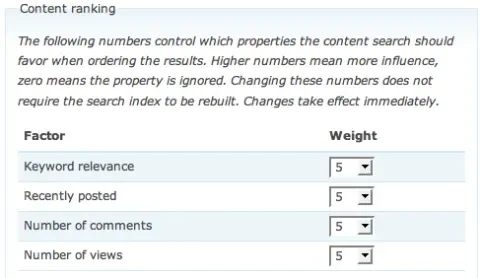
Drupal's search administration interface has controls for the scoring factors

The search module's scoring factors (admin/settings/search)

If you don't see the page views scoring factor, it means you don't have the statistics module enabled and configured properly. Enable the statistics module and make sure that Count content views is also enabled.

The Drupal statistics module can influence search results

The statistics module needs to be enabled and Count content views turned on in order for the page view scoring factor to work.

The weights given to each scoring factor have a profound effect on the order of search results, and it is well worth your while testing different values in order to achieve the best possible search result ranking. The scoring factors can be changed at any time and take effect immediately. There is no need to re-index your site.

Four different nodes

In order to demonstrate the affect of scoring factors on scoring I have created four nodes, each of which scores especially high with one scoring factor. The first node has the word Drupal in both the Title and in the Body. Since the Title field gets extra weight (due to being wrapped in an <h1> tag), and also due to the fact that Drupal appears twice in the node, this node will score very high for the keyword relevance scoring factor when searching for Drupal.

The second node contains the word Drupal in the Body, and also has a comment. As it is the only node that has a comment, it will score the highest for the comment count scoring factor.

The third node has been viewed 50 times, whereas the others have each been viewed only once. Node #3 will score the highest for the page view scoring factor.

Finally, the fourth node is the newest, being created after all of the others. Thus, node #4 will score highest for the recency scoring factor.

In summary, there are four nodes, each of which is designed to have a special advantage over the others in one scoring factor.
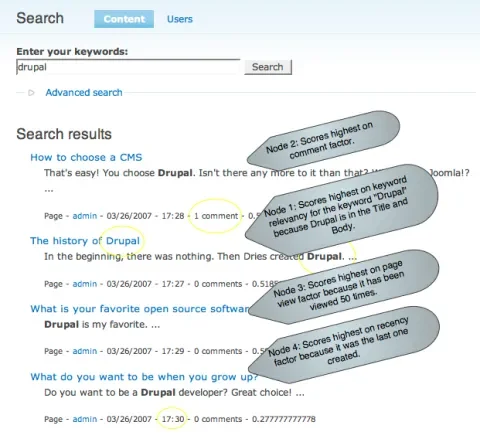
Drupal search results with default scoring factors

With four nodes and the default scoring factor weights, searching for "Drupal" favors the node with a comment over the others.

Displaying the score

In order to better observe how search results are ranked, we will now override the theme_search_item function and extend it to output each search item's score. Seeing the scores of items and watching them change in response to various score factor weights will help you decide which settings are optimal for your site.

To display the score on each themed search item, add this function to the template.php file in your theme's directory. If you are using the Garland theme, for example, this function should be added to /themes/garland/template.php.

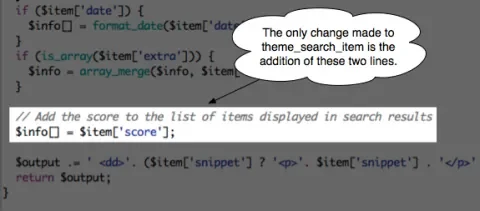
Code added to theme_search_item to show score

Two lines have been added to the theme_search_item function.

Now when you search, each search result will display its score. Here is the search results page for a search on Drupal with the four nodes I have created and default values for all of the score factors.
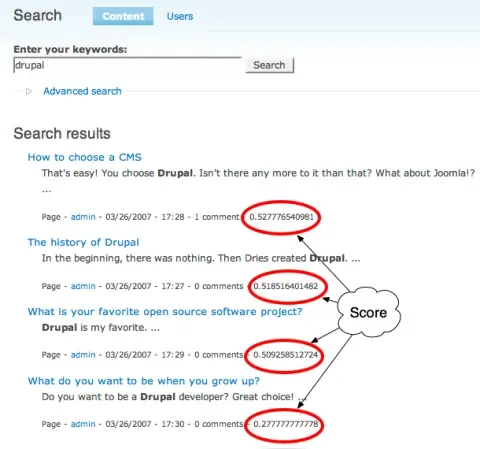
Search results that show the ranking score

Overriding theme_search_item allows us to see how each node has scored in the ranking algorithm.

Boosting keyword relevancy

When looking at the search results for Drupal using the default scoring factors, it is noteworthy that node #1 ranks second in the results. Why? Because it has the word Drupal in the title and in the body. While this guarantees that node #1 will score highest in the keyword relevancy factor, it seems that overall, the comment count factor (or some other aspect of the scoring algorithm) favors comments more than keywords. Lets boost the keyword relevancy scoring factor by +2 and repeat the search.
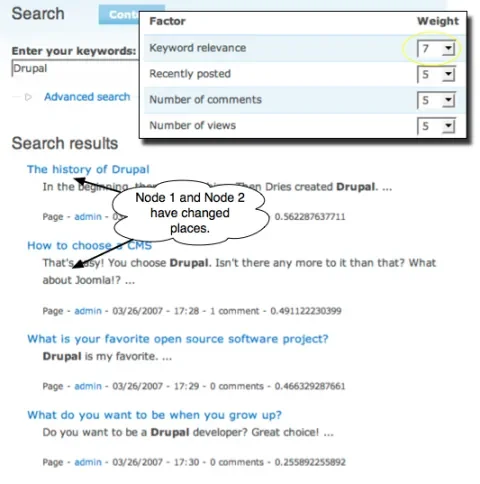
Search results with the keyword scoring factor increased

By boosting the keyword relevancy scoring factor, the node with Drupal in the title now ranks first in the results.

Adding the scoring factor widget to advanced search

Drupal's advanced search feature lets you construct many specific and interesting search queries. You can, for example, search for all Page nodes that have the taxonomy term Politics but not the word Bush. This is one realm where Drupal consistently beats the search results delivered by external search engines such as Yahoo! or Google. Drupal simply knows more about its own content and is thus more capable of searching through it in a structured manner.

Drupal doesn't give you any options for how to sort or score the search results. Since the score factor weights are only used during the actual searching, and not during indexing, there is nothing stopping us from applying custom factor weights to every search. We will now add the score factor weight controls currently found in the search administration section to the advanced search form so that any user can tweak the weights to get the search results they are most interested in.

The node module uses the HTML Analyzer and Indexer provided by the search module to implement Drupal content searches. The node module adds the advanced search form to the basic search form in its implementation of hook_form_alter. Thus we turn to node_form_alter to add the score factor controls to the advanced search form.

<?php
// Grab the administration form from node_search
$factors = node_search('admin');

// Get rid of the help text because it takes up too much space
unset($factors['content_ranking']['info']);

// Get rid of the fieldset
$form['advanced']['factors'] = $factors['content_ranking']['factors'];

// Wrap the form elements in a div to hold them together.
$form['advanced']['factors']['#prefix'] = '<div class="criterion">';
$form['advanced']['factors']['#suffix'] = '</div>';
?>

Code added to node_form_alter to add scoring factor controls to advanced search.

The node module handles the validation of the advanced search form in the node_search_validate function. This is where all of the various conditions, such as taxonomy terms, node types and NOT keywords are turned into a keyword query that is usable by the search module. We will extend node_search_validate to also store information about the user's scoring factor preferences in the session.

<?php
if (isset($form_values['node_rank_comments'])) {
 
$_SESSION['node_rank_comments'] = $form_values['node_rank_comments'];
}
if (isset(
$form_values['node_rank_relevance'])) {
 
$_SESSION['node_rank_recent'] = $form_values['node_rank_recent'];
}
if (isset(
$form_values['node_rank_views'])) {
 
$_SESSION['node_rank_relevance'] = $form_values['node_rank_relevance'];
}
if (isset(
$form_values['node_rank_recent'])) {
 
$_SESSION['node_rank_views'] = $form_values['node_rank_views'];
}
?>

Code added to node_search_validate to store scoring factor preferences during searhing.

The need to store these preferences stems from the fact that the search module accepts a POST request from the search form and then resubmits the form resulting in a GET request with the keyword query in the URL. It is on the second GET request that the search is actually executed and the initial POST values are not available. The POST-to-GET redirect is to enable bookmarking of searches and is one of Drupal's nice features. It means, however, that the POST values for the scoring factor are not available at the time the search query is built. The solution chosen here is to put them into the $_SESSION variable until the are used, at which point they are removed from the $_SESSION. The alternative would have been to make them actual search query terms, as is done with all of the other advanced search form elements. This option resulted in long search queries. The merits of both approaches can be discussed further, but the approach using the $_SESSION is the one being used for this article.

Upon the GET redirect, the node module builds a specific search query in node_search. Here is a sample of the code from that function which make use of the scoring factor values stored in the $_SESSION.

<?php
$weight
= $_SESSION['node_rank_relevance'];
unset(
$_SESSION['node_rank_relevance']);
$weight = empty($weight) ? (int)variable_get('node_rank_relevance', 5) : $weight;
if (
$weight) {
 
// Average relevance values hover around 0.15
 
$ranking[] = '%d * i.relevance';
 
$arguments2[] = $weight;
 
$total += $weight;
}
?>

Code from node_search which takes $weight first from the $_SESSION, and otherwise from the default variable_get().

In the code above, $weight is the scoring factor. It is first taken from the session variable. If that has not been set, then the traditional value is taken from variable_get(). The weight is then used to construct a SQL snipped which is used in the final search query.

The patch containing all of the code for this feature is attached. It applies to Drupal 5.1.
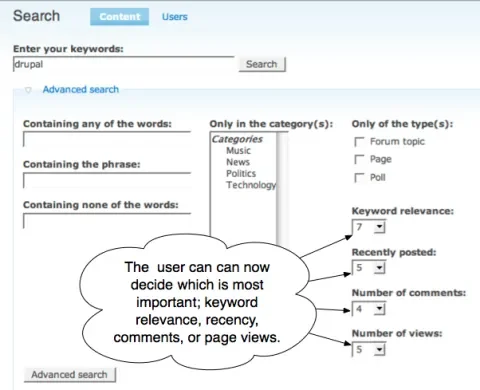
The Drupal advanced search form with scoring factor widgets

The advanced search form with the scoring factor controls added.

One goal of this article is to encourage Drupal administrators to experiment with the scoring factor controls. It would be interesting to hear from others which combination of values works best. Another goal of the article is to introduce the idea of having the scoring factor controls present in the advanced search form. Feedback on this idea, its implementation, and the results is very welcome. Drupal's built-in search module has a lot of potential, but some configuration may be needed before it returns optimal results.

Comments on this post will automatically be closed three months from the original post date.

AttachmentSize
advanced-search.patch5.64 KB

Comments

:)

Good read! Thanks!

Expanding search weighting

I've had a request regarding the search system a couple of times now and wondered how its best to implement within Drupal.

How would you go about giving more weight to a content-type which is marked as more important - say an Intranets department homepage?

Would using taxonomy suffice, say a content-type is assigned a term "home page" and this term gets priority weight value in the search. if so, is there any way to shoe-horn this in to the existing Drupal node search code as it stands?

Maybe I'm asking in the wrong place...

That would be a great feature

The way to do it would be to look at node_search ($op = 'search) in node.module and see how there is a series of scoring factor adjustments that are made based on the things I discussed in this article. The quick-n-dirty way would be to add another one of those blocks and add weight based on content type. The better way would be to rip that whole block of code out and build a hook or plugin system for it so that scoring factors could be contributed or modified outside of core. Here's an example of what I mean:

<?php
     
if (module_exists('comment')) {
       
$weight = $_SESSION['node_rank_comments'];
        unset(
$_SESSION['node_rank_comments']);
       
$weight = empty($weight) ? (int)variable_get('node_rank_comments', 5) : $weight;
        if (
$weight) {
         
// Inverse law that maps the highest reply count on the site to 1 and 0 to 0.
         
$scale = variable_get('node_cron_comments_scale', 0.0);
         
$ranking[] = '%d * (2.0 - 2.0 / (1.0 + c.comment_count * %f))';
         
$arguments2[] = $weight;
         
$arguments2[] = $scale;
          if (!
$stats_join) {
           
$join2 .= ' LEFT JOIN {node_comment_statistics} c ON c.nid = i.sid';
          }
         
$total += $weight;
        }
      }
?>

The first indication of something fishy here is that we have to use if (module_exists()). This is already a sign that a hook system might be a better deal. The real problem is the SQL. What's being built is some complicated SQL that will proceed to build two temporary tables, the second a subset of the first, and then make the final select from the second. Knowing how to build the SQL for these scoring factors is very complicated and not well documented. Finding a way to make this whole sub-system intuitive for developers and easier to extend would be a huge win for Drupal.

I had this same question and

I had this same question and got round it by installing the 'weight' module. Applying a different weight to each of my content types allowed me to choose the order in which they would appear in the search results page (and in other views, such as via the taxonomy menu), which was exactly the behaviour I wanted.... maybe this would help you too?

Thanks for the great article, by the way, and love the podcasts!

I installed the weight

I installed the weight module, assigned weight to a node-type and some of its nodes, but in the search results the nodes still turn up lower than other nodes.

Should I disable the weighting options on the search settings page? Or are there other things I should change for this to work?

No easy solution

Unfortunately, the core Drupal search doesn't yet support support adding your own custom scoring factors. Doug Green's views_fastsearch module does, and you can emulate core Drupal search with that by making a view of all nodes and exposing the fastsearch filter. Then, either the weight module has views integration that you can use to affect ordering, or you can write a very simple custom scoring factor for the fastsearch (or get someone like Doug Green to do it for you). The new fuzzysearch module also supports custom scoring factors. You might try it.

Drupal search broken

This is a great hack!

However- isn't it in vain seeing that Drupal's search is broken?

At some point Drupal just stops indexing new content
http://drupal.org/node/139537

I hadn't seen that issue

But I've subscribed and may be able to contribute. Thanks for bringing it to my attention.

Great article, thanks! I am

Great article, thanks!
I am wondering is there a way to control what (or which part) of content being indexed? Looks like drupal search.module always do a full text index on all content types? I'd like to see, e.g:
1. Prevent indexing on certain content types.
2. Index only node title or teaser, not full text
....

Nope. Not currently possible.

First step: file feature request issues on Drupal.org. Second step: join the new search group on groups.drupal.org and talk about the work being done to improve Drupal search.

Hi robert, thanks! you

Hi robert,
thanks! you described everything well and understandably. added this article to my drupal tutorials.

I'd like "most recent posts" show up first, but I cant get it!

I want my search to do something fairly simple - show the most recent posts first. Sounds easy, right?

So I set the scoring Keyword relevance = 5 and Recently posted = 10 - everything else gets zero because comments and hits have no relevance when I want the most recently posted first.

Still, the results mixes entries from 2002 with entries from 20006 and 2004 quite randomly, and it seems it doesn't find anything from 2007.

Anyone have any ideas as to why the search does this or could do a tutorial on how to get the most recent first?

I've asked in drupal forums, they were of no help there, though they tried. :/ They just suggested I use views, but I'm using the Category module - not taxonomy so views is out of the question.

You'd think a "most recent posts first" in the search results would be pretty simple to get but it's impossible. Shame.

ps - interestingly enough,

ps - interestingly enough, the most recent posts end up last in the search results. Is this a known bug?

Have you filed a bug report

Have you filed a bug report or support request in the issue queue on Drupal.org? That would be the appropriate thing to do at this point. Then you can post the link to the issue here so that we can track the issue with you.

http://drupal.org/node/155947

http://drupal.org/node/155947

Bug Report on search. No replies yet.

Partial word search

doesn't seem to work. Try a search for "drup" and you won't get any matches for "drupal". That's a serious limitation.

re

Thanks very much man! I'm just begging my adventure as an amateur site admin and these here tips of yours are like hot man!:D I'm sure it'll come in handy in my future business with site administration. I'll be glad if you post some more info:)

What I was looking for

Great! That's what I was looking for. I think it should be commited to the core. An even greater feature would be having an option to change the sort order after having done a search (without putting the options again).

Solidarity

very good article:))

Robert Douglass this is very good article:))

Lost?

hmm, this page http://drupal.org/node/132700 no open

"Site off-line

Gremlins ate the DB server, but Druplicon is fighting them. Drupal.org should be back soon."

"updated" vs. "created" date

As I already said, this is a great feature. I'm experiencing one problem though: If the results are ordered by date, the "updated" date seems to be used, not the "created" date. Or am I doing something wrong?

Drupal search is broken, and nobody wants to fix it

I have the same problem. Drupal Search is driving me insane. I find that people in the drupal forums have the same issues but nobody seems to know how to solve them and if there are replies they don't seem to understand the original posters problem. The main things that I find is really wrong with Drupal search:

"Update" date is returned in search not "Created" date. Why? Can this be changed?

Search results return OLDEST POSTS FIRST not most recently posted. That's just wrong.

Are the other options, standalone search engines that you lullabot folks might reccomend instead of the clearly broken Drupal search?

Solr

There is a Solr project on drupal.org. I haven't tested it, but this could be a solution. Blake Lucchesi's Summer of Code project will also be of interest. It is called fuzzysearch and it is a complete reimplementation of the search index. It isn't finished yet, but is far enough along for early adopters to start poking it.

Anything out there that may

Anything out there that may help people stuck with a broken search on 4.7?

Hmmm

I think that drupal is taking too much cpu.. on some hostings there are blocking account becouse its too much using cpu,

krakow

re

Thanks very much man! I'm just begging my adventure as an amateur site admin and these here tips of yours are like hot man!:D I'm sure it'll come in handy in my future business with site administration. I'll be glad if you post some more info

search, advanced search, and CCK created nodes/fields

Any thoughts, references, or leads on search/advanced search with respect to searching fields created vi CCK?

I would like an advanced search page that allow for searching fields created via CCK. Specifically, I have a custom content type with numeric values fields and date fields. I'd like the Advanced Search to search on ranges of values / dates and return only items from that content type that are within the ranges specified.

Thanks in advance,
John Blue

I think that drupal is

I think that drupal is taking too much cpu.. on some hostings there are blocking account becouse its too much using cpu,

krakow

Great That's what I was

Great That's what I was looking for. I think it should be commited to the core. An even greater feature would be having an option to change the sort order after having done a search without putting the options again

To fix the partial word

To fix the partial word problem in Drupal 4.7 you can add this module: http://drupal.org/project/porterstemmer It reduces each word in the index to its basic root or stem (e.g. 'blogging' to 'blog') so that variations on a word ('blogs', 'blogger', 'blogging', 'blog') are considered equivalent when searching. Which frankly, should be in the search by default.

Drupal search is broken from the start.

Drupal search ist not working properly

Dear Robert,

I hope you remember me. We saw hat FrosCon in Bonn I belive. I had a lecture about the website www.freelens.com wich was build with Drupal. Now I have a problem with the drupal search. The system is running on 5.3, MySQL 5 and Php 5.

We have the problem that it looks like drupal dos not index any words from node body. It works only for titles, and that´s it. If I try to find any word in a node body, wich is not mentioned in the title, i got no search results.

So in my case that means at least 3 milion words are not indexed. I have read some of the threats in drupal.org about this, but i found no conviniend solution.

Do you have any idea?

Warm regards from cologne.

Dirk

Don't know without being able to look

Dirk,

I'd have to do some exploration before I could analyze the problem. I'd need to look at the index and watch what happens when cron runs. Are there any errors in your PHP logs from when cron runs?

I can give you...

Hi Robert,

send me an email and I can give you access to the database. info@dwork.de

Thanks

Dirk

Thanks

Thanks for this article i`m search many weeks,but now i found this information here.
Thanks for help!

Thanks for this nice

Thanks for this nice article,
I was playing with that code for a while, and it wasn't working for me.

The problem is that if you have in your search settings lets say keyword relevance = 5 and then you want in advanced search change it to 0 it will always use the default search settings.

because in $_SESSION will be 0 then the code below will ask for variable_get instead of using zero because empty(0) = TRUE

<?php
$weight
= empty($weight) ? (int)variable_get('node_rank_relevance', 5) : $weight;
?>

So its worth saying its good to set in your search settings all factors to zero. I hope it wasnt said elsewhere.

Thanks for this nice

Thanks for this article i`m search many weeks,but now i found this information here.
Thanks for help!

Great Article. Hopefully we

Great Article.
Hopefully we fix the search in the future version of Drupal D7 etc..

Managing search order of display

This is great functionality to help manage the search order of display. Some additional factors available include:

In Drupal 6, the Search Ranking module adds additional search factors:
- Relevance (keyword relevancy score)
- Sticky
- Promoted
- Recency (time posted)
- Comment (number comments)
- Statistics (number visits)
- Incoming Links (number of other nodes linking to a node increases score)

In Drupal 5, the Views Fast Search Module with its Views Fast Search Node Type Ranking adds an additional scoring factor (which is not available for Drupal 6) for:
- node type

module name?

on drupal 6 there is the same , but on a module, which is the module name?

I recently used Drupal for

I recently used Drupal for one of my site but got stuck with the search module.

I am facing the same problem as faced by Dirk.

>>We have the problem that it looks like drupal dos not index any words from node body. It works only for titles, and that´s it. If I try to find any word in a node body, wich is not mentioned in the title, i got no search results.

Please help me out if there is any solution for this.

please correct and delete this comment

Code added to node_search_validate to store scoring factor preferences during searhing.

should be

Code added to node_search_validate to store scoring factor preferences during searching.