Get updates and news:
Want to get Lullabot article, videocast, and podcast announcements delivered right to your in-box? Let us know your email address (we won't share it) and we'll let you know when anything exciting happens.

Drupal Usability: Comment Configuration

Drupal offers many different settings for displaying and collecting comments. Listings can be displayed in forward or reverse chronological order, and comments can be displayed in a tree-like hierarchy so that it is possible for people follow the thread as users comment on comments.

However from a usability standpoint, most of these options are NOT GOOD.

In this article, I'm going to run through the various Drupal comment options and the pros and cons of each setting.

Viewing Options

Display Mode
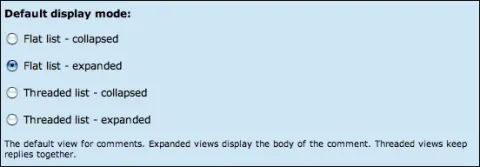
Collapsed vs. Expanded

From the "I Don't Know Why Drupal Even Has This Option" department comes the "collapsed" option which breaks every comment out onto its own page. This makes it virtually impossible to follow series of comments because reading each requires clicking on its title in the list, reading it, hitting the back button, and scrolling down to try to find your place in the comment listing. Does anyone use this? Use expanded.

Threaded Lists

While this option looks useful on its surface, in use it means that comments will no longer be listed in chronological order. By placing listings in a threaded list, comments are listed by thread before they are listed by date. So the latest posts will not necessarily be at the bottom of the page. In addition, many users don't understand the concept of the threaded comments and will click on any "reply" link splitting off a thread when they really mean to respond to the original post. Keep in mind that you want the users to post ON THE TOPIC OF YOUR POST and NOT to wander off onto tangental subjects. You want comments on any given node to be ABOUT THAT NODE. If the subject of a discussion changes, it should move elsewhere. People will not come to an entry entitled "Drupal Comment Usability" to find discussion about configuring clean urls - so your user interface should discourage this type of tangental commenting.
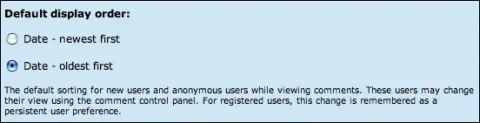
Display Order

While it is the convention of blogs to show the latest blog entries at the top of the page, do not get confused and believe that comments should be handled the same way. Most visitors to a web page will expect that they will be able to follow the history of a page by reading from top to bottom. This means that the latest comments should be listed at the bottom therefore comments should be listed oldest first.
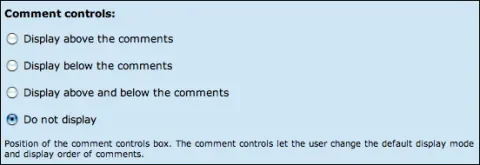
Comment Controls

By enabling comment controls, it is possible to allow the users to configure any of the above settings themselves - essentially destroying any comment configuration that the administrator has done. I'm from the school of: "Give the options to the administrators, NOT to the users". It will be the novice users who arrange their settings so that they can no longer follow the comments. They will call you on the phone asking what has happened to your site. I recommend setting comment controls to "do not display".

Comments Per Page

While shorter pages are generally more usable, setting the number of comments per page to a low number comes in conflict with my recommendation of setting the display order to oldest first. With a small number, it is very possible that the latest comments will not be listed on the initial page and will require several clicks and scrolling to get to them. This is bad. A better solution is to set the comments per page as high as possible. Users will intuitively scroll down to find the latest stuff.

Posting Settings
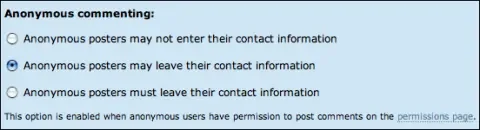
Anonymous Commenting

Anonymous commenting is good. Most users will not want to register for a site simply to post a comment. However allowing random comments opens up a site to comment spam. These comments are placed on sites across the net in order to link people to a commercial (usually gambling or porn) site and also to increase the site's Google ranking.

A solution to this problem is to visit admin/access and set permissions so that anonymous users can post comments, but their comments will require approval. Then either visit admin/comment/list/approval on a regular basis to see if there are new comments or use a solution like Comment Mail module or Actions and Workflow (untested) to have email sent to the site administrator when new comments (requiring approval) are posted to the site.

Contact information for anonymous users can be optional, required, or not collected at all. I prefer the optional option so that users can post to the site anonymously or give themselves credit if they choose.

Anonymous commenting is enabled on the "administer >> access" page in Drupal.

Other Comment Options


Subject Field: Technically speaking the subject of most comments will be the post itself. So the comment subject line often ends up being something like, "Agreed" or "Another thought", which doesn't really mean much. However the comment subject line is used in the comment block and several other places in Drupal where comments are listed. If it is not enabled, Drupal will use the first few words of the post as the subject line. It's a close call on this one, but I'm going to recommend leaving it enabled.


Preview Comment: Requiring comments to be "previewed" before posting provides another line of defense against comment spam. And since anonymous users will not be able to edit their comments once they are posted to the site, it is also a last chance to review their post before it is committed. However, from a usability standpoint, the idea of adding an extra screen to the posting process is confusing. Many users will get to the preview screen and assume that since they are seeing their comment presented on the screen, the comment has been posted to the site. They could navigate away and never have their comments actually posted.

My recommendation: If you're site has primarily registered users, do not require preview. If you're site has primarily anonymous (non-logged-in) users, do require preview.


Location of Comment Form: This one really depends on the design esthetic of your site. You can choose to place the comment form at the bottom of the comments on the post page, or on a separate page. From a usability standpoint it is clearer to a user that they CAN post a comment if there is a form presented right there at the bottom of the comments. It really comes down to how hard you want to push for comments to your posts. So basically, if it doesn't turn your designer's stomach, place the comment form at the bottom of the post page.

Comments

Thanks for good article but

Thanks for good article but I'd like to add some comments:

1) Threaded vs. Flat: I would be very careful to make any recommendations. While your points are valid, there are also many reasons why one could prefer threaded comments. My observation is that blogs and personal websites use flat comments while webzines and “bigger websites” use threaded style.

2) I’m clearly against moderation. Imagine that I visit some very interesting blog post; don’t see any comments yet and therefore write a very thoughtful reply. But when I visit the same site hour or two later, my comment is the 7th one and repeats the same points that other commentators already made. I always feel somehow stupid. But for some heavy-traffic sites with many trolls around, moderation is unfortunately the only way.

3) Required comment preview is a very powerful anti-spam technique. (But I agree that it can be somehow confusing to visitors.)

4) Drupal suffers from one very bad usability issue – it doesn’t have “remember me” checkbox for anonymous posters. It’s not hard to develop a custom module but you’re completely lost if the caching is enabled. Then, there’s no way to provide “remember me” functionality. Bad, bad, bad.

flat comments in blogs

Flat comments in blogs seems mostly likely derived from the limitations of the software. I can remember as blogs were catching on (particularly Blogger and MT) that the only viewing option they provided was flat. Used to bug me (and still does) and I suspect many other people who were used to web-based discussion forums which often offered a threaded view. Now we have a whole new generation of Internet users whose primary experience with discussion boards seems to have been with blogs and, as Jeff points out, are confused with threaded discussion.

Seems a step backwards in electronic communication literacy, which raises the question which is more efficient to use--flat vs threaded? I agree with your observation that there are many reasons why threaded might be preferable. I can't imagine using Slashdot with flat comments. It's not always advantageous to deprecate an efficient, advanced feature in software. After all, the feature is there to improve the user experience. They just have to learn how to use it.

Comment Info module does the

Comment Info module does the "remember me" checkbox for anonymous commenters.

And apparently it will be included in D6. Nice.

interesting premise

this one comes from the "jeff's configuration preferences should be evenryone's preference" school :)

i agree on almost all points.

location of comment submission form

"This one really depends on the design esthetic of your site."

Actually, if using threaded comments, I believe that you should set this to "display on separate page" based on the observation about user problems with replying properly in threaded display. When the comment form appears on the page of the node, they are more likely to be drawn to it instead of the "reply" link with each comment.

re: location

True. But I've also seen a lot of people click the "reply" on the last comment in order to leave a comment on the original post. This is really an argument against threaded comments more than form display though.

re: re: location

Is it just me... or are the comments on this very article displayed as threaded? Perhaps you've changed your mind, Jeff? I guess a lot can happen in 2.5 months... ;)

Thanks for this article, the

Thanks for this article, the discussion system in drupal has bothered me since I first started using it, and it's edifying/encouraging to see a reasoned analysis from a drupal pro.

Comments, not displayed anyway?

I'm very new on drupal, it is not displaying comments, just has links, and the only way to see them is to edit them.


Any ideas?


Terry.

Down with comment subjects!

I completely agree with the premise of this post that some of Drupal's comment options make no sense. I also agree with most of Jeff's choices.

I'll add my pet peeve, though: COMMENTS SHOULD NEVER HAVE SUBJECTS. Never. Not just no Subject field, but NO SUBJECT AT ALL. A comment is about the post, so the subject is the post. If you provide a field, people put content in the field which is confusing. If you don't provide a field, the subject ends up being the unintelligible first few words. Solution? Comments should be identified by Author and Date, and just not show a subject at all.

Aren't religous issues fun? :-)

Barry

Agreed

Yeah... I'm inclined to agree with you, Barry.

Definitely agree with Barry.

Definitely agree with Barry. I wonder how to configure Drupal not to show any Subjects at all. Any hints, gentlemen?

TYIA.

Theming!

In order to suppress the output of comment subjects, you should open up the comment.tpl.php file in your (PHPTemplate-based) theme and change this line:

<h3><?php print $title ?></h3>

to this

<?php if (variable_get('comment_subject_field', 1)) { ?>
<h3><?php print $title ?></h3>
<?php } ?>

Now that I think about it, this should really be the default code.. Perhaps I'll roll a patch.

Bug with flat comments

I totally agree that threaded comments are confusing for many people, and I personally am not that fond of them. However, one huge drawback to flat comments in Drupal is that if the author of a comment edits their comment, the comment's creation date is altered, and the comment then appears out of order (and context) as the latest comment.

If the admin edits a comment this does not happen.

How has this unintuitive behaviour stayed in Drupal for so long? Is it because no-one uses flat comments?

Wow!

I didn't realize that. You should definitely post that as a Drupal bug at drupal.org.

The comment timestamp bug is

The comment timestamp bug is a very, very annoying one. In terms of display I think it's got something to do with the fact that comments are still threaded in the database even if displayed flat > expanded.

issue here:
http://drupal.org/node/55277

the flat comment module which makes all comments children of the node and fixes the visual side-effects of this.

+1

I agree on that patch being submitted (assuming it hasn't already). I think it's silly that if the option to enter a subject is turned off that the subject is still displayed in the comments (which just shows the first 20 or so characters of the comment as the subject).

Does this work in V6

Very helpful post on comment settings.

I'm not keen on the default layout of comments in version 6 with the Subject and then the text immediately below. Very confusing.

I was hoping to hide the Subject so was very please with your code suggestion but I tried it and was unable to get it to work. Actually I think I am modifying the wrong file as NO changes are made at all even if I make a simple font colour change. The themeing aspect of Drupal I haven't got my head around yet. I was modifying the comment.tpl.php of my custom theme "tania" (sites\all\themes\tania).

I actually like the format of Comments here, where the subject line is clearly separated from the comment body. Could you give a few tips on getting the presentation like this?
Many thanks
Tania

Another setting :-)

One comment setting I miss in Drupal is the possibility to have all comments 'one click away': ie users would be presented a collapsed list of comments, and when they click a comment, they all become expanded. That way, on news websites for instance, you could have a 'clean' article page, with a list of (comment) links underneath, instead of immediately showing (sometimes very long threaded or flat lists of comments). Plus it would give Drupal admin another way of pushing / not pushing users to comment on the site.

Collapsable comments

http://drupal.org/node/105658

Collapsable comments are fully implemented.
I even had karma module attached in order to have slashdot-like moderation system. Unfortunately after introduction of JQuery the whole thing was broken.

Can anyone help me?

Delf.
P.S. Does anyone plan implementing comments as nodes?

Moderation Legalities

I ran into a post a while back that got me thinking about moderating comments. Aaron, from SeoBook.com, got sued for a comment someone left in his blog that supposedly disclosed a trade secret. A huge discussion ensued, and Paul P chimed in with the following:

"If you *ever* delete or edit a comment, then your legal position changes from a "common carrier" (like the phone company) to a "publisher" (like the NY Times) and you are then indeed responsible for all comments and material on your site, like it or not. A disclaimer doesn't matter, either."

Very interesting, although Aaron won the suit regardless (he moderates his comments). I am still in favor of moderating comments, for the primary purpose of stopping spam.

collapsed comments

For a forum with a 'collapsed comments' that does make sense, have a look at the DPReview forums, eg:
http://forums.dpreview.com/forums/read.asp?forum=1000&message=20662142
This is just a random topic, at the time of posting it had 62 comments to it. All expanded, that would be quite a lot.

See however what happens when you navigate to comments as opposed to what would happen in Drupal: you only get to see the comment (not the original post, because the comment is probably a reply to the comment above, not the original post), but you also get the comment tree so you can navigate to other comments (and to the first post ofcourse).

Comment Permissions

I've had difficulty with comment permissions and I wondered if you guys have an answer.

I've built a site, www.newsnosh.com, that is a community/directory site. It has a CCK content type for my main directory entries and member blogs, forums and voting.

I want to allow comments for anonymous users on the blogs only, and then require registration for forum comments and comments on my directory entries. Do you know of any way to do this?

Since comments aren't nodes, I can't find a workaround. Is there some provision in 5.0 for this? My site is currently on 4.7.4.

Thanks much.

Comment permissions are global

Comment permissions are global so there's (currently) no way that I know of to give different permissions to different areas.

This is a great argument for comments as nodes.

Comments as Nodes

Yes, I think the only fix is comments as nodes.

Wasn't a Summer of Code project on something along these lines discussed on your podcast? Maybe it was just users as nodes... I can't remember.

This is a shame, as the current configuration of comments links forum responses to all other comments, and I see the two as completely different from a functional perspective.

Thanks for the response.

I've been wrestling with the lack of comment permission control

Another possible fix would be to modify comment.module to have a setting per node type rather than a single global setting. Then you could say anonymous posts for blogs and users only for forums. From a UI perspective it could be defined along with the whole current comment settings for node types.

Comment subject field

There's a tiny module that fills in the comment subject field in a familiar 're:' fashion. Users can still change the comment subject if they want to.

http://drupal.org/project/comment_subject

Nice!

Nice!

Anyone know how to build a comment system like this?

I am starting to build a Drupal website. After searching for a long time. I think the comment system in www.twit.tv is the best. Anyone know how to create it or the module to build it.
This is an example of the comment that I like
http://www.twit.tv/2006/10/25/ok_ok

Hope somebody can help me!
much appriciate!

Good article!

Thanks for the good article. It's a good manual.

Thanks for the article Jeff.

Thanks for the article Jeff.

I like threaded comments

I understand the concept of threaded comments, and so do the people I talk to. I don't find myself hanging out on sites where the users are not bright enough to grok threaded comments. I think comment threading is vastly superior to a chronological display.

There's a fairly simple

There's a fairly simple cut-n-paste hack to make collapsed comments function in a usable manner. I haven't tested this edit fully for compatibility, in particular, I'm not sure what it does when it spans pages, but in theory I don't see any issues, unless there's someone who actually finds the single comment view useful.

1. drop the if ($cid) conditional branch from comment_render(). This is pretty much a code appendix, from what I can tell.
2. Replace that big ol' honking block of if elses with the following switch statement:

<?php

 
switch ($mode) {
         case
COMMENT_MODE_FLAT_COLLASPED:
        
$output .= $cid==$comment->cid?theme('comment_flat_expanded', $comment):theme('comment_flat_collapsed', $comment);
         break;
         case
COMMENT_MODE_FLAT_EXPANDED:
        
$output .= theme('comment_flat_collapsed', $comment);
         break;
         case
COMMENT_MODE_THREADED_COLLAPSED:
        
$output .= $cid==$comment->cid?theme('comment_thread_expanded', $comment):theme('comment_thread_collapsed', $comment);
         break;
         case
COMMENT_MODE_THREADED_EXPANDED:
        
$output .= theme('comment_thread_expanded', $comment);
         break;
        }
?>

3. Enjoy typical comment behavior instead of WTF.

The whole function now reads:

<?php


function comment_render($node, $cid = 0) {
  global
$user;

 
$output = '';

  if (
user_access('access comments')) {
   
// Pre-process variables.
   
$nid = $node->nid;
    if (empty(
$nid)) {
     
$nid = 0;
    }

   
$mode = _comment_get_display_setting('mode');
   
$order = _comment_get_display_setting('sort');
   
$comments_per_page = _comment_get_display_setting('comments_per_page');

     
// Multiple comment view
     
$query_count = 'SELECT COUNT(*) FROM {comments} WHERE nid = %d';
     
$query = 'SELECT c.cid as cid, c.pid, c.nid, c.subject, c.comment, c.format, c.timestamp, c.name, c.mail, c.homepage, u.uid, u.name AS registered_name, u.picture, u.data, c.score, c.users, c.thread, c.status FROM {comments} c INNER JOIN {users} u ON c.uid = u.uid WHERE c.nid = %d';

     
$query_args = array($nid);
      if (!
user_access('administer comments')) {
       
$query .= ' AND c.status = %d';
       
$query_count .= ' AND status = %d';
       
$query_args[] = COMMENT_PUBLISHED;
      }

      if (
$order == COMMENT_ORDER_NEWEST_FIRST) {
        if (
$mode == COMMENT_MODE_FLAT_COLLAPSED || $mode == COMMENT_MODE_FLAT_EXPANDED) {
         
$query .= ' ORDER BY c.timestamp DESC';
        }
        else {
         
$query .= ' ORDER BY c.thread DESC';
        }
      }
      else if (
$order == COMMENT_ORDER_OLDEST_FIRST) {
        if (
$mode == COMMENT_MODE_FLAT_COLLAPSED || $mode == COMMENT_MODE_FLAT_EXPANDED) {
         
$query .= ' ORDER BY c.timestamp';
        }
        else {

         
/*
          ** See comment above. Analysis learns that this doesn't cost
          ** too much. It scales much much better than having the whole
          ** comment structure.
          */

         
$query .= ' ORDER BY SUBSTRING(c.thread, 1, (LENGTH(c.thread) - 1))';
        }
      }

     
// Start a form, for use with comment control.
     
$result = pager_query($query, $comments_per_page, 0, $query_count, $query_args);
      if (
db_num_rows($result) && (variable_get('comment_controls', COMMENT_CONTROLS_HIDDEN) == COMMENT_CONTROLS_ABOVE || variable_get('comment_controls', COMMENT_CONTROLS_HIDDEN) == COMMENT_CONTROLS_ABOVE_BELOW)) {
       
$output .= drupal_get_form('comment_controls', $mode, $order, $comments_per_page);
      }

     
$divs = 0;
     
$last_depth = 0;
     
drupal_add_css(drupal_get_path('module', 'comment') .'/comment.css');
      while (
$comment = db_fetch_object($result)) {
       
$comment = drupal_unpack($comment);
       
$comment->name = $comment->uid ? $comment->registered_name : $comment->name;
       
$comment->depth = count(explode('.', $comment->thread)) - 1;

        if (
$mode == COMMENT_MODE_THREADED_COLLAPSED || $mode == COMMENT_MODE_THREADED_EXPANDED) {
          if (
$comment->depth > $last_depth) {
           
$divs++;
           
$output .= '<div class="indented">';
           
$last_depth++;
          }
          else {
            while (
$comment->depth < $last_depth) {
             
$divs--;
             
$output .= '</div>';
             
$last_depth--;
            }
          }
        }
                switch (
$mode) {
         case
COMMENT_MODE_FLAT_COLLASPED:
        
$output .= $cid==$comment->cid?theme('comment_flat_expanded', $comment):theme('comment_flat_collapsed', $comment);
         break;
         case
COMMENT_MODE_FLAT_EXPANDED:
        
$output .= theme('comment_flat_collapsed', $comment);
         break;
         case
COMMENT_MODE_THREADED_COLLAPSED:
        
$output .= $cid==$comment->cid?theme('comment_thread_expanded', $comment):theme('comment_thread_collapsed', $comment);
         break;
         case
COMMENT_MODE_THREADED_EXPANDED:
        
$output .= theme('comment_thread_expanded', $comment);
         break;
        }
       
      }
      for (
$i = 0; $i < $divs; $i++) {
       
$output .= '</div>';
      }
     
$output .= theme('pager', NULL, $comments_per_page, 0);

      if (
db_num_rows($result) && (variable_get('comment_controls', COMMENT_CONTROLS_HIDDEN) == COMMENT_CONTROLS_BELOW || variable_get('comment_controls', COMMENT_CONTROLS_HIDDEN) == COMMENT_CONTROLS_ABOVE_BELOW)) {
       
$output .= drupal_get_form('comment_controls', $mode, $order, $comments_per_page);
      }
    }

   
// If enabled, show new comment form.
   
if (user_access('post comments') && node_comment_mode($nid) == COMMENT_NODE_READ_WRITE && (variable_get('comment_form_location', COMMENT_FORM_SEPARATE_PAGE) == COMMENT_FORM_BELOW)) {
     
$output .= comment_form_box(array('nid' => $nid), t('Post new comment'));
    }

   
$output = theme('comment_wrapper', $output);
 
//}

 
return $output;
}
?>

Some of Drupal's biggest flaws are in modules whose functionality is so far outside user expectations that it is unusable. Thank god the code is usually pretty clear, because the output is sometimes unintelligible.

a little bit of a paste-o

a little bit of a paste-o there; the case for COMMENT_MODE_FLAT_EXPANDED should be:

<?php
case COMMENT_MODE_FLAT_EXPANDED:
        
$output .= theme('comment_flat_expanded', $comment);
         break;
?>

and not

<?php
case COMMENT_MODE_FLAT_EXPANDED:
        
$output .= theme('comment_flat_collapsed', $comment);
         break;
       
?>

looks like there's some

looks like there's some weirdness with the captcha when you fail the first try.

anyways, as i was saying, there is a typo in the code i provided above.

the correct case for COMMENT_MODE_FLAT_EXPANDED is below:

<?php
case COMMENT_MODE_FLAT_EXPANDED:
        
$output .= theme('comment_flat_expanded', $comment);
         break;
?>

n/a

Cool! I found what I searched, Thanks

Comments theming

Thank You for Your post. It was the perfect start. But then the problems began. There the core does not let me change urls, links - it is so difficult. I looked at comments in wordpress (sorry for that word here, but drupal could improve template-tags a lot here) and in the theme everything can be changed easily. I switched with one website because of this. :-/

Thanks!

I'm a newbie of Drupal administration. I wonder why name/mail area is disappeared for anonymous user. I've searched serveral hours about this issue. Finally I can meet your article. It is very useful. Thanks!

good

good work

good job

good job

Thank you

Thank you for this great write up! I am putting some of the tips into use on my VB6 Tutorials page! I specifically find it useful when I have a bunch of people trying to add comments such as on this VB6 Beginner page.

I was wondering what you think about using Mollom for comment filtering? I am using it right now on one of my sites and it seems to work quite well. I know this is an old post I'm commenting on, but I'm curios as to what you think.

nub

nub

very nice

very nice working.
thanks

Post new comment

The content of this field is kept private and will not be shown publicly.
  • Allowed HTML tags: <a> <em> <strong> <cite> <code> <ul> <ol> <li> <dl> <dt> <dd> <blockquote> <h2> <h3>
  • Lines and paragraphs break automatically.
  • Use <!--pagebreak--> to create page breaks.
  • You may post code using <code>...</code> (generic) or <?php ... ?> (highlighted PHP) tags.
  • Web page addresses and e-mail addresses turn into links automatically.

More information about formatting options