Home

Lullabot

Lullabot Ideas

We know stuff. We empower you to know stuff too.

Drupal Theming Deep Dive Week
Portland, OR
August 2nd - 6th, 2010

Drupal Performance Tip: Block Visibility

Article by Angie ByronOctober 8, 2009 - 6:07pm

This is something we hit a lot when doing performance analysis on very slow websites, so I figured I'd issue a public service announcement. :)

It's not uncommon in more complex themes to have many different block regions, and even dynamic regions that will only appear on certain pages or when viewing nodes of certain types. One very common use-case is to have both a page.tpl.php, and a page-front.tpl.php, each of which print out different regions, particularly for ads or promotions:
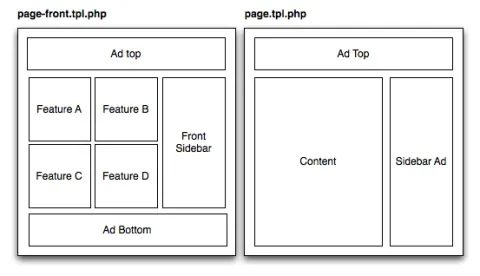
Block region examples

Defining block regions is super easy; simply add a couple lines in your theme's .info file:

regions[ad_top]        = Ad Top
regions[ad_bottom]     = Ad Bottom
regions[front_sidebar] = Front Sidebar
regions[sidebar_ad]    = Sidebar Ad
regions[content]       = Content
regions[feature_a]     = Feature A
regions[feature_b]     = Feature B
regions[feature_c]     = Feature C
regions[feature_d]     = Feature D

And then in your *.tpl.php file, wherever you want the region to appear, simply print out its machine-readable name:

<?php
print $feature_a;
?>

Don't want the blocks in the "Feature A" region to show up in page.tpl.php? No problem! Just don't print the region out there! Done! Right?

For many people, their concern about block visibility ends there; they're not showing up, so they move on with their day. However, this can have a profoundly negative performance impact on your site.

The block_list() function has no knowledge of which block regions are printed out on this page. This means that Drupal's default behaviour is to render every single block on your site that's assigned to any region on every single page view, regardless of whether the region's content is actually being visibly printed out or not.

If you're doing a bunch of complex queries in those feature blocks, and you're not hiding the block by one of the following:

  • Setting the block's visibility settings (on the block's configuration form) to not show up on pages that do not have the region it's assigned to printed. For example, setting any blocks assigned to the Feature A region to only show up on the <front> page.
  • Hiding the visibility of the block by some other means; for example, by limiting it to a role using the checkboxes on the block configuration form (or content types in Drupal 7), or installing a contributed module that implements hook_db_rewrite_sql() on the block list.

...then your server is probably melting. :P

Incidentally, setting <front> visibility by hand in each block that should only appear on the front page can be fairly tedious. You might also have a look at the Block Page Visibility module, which allows you to hijack the block visibility settings. It'll prevent them from being set anymore in the UI, but will allow you to establish whatever complex visibility logic you need in code instead.

So remember: don't rely on regions and template files to hide blocks; they do so visually only. Using block visibility settings will ensure that extra processing is not performed on blocks that aren't being printed out in the first place, and keep your server nice and speedy!

Comments

Damien McKenna (not verified) on October 8, 2009 - 7:42pm

Or use Context

The Context module works differently, it doesn't cause each enabled block to be rendered, it just renders the ones that are needed. Good stuff. Plus you get a lot of awesome flexibility for controlling your block visibility and regions beyond what you get with vanilla Drupal.

Doug Green (not verified) on October 8, 2009 - 8:13pm

Or use Panels

If I'm not mistaken, Panels module also overrides the entire block system and solves (but comes with it's own performance issues).

joshmiller (not verified) on October 8, 2009 - 9:14pm

I asked Earl personally and

I asked Earl personally and he said the performance work he has done points to panels being faster than core block performance.

TravisC (not verified) on October 20, 2009 - 2:05pm

one caveat

The flexible panel layout, has many more configuration options which have to load from the DB. If performance is a concern the flexible layout should probably only be used for prototyping...

October 9, 2009 - 1:47am Angie Byron

hook_block_info_alter()

Also note that in Drupal 7, there will be a hook_block_info_alter() for better flexibility around this than the 'pages' column of the blocks table, and/or re-writing the block_list() query. Thanks, catch! ;) Original issue: http://drupal.org/node/370172

jackinloadup (not verified) on October 9, 2009 - 2:11am

Thanks, this confirms what i

Thanks, this confirms what i have always assumed about blocks.

On a side note i have never really used page-front.tpl.php I suppose i just didnt know it was possible.

would there be any performance benefits or degradation between using

if($is_front) print "something";

in particular areas or using page-front.tpl.php?

it just seems like there would be more duplication. though it depends on the theme of course.

Anthony (not verified) on October 9, 2009 - 10:25am

The main reason to use

The main reason to use another template is when the <front> design is greatly different than the rest of your site. Personally, I get way more mileage off the node type templates, and recently off overriding Views templates.

Davy Van Den Bremt (not verified) on October 9, 2009 - 2:14am

Performance trick for block visibility

I once wrote a 2 part article about this on my blog :
http://www.drupalcoder.com/story/313-improve-drupals-performance-by-not-...
http://www.drupalcoder.com/story/339-improve-drupals-performance-by-not-...

It's a little snippet of code you have to set up in your template.php. You can then map regions to page templates and you don't have to worry about the individual blocks.

William (not verified) on October 9, 2009 - 10:35am

What about "disabled" blocks?

Just to clarify, the blocks listed under "disabled" in the blocks admin area - they are NOT rendered, correct? I don't need to worry about setting all of those visibility settings?

October 9, 2009 - 11:07am Angie Byron

Correct.

This only applies to blocks that are assigned to an actual region within the currently-active theme. It's just that it applies to *all* regions, regardless of whether they're printed out or not.

q0rban (not verified) on October 9, 2009 - 12:20pm

Another "or use" post

Or use Region Visibility. :)

bola (not verified) on October 11, 2009 - 1:12am

List of all tpl.php?

Nice tip..

I dont even know "page-front.tpl.php" is available to use.

Can anyone give me list of all *.tpl.php that I can use?

By the way, this is all the *.tpl.php I know:

node.tpl.php
page.tpl.php
page-node.tpl.php
comment.tpl.php
comment-node.tpl.php
comment-wrapper.tpl.php
comment-wrapper-forum.tpl.php
maintenance-page.tpl.php
search-result.tpl.php
search-theme-form.tpl.php
theme-settings.php
views-view.tpl.php
user-picture.tpl.php
user-profile.tpl.php

Thanks

Rick Hood (not verified) on October 12, 2009 - 8:58am

List of all *.tpl.php - is endless

There are almost endless TPL files that can be used because along with the standard ones you have listed you can also use:

TPL files (node and page) for node types (page-nodetype.tpl.php, node-nodetype.tpl.php)

TPL files depending on path of page, but you have to add code to template.php file (see http://drupal.org/node/139766)

TPL files for Views (when in a View click the Theme: Information link)

TPL files for individual fields (I haven’t done that but look it up).

TPL files that come within modules that you can pull out, put in your theme folder, and modify.

Other? Probably….

If you do any of the above remember to clear cache or changes might not be seen. To do that easily I like installing admin menu module (http://drupalmodules.com/module/administration-menu), then click the icon at way left to see flush cache options.

I do not quickly find a page for how to use TPL files in the theming documentation on Drupal.org – must be there somewhere, anybody know where?

suplementy (not verified) on October 12, 2009 - 4:03am

Hi. I like your blog. well

Hi. I like your blog. well done!

ulfa (not verified) on October 16, 2009 - 12:47am

Great post

Thanks for this article..
I Like it

ulfa (not verified) on October 16, 2009 - 12:50am

Thanks

Thanks 4 this article, very useful 4 me..

BarisW (not verified) on October 16, 2009 - 10:32am

I use this a lot

And find myself often using the page.tpl.php name as a starter for the Admin block title. For example:

Front: News headlines
Front: Active users
Front: Etc

Main: Sidebar ads

This set-up works great and is a charm to maintain.

jesse (not verified) on October 19, 2009 - 10:04pm

Keep up the good work, and

Keep up the good work, and post more articles like the one you have posted above.

Dekbed overtrek (not verified) on October 28, 2009 - 7:37am

Wow, I'm learning every day

Wow, I'm learning every day still. Didn't know of the context module, great tip too!

Harris Rashid (not verified) on October 29, 2009 - 12:02pm

Alternative Way - Parformance Hit?

Great Post.

I've also seen a method to call the block directly in a .tpl file:

<?php
$block
= module_invoke('module_name', 'block', 'view', 0);
print
$block['content'];
?>

(http://drupal.org/node/26502)

Does anyone know if this is absolutely the wrong way to do things, and if it bypasses the block cache system?

I'm having some block caching issues with a block heavily dependent on jquery effects (views carousel), and am considering suing this method to call the block.

Thanks!!

Anonymous (not verified) on December 28, 2009 - 1:13pm

Block in tpl.

Did you find an answer for this? Performance? Block Cache?

Is it better to theme the node file (load the entire node) than to theme the a Views page? I need to call out fields to from other others from other content types.

Anonymous (not verified) on November 3, 2009 - 1:29am

Debug Mode?

Know this is probably not the right place to ask, but found this article while scouting around to find a way to get my Drupal site to be fully functional again!? You all seem to know what you're talking about - so please excuse the intrusion - I am desperate!? When using Views-Mail I unknowingly (and against advice) turned on the "Debug Mode"! Now all I see in the place of content, is code!? I can't get to turn of the feature, and I am getting no response from the "Views-Mail" developer team. Please help, I will be eternally great-full.

John Woltman (not verified) on November 5, 2009 - 12:53pm

Great tip, thanks

Thanks for the interesting tip, and I love the podcast!

About this 'bot

Angie Byron

Angela Byron is the Drupal 7 core maintainer, recipient of the Google-O'Reilly Open 2008 Source Award for Best Contributor, and an Open Source evangelist who lives and breathes Drupal. She got her start as a Google Summer of Code student in 2005 and since then...

more

Recent

Podcast 87: Panels vs Context, The Cage Match!

Podcast 7.30.2010

Drupal Voices 140: Nathaniel Catchpole on Drupal 7 performance improvements

Podcast 7.29.2010

Drupal Voices 139: Mike Carper on the Boost module

Podcast 7.28.2010

Drupal Voices 138: Khalid Baheyeldin on Performance & Scalability Strategy

Podcast 7.27.2010

Command Line Basics: Intro to Vi/Vim

Video 7.27.2010

Popular

Podcast 87: Panels vs Context, The Cage Match!

Podcast 7.30.2010

Assembling Pages with Drupal

Article 7.17.2010

Drupal Voices 140: Nathaniel Catchpole on Drupal 7 performance improvements

Podcast 7.29.2010

Drupal Voices 139: Mike Carper on the Boost module

Podcast 7.28.2010

Install a Local Web Server on Ubuntu

Video 11.14.2007
 
  • Home
  • Services
  • Events
  • Ideas
  • Store

Connect the Bots:

Twitter Facebook YouTube blip.tv All Posts Newsletter
  • Ideas
  • Blog
  • Podcasts
  • Videos
  • About
  • Contact
  • Jobs
  • Services
    • Training
  • Events
    • Training Workshops
    • Other Events
    • Conferences
    • Calendar
  • Products
    • Videos
    • Books
    • Swag
  • Ideas
    • Blog
    • Podcast
    • Videos
  • About
    • Philosophy
    • Team
    • Presskit
  • Contact
    • General
    • Work Inquiries
    • Mailing List