Get updates and news:
Want to get Lullabot article, videocast, and podcast announcements delivered right to your in-box? Let us know your email address (we won't share it) and we'll let you know when anything exciting happens.

Thoughts About A Drupal Drill Down System

Drupal's taxonomy system is certainly one if its greatest strengths. The ability to categorize, classify, and/or tag nodes is very powerful and theoretically should make it easy to find similar content quickly. But the "finding stuff" part has been a weakness for Drupal. There have been some recent improvements in the core search functionality and Earl Miles' excellent Views module provides a nice user interface to a complex database query engine that can be used in many different ways.

A client recently had me thinking about how to easily "drill down" in taxonomy to find nodes. Taxonomy browser has the right idea, but this module lists all taxonomy terms whether or not any content has been tagged with this term. Views module's "exposed" filters adds the ability to filter by any views-aware criteria such as node-type, author role, and a bunch of other good stuff, but again shows everything whether a filter item "contains" content or not.

Let's use songs as an example -- you're not going to find any results when narrowing down to "Techno" songs by "the Beatles" on the album "Nevermind". So when you select "Techno" you should only see artists and albums with songs in this category.

Of course, Apple has come up with an elegant user interface for this very example:
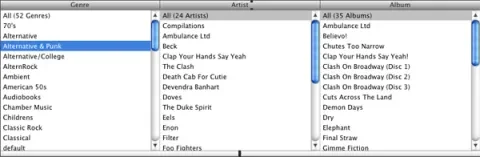
But how can we adapt this to Drupal? Again, Views' interface comes close and probably makes a great starting spot for non-AJAX backwards compatibility. By setting filters to "exposed" you get a display like this at the top of your page:
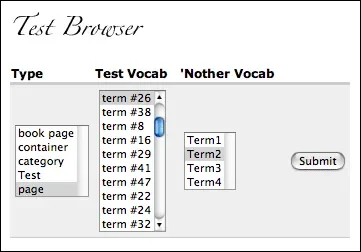
And what's more, by combining this with non-exposed filters, you can provide an interface to filter within "song" content items so that you do not need to burden the user with confusing selections like "node type". But Views suffers from the same problem as Taxonomy Browser in that there is no live feedback to let you know that your filtering will yield results.

My thinking is that a little bit of AJAX could really benefit this system. Imagine that as you click on a selection in the left column, the items in the right columns update to show only those containing content. Each column contains an "all" item at the top and multiple selections would be allowed. Well don't just imagine it. Fire up iTunes and use it for yourself. It's so intuitive that it's transparent. It just works.

In terms of the database query logic, each column represent an "AND", while multiple selections in each column represent an "OR". So if your columns are "Genre", "Artist", and "Album", then you would search could look a bit like this: (Genre = "ALL") AND (Artist = "Rolling Stones" OR Artist = "Clap Your Hands Say Yeah") AND (Album = "Their Satanic Majesty's Request" OR "Clap Your Hands Say Yeah"). Of course that's not proper SQL, but the logic is there. It's also important to note that the logic flows from left to right with each column narrowing what shows up in the columns to its right - hence the "drill down" concept. Also note that the logic for hierarchical taxonomy vocabularies would probably need to be handled slightly differently.

Views' exposed filters would need to be prettied up a little bit, but I think most of this is doable using Drupal's core JavaScript functions. It would mostly be a matter of repopulating each select with only items that have nodes assigned to them.

If written correctly, this type of search widget could be a HUGE benefit to Drupal. Add iTunes' real-time search box into the equation and we could really get some respect. But let's just take it one step at a time.

The disclaimer: I do NOT see any time on my schedule to code this. However I'd be happy to help work out the logic (and perhaps the JavaScript) for anyone that does want to code it. I would also encourage anyone interested in funding this development to post comments here. Perhaps we can organize this as a fundable project and match up some folks willing to pay for this functionality with some people willing to code it. And all will be right with the world!

Comments

AWESOME IDEA.

AWESOME IDEA.

old school

livesearch module already does that real time itunes stuff. was written a while ago and not maintained ... the filtering UI would be useful sometimes. Our current filter on node/admin is a bit less inuuitive than whats described here.

LiveSearch?

Boy, reading the module description for LiveSearch, you wouldn't have ANY IDEA that it does this type of thing. I'll have to check it out.

Live Search: No Cigar

Yes, this module is busted. It looks like the 4.6 branch version doesn't actually work with 4.6. But the module is based on this, so you can see how it ought to work. Some thoughts:

  1. This is *not* the same as what I'm outlining above. It's basically just an autocomplete search box.
  2. This module could easily be updated to work with Drupal 4.7 using the new form api, slapping an autocomplete on the search textfield and writing a quick callback to spit out the search results. Easy and very cool! (But still not a drill down interface)

Kinda Like This

I stumbled across this interface that implements the above idea on a web page. Don't know if/how it degrades, but that's the idea.

Category + Activeselect

I have a little tip for you, Jeff: download the category module and the activeselect module, play around with distant parent structures, and observe the magic. Using these two modules, the kind of AJAX-powered drill-down that you envision is available now!

This drill-down is only available on category selection elements on node forms for now. However, I recently upgraded the taxonomy_browser module to 4.7. I plan to port this module to the category system (and call it category_browser), and to add drill-down activeselect functionality to it.

Jeremy Epstein.

Awesome!

I knew I'd seen some of this functionality being worked on in Drupal but I couldn't remember where/what it was. I will definitely check this out!

What is the URL?

Jeremy,

Where can I actually see this magic? I can't find it.

The A9.com way

this is similar but on search results which can be transtled as 'categories + search'
search options by ticking the options renders fast without refreshing the whole page

http://a9.com/drupal

Drupal can be more handsome :)

have hardwired this in

I have hard wired this functionality into my views module. Hopefully this will kick this off into a new module. My module skills arnt upto scratch at the moment (newbie to drupal) to do this.

brief description of what i have done. http://drupal.org/node/54365 bottom of thread.

Yes - this is indeed a problem

Drupal's taxonomy is wonderful, but it needs an interface to access it. The "Flamenco Search" is exactly what we are after - have a look at the Flamenco site There are several demos (not working at the moment), but the screenshots will give you idea of what it is like. Also, a very interesting video with one of the developers Marti Hearst, and their preliminary study (pdf) on web search.

Here's a working model of three-column iTunes nav

Check out the excellent advances being done by dvessel on his Lumen theme, which incorporates a three-column, drill-down navigation system ala iTunes. It also promises to play nicely with taxonomy drill-down once greggles and merlinofchaos can put heads together on a filter that stops taxo drill-down at the first child vocab element. This is gonna be cool!

http://si-lumen.us
-- OR --
http://dvessel.com

Wrong URL

Thanks for plugging it Senpai.

It's still on the scratch site drupalcvs.dvessel.com and will make it to its' permanent home @ si-lumen.us when the time is right.

It's not exactly a 3 column view. The number of columns changes dynamically. If anyone wants to use it, I have it up on drupalcvs.dvessel.com/column-view-drill-down as a jQuery plug-in. I'll be creating a Drupal module for it as soon as I figure that out.

As far as taxonomy drill down. I haven't discussed this too much with the others. It would definitely kick ass but the way it was done would degrade performance on huge lists. I do hope to work with anyone more experienced to get that nailed down.

flamenco search

This drill down method is perfect for data stored in a hierarchy, but it does mean you have to search by criteria in the order given in the interface. In the example above, that means you search first by genre, then by artist, then by album.
Some excellent work has been done by Berkely university about how users want to search. It's called the flamenco project.
http://flamenco.berkeley.edu/
They have some software to do this, but it involves using prepared tsv (tab seperated value) files.
One look at this and I knew it would be straight forward to make a module which is pointed at a database table or joined table, and generates the whole lot.
Send me an email address and my organisation will send you a Request for proposal for a system which includes this functionality, if we can afford it.

Faceted Search

The Faceted Search project provides this kind of drill down searching (and more) for Drupal, with an interface that's similar to Flamenco's.

a couple of resources...

These guides/demos might be helpful in developing this:

Auto-populating Select Boxes using jQuery & AJAX at remy sharp’s b:log

AjaxAC Sample Application: CountryRegionCityJax

Oh and check out this cool demo for inspiration (made with Flex):

Elastic Lists Demo

Working system

I have this working with Views' exposed filters and Category's distant parent/child relationships. Though this may be a little challenging to set up for a newbie, the system is solid and works well.

http://drupal.org/node/190949

Headed for core

http://drupal.org/node/191360 this is the menu parent selector as a custom form element. While I am unsure how much the form is reusable generally -- the JS contains no menu code, it's totally general. A similar taxonomy drilldown should be easy to develop.

Post new comment

The content of this field is kept private and will not be shown publicly.
  • Allowed HTML tags: <a> <em> <strong> <cite> <code> <ul> <ol> <li> <dl> <dt> <dd> <blockquote> <h2> <h3>
  • Lines and paragraphs break automatically.
  • Use <!--pagebreak--> to create page breaks.
  • You may post code using <code>...</code> (generic) or <?php ... ?> (highlighted PHP) tags.
  • Web page addresses and e-mail addresses turn into links automatically.

More information about formatting options