Home

Lullabot

Lullabot Ideas

We know stuff. We empower you to know stuff too.

Drupal Module Development Deep Dive Week

London, UK
September 20-24, 2010

Custom search forms with Views and Fastsearch

Article by Robert DouglassAugust 20, 2007 - 3:34pm

This article applies to Drupal 5.x, plus the views 1.6 and the views fastsearch 5.x-1.x-dev modules.

UPDATE: As of August 21, 2007, there is no 5.x-1.2 release of views_fastsearch. Until that release is completed, use the 5.x-1.x-dev version of the module to see the features described in this article.

Drupal's search module contains a powerful indexer which makes keyword searching efficient and accurate. On its own, the search module provides either a plain vanilla search field, or the advanced search form, but doesn't provide a mechanism for customizing the offerings. It is an either/or proposition. The views module is well loved for its ability to let you define a custom set of content on your site, and through the use of exposed filters, allow the site visitor to narrow the selection even further. These two modules can be glued together and made to cooperate using the views fastsearch module. In this article I show how to build a search form that has filters for taxonomy terms and content types.

What is a view?

For all the talk about the views module, it is often not fully understood what a view actually is. In its most basic form a view is a set of content (nodes). In fact, when you create a new view, it is, in its initial state, the set of all of the nodes on your site. All of the other stuff that you may do that view will either narrow the set of nodes to be smaller and more focused, or define how those nodes should be displayed.

One of the best features of views is its filters. Once you've defined the initial set of content that the view is dealing with, filters can be used to narrow the set. By exposing the filter to the end user as a form element you empower your visitors to slice and dice the view to taste, and find exactly the content that they are looking for.

What is views fastsearch?

The views fastsearch is one such filter. It allows you to start with a view and narrow the set of content based on keywords. It utilizes the very search index that the search module has built, but it restricts its search to the content set defined by the view. It also uses clever SQL to do the actual searching quicker than the search module, thus the "fast" aspect.

The definition of a view as a set of content is a practical definition to work with. It makes it clear that if our goal is to replace Drupal's standard search (which searches all of the published content on your site), the default view (all content) is a good starting place. Once we create a new view, the steps that remain are to narrow the set (limit it to published content), tell it how to present the results (as search results), and to expose the views fastsearch keyword filter so that users can enter their search keywords. We will then have a near identical replacement for Drupal's standard search.

Setting up

To get set up I installed the search, views and views_fastsearch modules. I created a small amount of content by hand. There are five nodes in total, and they all contain the word Drupal. I kept the two default content types, Story and Page, that are present in a fresh Drupal 5.2 install. I created a taxonomy vocabulary called Drupal topic with the terms core, modules, and themes. I ran cron.php once to make sure that the search index has been built.

First I will show you how to search this content with views fastsearch, after which I will show how a customized form can be built to filter by taxonomy and content type.

Building a view that works like normal search

Once the modules are installed and some content has been created, it's time to create a view. This is done by navigating to Administer->Site building->Views->Add.

Basic configuration
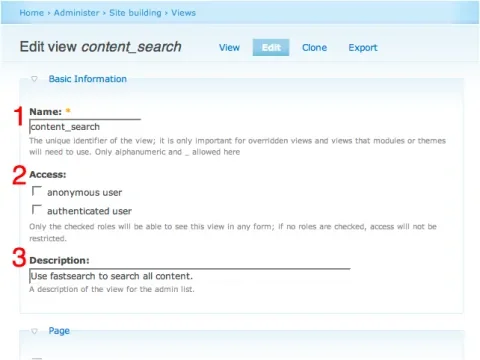
views1-annotated.png
Figure I: Name, Access and Description

Fill out the following fields:

  1. Name: This is the machine name of the view. I used content_search
  2. Access: You have the chance to limit access to this view by role. Leaving all roles unchecked is equivalent to allowing access to everyone, which is the typical configuration for site search.
  3. Description: A brief description of the view that will be useful to you as an administrator later. It appears on the views administration page and is never seen by your end users.

Provide a page view

We need to tell views to provied a page view for the search results.
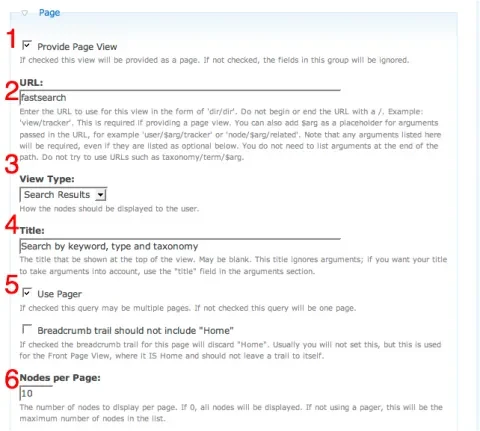
views2-annotated.png
Figure II: Page View, URL, View Type, Title, Use Pager and Nodes per Page

  1. Provide Page View: This must be checked in order for views to provide a page view.
  2. URL: This is actually the Drupal path (the 'q' parameter), not a full URL. It should not conflict with existing Drupal paths, so using search here will cause problems. I chose fastsearch, but you can use any path you choose. This path can be aliased using the path module.
  3. View Type: This should be Search Results to emulate traditional Drupal search. Feel free to try the other options, though. For Table View or List View you will need to also add the fields which you wish to be displayed.
  4. Title: This will be the page title for the search page. This can be whatever you want. I chose "Search by keyword, type and taxonomy".
  5. Use Pager: This is important if you want your end user to be able to see more than the first page of search results.
  6. Nodes per Page: Unlike the core search module, views allows you to define how many results per page are displayed. If you are the type who likes Google to show 50 results per page, you can set this number to 50 and enjoy.

Adding fields

For the Search Results view type the only field that is needed is the Search Score field. No configuration is need on the field. If you wish to experiment with other view types (Table, for example), you need to explicitly add each field that should be displayed.
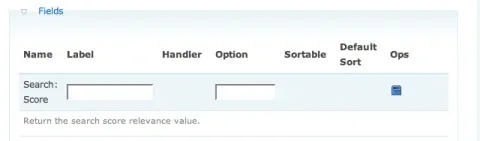
views3.png
Figure III: Search Score

Filters and exposed filters

Nearly every view that you ever create should be filtered to only include published material. The views fastsearch is also a filter (Search: Fast Index). Both of these are added in the filters section. The fastsearch filter should also be exposed to the end user (otherwise they can't enter their search keywords!)
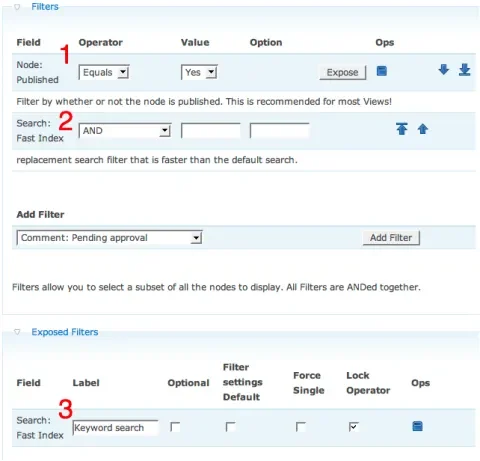
views0-annotated.png
Figure IV: Node: Published, Search: Fast Index

In the Filters fieldset:

  1. Node: Published: This limits the set of searchable nodes to those that are published. Yes means that the set should be filtered to only include those nodes that are published. If you wanted to build an interface for searching through the unpublished nodes on your site, you could set this to No.
  2. Search: Fast Index: This is the filter that says "take the set of nodes in this view and reduce it to only those which have a certain search term in the search index."
  3. After adding the Search: Fast Index to the filters, it will have an Expose button. Use that button to add the filter to the the Exposed Filters fieldset:
    • Label: This is text that will appear as a label on the form element that instructs the end user what the field should be used for. I chose "Keyword search".
    • Optional: This determines whether a value has to be given for this filter to get any results at all. When unchecked, as in Figure IV, it is not optional, and no nodes will be returned by the view if the Keyword search field is left empty. This is the same behavior that the Drupal core search module has, as well as Google and other search engines. First you are presented with a search screen and no results. Only after you type some keywords and submit the form are search results shown. If the Optional box were checked, it would instruct the view to ignore this filter if no value is present. The view would then show its default set of content (which is all content on the site in this case), and someone coming to the search screen would be confronted with a full array of search results even though they have not yet searched for anything. As you'll see later in this article, this creates a point of conflict when we add and expose further filters.
    • Filter settings Default: When checked, this tells the filter to inherit default settings from the Value field for this filter in the Filters fieldset.
    • Force Single: Some filters can have multiple values (eg. the taxonomy filter could have core and modules selected). Checking the Force Single checkbox limits the end user to only one choice. Practically, this changes the form element from a multiple select to a single select.
    • Lock Operator: Some filters have multiple possible operators (eg. AND/OR). When this is the case, the default behavior is to show an extra form element which specifies the operator. This is usually too much for the normal end user (but can be pure candy for power users), and you can hide that extra form element by checking Lock Operator

Sorting

Last but not least, it is important to tell views how to sort the results. If you think about this in terms of Google or Yahoo!, you'll realize that search is not just a matter of identifying the right results, but also making sure that the right ones appear at the top of the list for the convenience of the person searching. This task falls to the scores that have been created by the search index. Adding a Search Score sort to our view will guarantee that the most relevant results are displayed first. Make sure that the sort is set to Descending, or you'll end up presenting the least relevant items first!
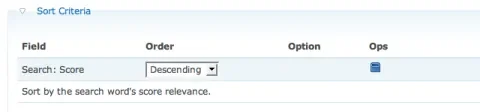
views6.png
Figure V: Search Score, Descending

The search results - Part I

Now if you visit example.com/fastsearch you should see a nice search form waiting for you. Since the core search module is also active, we can compare the search results produced by the two. In my tests, the scoring factors affect the ordering of the results differently for fastsearch and core search. Overall, the core search handles scoring in a more sophisticated manner than the fast search filter. Fast search makes up for this, though, by allowing more control over the set of content being searched, and also by defining a hook that lets modules add their own scoring factors to search results.
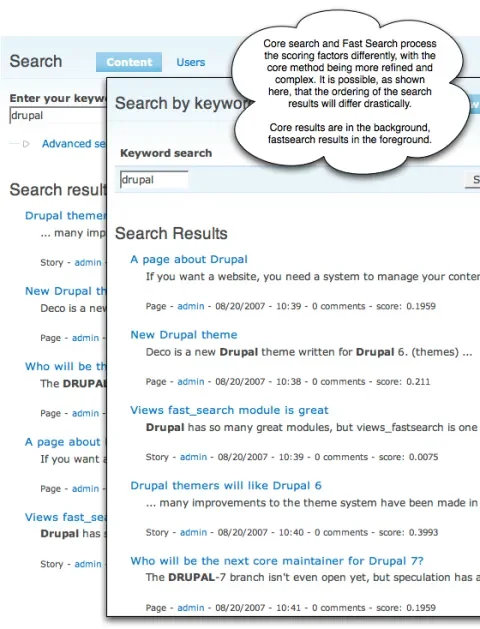
searchresults-annotated.png
Figure VI: Search results compared

Extending the search form by adding filters

Now it's time to add two more filters to the view so that we can narrow the results based on content type and taxonomy term. Go back to the view and open up its edit tab.
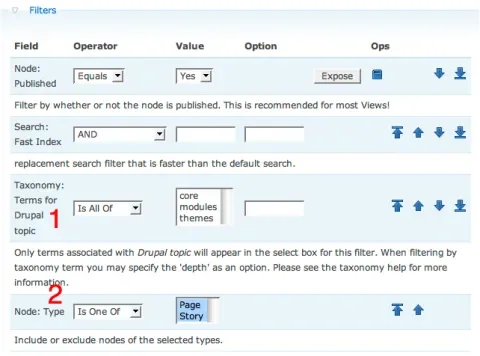
views4-annotated.png
Figure VII: Taxonomy Terms for a vocabulary, Node: Type

In the Filters fieldset, add two more filters:

  1. Taxonomy: Terms for Drupal topic: Drupal topic is the name of the taxonomy vocabulary in my test data. Different Terms for ... filters will appear for your specific vocabularies
  2. Node: Type: This filters on the node type, and you must select all of the options in Value that you want to be available to the end user. In my test data there are only two content types, Story and Page, and I want the end user to be able to search in both. One common feature request on Drupal.org is to limit search to one or more content types, or to exclude a content type altogether. With this filter you can achieve just that.

Now click Expose on both of the new filters to make form elements available to the end user.
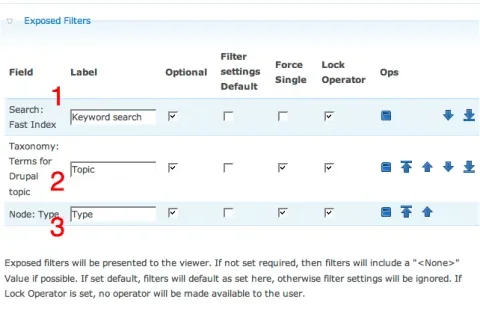
views5-annotated.png
Figure VIII: Search: Fast Index (Optional) and exposed filters

  1. Search: Fast Index - Optional: I mentioned in the discussion of the Optional checkbox in the Exposed Filters fieldset, there is some conflict between the Search: Fast Index field and the other filters. You'll notice in Figure VIII that Optional has now been checked - the search term is now indeed optional. This is done because it is a nice feature to be able to use the other two filters, Drupal term and Type, on their own. You can select all of the Story type content that is categorized as core, for example. If the Search: Fast Index filter is required, then this is impossible because you always have to enter a search term (thus narrowing the results to only that term). The drawback of making the filter optional is that the initial search page will show a set of results even before the user has entered any criteria. If this is disturbing to you, you'll need to make the field not optional and do without the functionality of filtering based on type and taxonomy alone.
  2. Taxonomy: Terms for Drupal topic:
  3. Node: Type: For both the taxonomy and the node type filters, the same applies. We want them to be optional so that the user can search with keyword alone. I chose the Force Single option because I like the cleanlier feel of a single select more than the multiple select. I chose Lock Operator because I don't think my site users necessarily want to think about AND/OR operators when searching.

The search results - Part II

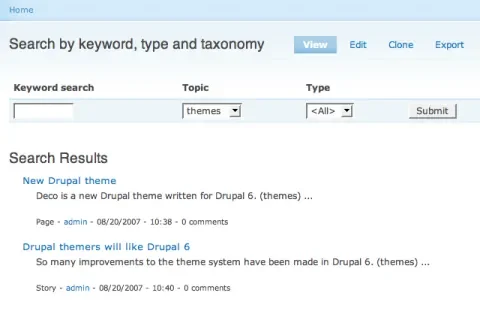
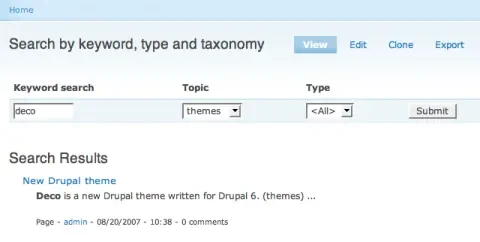
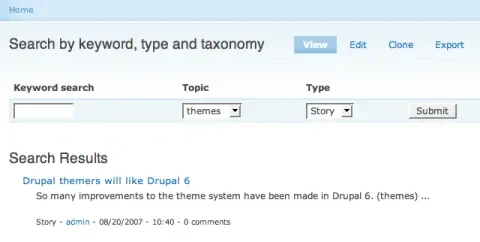
Now with two more exposed filters, we can do some very precise searching.
search1.png
Figure IX: All content in the themes category
search2.png
Figure X: All content in the themes category that matches the search term "deco"
search3.png
Figure XI: All Story content in the themes category

Configuring the Views Fastsearch module

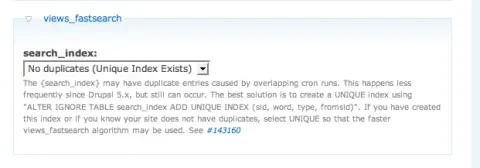
If you visit Administer->Site configuration->Search settings you will notice that the Views Fastsearch module has extended the options found on this page. There is now a views_fastsearch fieldset at the bottom of the page with a field labeled search_index. The issue here is the nature of the SQL query that gets built and an older bug with the search index building that leads to extra rows in the search_index table. For a full discussion of the issue, see the Drupal.org issue queue. For those sites that started off life as Drupal 5.x sites, it is fairly safe to choose the No duplicates (Unique Index Exists) option and save the configuration. This will lead in the best performance for your fast searches.
config.png
Figure XII: No duplicates (Unique Index Exists)

Other exciting stuff you can do

The Views Fastsearch filter is an exciting module that opens up many possibilities for custom searches in Drupal. One very neat feature is its exposing of a hook_search_ranking function. Modules can implement this function to add scoring factors to fast searches. For example, the Voting API could add a scoring factor that gave a higher score (and thus a higher ranking in search results) to content based on the average voting result. Since scoring factors can be weighed relative to each other, this gives administrators an amazing amount of control over the fine-tuning of search results.

Another neat trick that can be done with the fastsearch filter is to implement theme_search_form in such a way that the default search form is replaced with the filters from the fastsearch view. This effectively replaces core Drupal search with your fastsearch search.

Comments

Doug Green (not verified) on August 20, 2007 - 6:13pm

Two minor corrections

Very nice Robert. I'll get some grief from my co-workers at CivicActions that I didn't write this, but I prefer writing code to documentation. So Thank You!

I'm not sure if you were using the 5.x-1.1 version or the 5.x-1.x-dev version. (I'm waiting to create a 5.x-1.2 version until views commits this patch that I submitted for handling SQL subqueries.) With the 5.x-1.x-dev version,

  1. I've added a default view called "views_fastsearch" that you can "add" and then modify. It saves you from creating the view from scratch, as you've done here.
  2. I've improved the search ranking. The results don't mimic the core search results, but I think that VFS actually offers more options than core search for defining search rankings, with the implementation of hook_search_ranking. (BTW, I've submitted this as a core search patch here.)
August 21, 2007 - 3:03am Robert Douglass

Oops... yes, I used the 5.x-1.x-dev

Updating the article to reflect this.

Anonymous (not verified) on November 2, 2007 - 1:34am

Is it possible to do search on file names in drupal

Hi,

While searching for a efficient search method in drupal, I came across this node discussion.
I liked the method of search implementation using Views and Fastsearch. Still I have one doubt, can we do search on the basis of file/folder name.
For example: there exist a file called windows.doc in my database. Is it possible to search on the file name 'windows'.

Also can we use wildcard characters for search.
For example: for the file windows.pdf, can i search files such as '*.pdf' or '*.jpg'

I appreciate your time and effort...

Thanks

v1nce (not verified) on August 20, 2007 - 6:27pm

Great article indeed. This

Great article indeed. This is definitely a step in the right direction over the core search module. I have also been using the faceted search module which is very promising. I'm glad to see search is getting some much needed attention within Drupal.

Barry (not verified) on August 20, 2007 - 7:25pm

Thanks!

Great tutorial, and just when I needed it!

A question though; Although I got the search working as per the tutorial, I don't have 'Search Results' available as a View Type and there is no views_fastsearch option on my Search settings page.

I'm using Views Fast Search 5.x-1.1, are you using that or the dev version?

Cheers

Barry

August 21, 2007 - 3:04am Robert Douglass

Using the dev version (will be 5.x-1.2)

Barry, I made a mistake with the version I used and the article describes the dev version, which (per Doug's comment above) will become the 5.x-1.2 version.

Peter Deitz (not verified) on August 22, 2007 - 1:29am

great article

wow -- this module rocks. i've just implemented it on my site, which is launching on september 1st. the fast search index is going to be so help.

By the way, I'm using the teasers, 2 column view for my output. works fine.

Peter (of socialactions.com)

Anonymous (not verified) on August 22, 2007 - 12:32pm

Search Box

Awesome article, but how can you place a search box for this new view into a block?

That way when someone enters search terms into this new search box, it will take them to results page of the newly created fastsearch view.

Thanks for your help.

August 22, 2007 - 12:45pm Robert Douglass

Great question, with a great answer =)

Please see the views_filterblock module: http://drupal.org/project/views_filterblock

futurist (not verified) on August 29, 2007 - 9:13am

Issues with filter block and empty result

Robert, thanks again for your insightful tutorial! I'm quite happy now using a Views filter for my search, as the "results" view fits in perfectly with my other views. However, when implementing your method in my site these questions arose:

Issue with Views Filter Block module and custom theme
Is there a D5 alternative to Merlin's Views' exposed filters in a block using template.php? I have a custom theme with custom regions. The exposed filter block displays fine in one of those regions, but there is an issue with the filter showing a second time above the view.
Theming the filter block
My exposed filter block contains just a simple form with a textfield and a submit button. Is there a simple way to theme this? (I found theme_views_filterblock() in views_filterblock.module but it's not documented and it doesn't seem to be the function responsible for the block form output.)
Empty result - Friendly message
Is there a way I can get the view to show a message like "Sorry, your search didn't yield any results" when no matching nodes were found?

Thanks for your help!

Doug Green (not verified) on August 29, 2007 - 7:22pm

1. Issue with Views Filter

1. Issue with Views Filter Block module and custom theme - I think this has been fixed in the dev version for some time. The place to resolve it is on the issue queue, and I see that you posted your question there.

2. Theming the filter block - use theme_filterblock_output. See http://drupal.org/node/136640.

3. Empty result - Friendly message - you can do this in the view - there's a place to put the "empty text message".

futurist (not verified) on August 30, 2007 - 9:20am

No Issues!

Thanks a lot, Doug, all resolved now!

1. I had mistakenly left a custom filter block enabled instead of the one created by the Views Filter Block module. Sorry.

2. Not so easy to theme it to get rid of the fieldset. But I see there is a patch! :)

3. Doh! (Well, it's a bit hidden.)

Thanks for the fine module!

Anonymous (not verified) on November 2, 2007 - 5:30pm

Thank you robert, I did

Thank you robert, I did install the views_filterblock module, and it does the job... but with one problem:
1. Enter a search query in the created block
2. displays the search results in the view created, BUT, there is no search form in that page now.
How can we simply use the search box, then display the results in the page, with the search form included in that page?

Boblouis (not verified) on November 5, 2007 - 2:47pm

Hello, You are right,

Hello,

You are right, views_filterblock module works for that, but then once a search has been done, the search field is not displayed on the views_fastsearch page that displays the results.

At the end of the article, you say :
"Another neat trick that can be done with the fastsearch filter is to implement theme_search_form in such a way that the default search form is replaced with the filters from the fastsearch view. This effectively replaces core Drupal search with your fastsearch search."
=> do you know where I can find the documentation to practically do that ?

Cheers, and thank you for the great article anyway!

Anonymous (not verified) on November 19, 2007 - 4:15pm

Any auto complete search modules?

Is there any auto complete modules that will work with the views_filterblock module?

I would like to provide a live search for my custom search box I made.

Thanks

xamox (not verified) on August 23, 2007 - 10:28am

Awesome.

Yes! I've been waiting for something like this for a long time. Thanks for the tutorial!

futurist (not verified) on August 27, 2007 - 1:15pm

Should be in core

Great tutorial, thanks. But installing 4 (!) modules (search, views, views_fastsearch, views_filterblock), configuring them, building a view and adding filters -- I can hardly believe there is no easier way to get a simple search block to search only a specific node type! More of this flexibility plus the "clever SQL" should be integrated in the core search module...

Mike H (not verified) on August 28, 2007 - 12:44pm

Nice One

Wow thanks for this! It arrived just in the nick of time! Its just the ticket for the jobs board i'm building!
Mike

Anonymous (not verified) on September 17, 2007 - 9:43am

search form as div's

In the output, the seach form itself is a table. How can i change this output? Not as table, as div containers?

Thanks
Quiptime

September 17, 2007 - 9:58am Robert Douglass

Choose your view type

If you have chosen the search result view type you should not be getting a table. If you choose a table view type, you'll get a table. Any view can be themed as well, please read the views documentation for instructions on how to do that.

Quiptime (not verified) on September 17, 2007 - 12:08pm

I can't select the search

I can't select the search result view type. This type isn't avalaible.

For your understand. I mean this form area:

http://farm2.static.flickr.com/1124/1397061979_2d5a308d3f_o.jpg

What you see in the image: I use the search result view type and can fix my problem? I think not.

Regards
Quiptime

September 17, 2007 - 1:37pm Robert Douglass

Look for theme functions

Aaah, you're talking about the views exposed filters. So here's what you do in a case like this. You know that these controls are coming from the views module, so open up the views.module file and look for functions of this patern:

function theme_foo() { }

This is what I did just now, and I found this function:

function theme_views_filters() { ... }

That means that you can study that function and write a replacement for it:

function phptemplate_views_filters() { ... }

Put the new function in your template.php file in your theme, and you can output the filters however you care to.

Anonymous (not verified) on September 20, 2007 - 7:04am

Page view

The 'search results' select option doesn't exist in the view type for the page view.

Any ideas ?

Erich Beyrent (not verified) on September 25, 2007 - 10:22am

Use the dev version of the

Use the dev version of the module

Dave (not verified) on September 26, 2007 - 2:04am

Views Form Output & Integer Drop down

I aready asked this on the drupal forums without any reply :

1.Views Form output.
After adding a few filters i noticed the Forms are displayed horizontally in a Table and start breaking the Layout. Is there any way to Output the forms Vertically, so i can add a linebreak after each Form ? I did had a look at Theming views and Theme wizard, but i had the feeling it was more related on the node output.

2. Integer Drop down
Iam using a Integer CCK Field which i want to include in the custom search forms. I wonder how its possible to add operators to the users kind of "between 1-10" or "between 11-100" etc. so that users can filter by using the drop down.

Cheers

Patrick (not verified) on September 30, 2007 - 5:24pm

Theming filters without tables

For 1., I found this thread:
http://drupal.org/node/79302

And came up with this version with a bit more semantic labels and not so many divs:

<?php
function phptemplate_views_filters($form) {
$view = $form['view']['#value'];
foreach (
$view->exposed_filter as $count => $expose) {
  
$label = '<label for="edit-filter'.$count.'">'.$expose['label'].'</label>';
  
$formelement = drupal_render($form["op$count"]) . drupal_render($form["filter$count"]);
  
$o .= $label.$formelement;
}
$o .= drupal_render($form['submit']);
return
$o . drupal_render($form);
}
?>

Dave (not verified) on October 1, 2007 - 11:49pm

Thats much better :) For 2.

Thats much better :)
For 2. iam using computed fields by copying a field.

All in all iam happy with my search page now.

Chad (not verified) on October 6, 2007 - 7:38pm

Anyone have any creative

Anyone have any creative ideas for Sorting? Instead of having to add Tabs for sorting? Wouldn't it be easier to patch Views to make "Exposed Sorts" . Essentially, giving the sort order option to the user just like an "Exposed Filter".

Andy (not verified) on October 11, 2007 - 2:22pm

Tabbed Search

Instead of exposing filters for content, I would rather have tabbed searching sort of similar to the core search module allows you to tab between nodes, users and other items. Only I would like to have tabs for filtered content types; so I might have a tab for blogs, pages, events, or whatever.

So I cloned the view several times, and changed the node type filter. Works great, except...

Using tabs with views, I lose the "filter0" argument between tabs.

The only way I can think to "fix" this is to ignore the menu settings in the views and create dynamic menus in a custom module that add the filter0 argument to the menu path, and would in a roundabout way call views_build_view() for the each fastsearch view. Which I am not sure will even work.

Is there a better way to do this?

Andy (not verified) on October 12, 2007 - 9:05am

Menus make baby Jesus cry

Sorry to steal that from Eaton but I would rather deal with FAPI in Drupal 5 than the menus any day.

It was much easier to just do this with the hook_forms_alter with some cookies and drupal_goto thrown in.

Anonymous (not verified) on November 2, 2007 - 1:39am

Hi, Can anyone let me know,

Hi,

Can anyone let me know, if we can do search on file names in drupal. For example: there exist a file called 'windows.pdf' in drupal database.
Is it possible to search as 'windows' or '*.pdf'

Thanks

Boblouis (not verified) on November 5, 2007 - 2:49pm

Hello, You are right,

Hello,

You are right, views_filterblock module works for that, but then once a search has been done, the search field is not displayed on the views_fastsearch page that displays the results.

At the end of the article, you say :
"Another neat trick that can be done with the fastsearch filter is to implement theme_search_form in such a way that the default search form is replaced with the filters from the fastsearch view. This effectively replaces core Drupal search with your fastsearch search."
=> do you know where I can find the documentation to practically do that ?

Cheers, and thank you for the great article anyway!

Boblouis (not verified) on November 7, 2007 - 2:22pm

Any idea on how to do this

Any idea on how to do this (see above) ?

Anonymous (not verified) on January 17, 2008 - 8:16am

Replacing default search form

Yes, this would be most interesting...

tobiaschristian (not verified) on November 19, 2007 - 3:52pm

How do i use my onw sql-query?

Hello, I'm new in Drupal. I want to realise a distance search by using the postale code. For this i wrote my own search query. Now how do i use this query for my search engine? If the user clicks on "search" the query should be done.

Sorry for my bad english, ... :-)

tobi

November 20, 2007 - 3:42am Robert Douglass

Views integration or custom search.

If you're using the views_fastsearch technique listed in this article you need to learn how to do Views integration and write a custom module. You can get support for learning how to do this at the views developers group.

Otherwise you might have a case for a custom search module. Writing one of these is covered in the Pro Drupal Development book.

Anonymous (not verified) on November 20, 2007 - 1:55am

Dear Boblouis, Thanks for

Dear Boblouis,

Thanks for your reply!

I have implemented the fastsearch view module, but I'm still unable to search on the filename....
Can you please guide me further to execute the search on filenames...

Appreciate your reply.

frederick (not verified) on November 21, 2007 - 12:52am

Apply the technique here at Lullabot?

I look forward to trying this. But I'd really like to see it implemented here at Lullabot, because I think it would make your site more valuable. Here's my example: I'm looking for information about using Drupal for podcasting, and of course I thought Lullabot would be a good resource to check. But guess what happens when I use your "bitchin' search box" (as far as I see your only available search option) to search for 'drupal podcast', or even just 'podcast'? Not a very useful search return for my purposes. A more advanced search function would really help here...

Anonymous (not verified) on November 21, 2007 - 2:04am

Is there any way I can get

Is there any way I can get the results to return the first image of a story/node?

November 26, 2007 - 4:09am Robert Douglass

Sure. At the theme level

See theme_search_item in the search.module. You can override this function and display the extra data that you need. The $item parameter will be the loaded node and your image should be available in that object.

Kevin (not verified) on November 25, 2007 - 8:54pm

Display Score?

Hey Robert,

Your search results (http://www.lullabot.com/files/u8/searchresults-annotated.png) show a "score: 1.234"

How did you get that to show up on you results page?

November 26, 2007 - 4:06am Robert Douglass

See the "Displaying the score" section

There's another article about search scoring factors where this is explained: http://www.lullabot.com/articles/drupals_search_module_and_scoring_factors

Kevin (not verified) on November 27, 2007 - 9:12am

Schweet!

Thanks Robert.

Benjamin Melançon (Agaric Design) (not verified) on December 6, 2007 - 8:49pm

Views FastSearch, Exposed Filters, and Table View

... everything shows in just the first column. Any thoughts?

Issue here: http://drupal.org/node/198617

(Background: http://agaricdesign.com/note/views-fastsearch-exposed-filters-and-table-... )

Damjan Dvorsek (not verified) on December 9, 2007 - 1:50pm

Custom user profile search?

Could fastsearch module be used for building custom user or user profile (core option) search forms.

Thomas (not verified) on January 4, 2008 - 4:18pm

Any way to only search / index only certain cck fields?

Thanks for a great article (as always)!

I have encounted a problem that's sort of related and throw my question in here with a slight hope to get an answer that can point me in the right direction.

Using a view as a base for searching is excellent. My problem is that I need to search only certain cck fields on a content type, not all. I have a content type "book" with 15 cck fields. And i'm trying to build:
1) Simple search that search only node title and 1 cck field (title, author).
2) Advanced search that search all cck fields on the "book" content type (but nothing from other content types).

Any ideas or tips would be very appreciated!

Thanks again for the article.

Best regards,
Thomas Kulvik
www.nymedia.no

Gustavo (not verified) on January 18, 2008 - 5:37am

Fastsearch + Stemmer

I've encountered that these both fantastic modules doesn't work together. This is why search index file with any stemmer module has stemmed words instead of the original node words, i.e. "love" and "loves" are stored as the short form "lov". The stemmer module is called twice, one before indexing and also at user input before searching, looking at the previous example, if user enters "loves" in the search box, the word is stemmed as "lov" looking at the search index.
Fastsearch doesn't preprocess user input by stemmer, so, it will try to find "loves" at the index with no sucess.
The suggested solution could be, calling the stemmer preprocess with the $filter parm before the views_fastsearch_views_handler_search_index ran. How to accomplish it? No idea.
Regards,
Gustavo

Eduardo (not verified) on January 18, 2008 - 12:42pm

Phrase search and negations

I've followed these instructions, and have a working search form.. but phrase searches and negated search terms aren't working. For example, if I put ‘-Bridgeton’ in the exposed "Search: Fast Index" filter's field, fastsearch returns only results that include ‘Bridgeton’, not results that exclude it. If I put ‘"After hours"’ in the field, fastsearch returns results that contain the words ‘After’ and ‘hours’, not the phrase ‘After hours’.

Am I missing something? Does views_fastsearch support these search syntaxes?

czeky (not verified) on January 22, 2008 - 8:00pm

is there a chance to...

... place this search in right sidebar? like ablock or something? when I enable Block in views, there is no search field (exposed field), many thanx

Rafael Ferreira Silva (not verified) on February 8, 2008 - 8:48am

Thanks a lot

It will very helpfull in a project I'm doing! Thank you very much!

Anonymous (not verified) on February 24, 2008 - 8:59pm

Help - error with this

This is a great tutorial! Only problem I have is that I get two errors on my search page:

---- warning: usort() [function.usort]: The argument should be an array in ___/public_html/sites/all/modules/hierarchical_select/hierarchical_select.module on line 428.
---- warning: Invalid argument supplied for foreach() in ___sites/all/modules/hierarchical_select/hierarchical_select.module on line 433.

I haven't had this prob with hierarchical select, so I'm wondering if there's something I should do differently with fastsearch (using 5.x-5.2 nondev)

thanks!!

Andrew (not verified) on February 28, 2008 - 3:04am

Thanks

Thanks, Robert.

You saved me on this project that I'm working on. Your walk-through turned a 45 minute research project into 5-10 minutes. Good luck with you future endeavors, sad to see you leave Lullabot.

--Andrew

Jan Polzer (not verified) on March 2, 2008 - 5:00am

Thanks a lot

Thanks a lot for this great tutorial, Robert.

Patrick Reynolds (not verified) on March 10, 2008 - 11:19am

Hiding the Selection Dialog

Hi there,

Have finally figured out how to use this excellent search facility: http://www2.digi-sign.com/en/knowledgebasesearch but can't figure out how to hide the "is all of" drop down dialog or the big selection dialog. Don't need either of these visible and in fact would prefer if they weren't visible (to the users but obviously need it on the Edit page).

Am sure this is easily done and I've overlooked something, but if you could tell me what, I'd be much obliged ;-)

Thanks

PR

Andy Galaxy (not verified) on August 29, 2008 - 8:10pm

"is all of" drop down

see: # Lock Operator: Some filters have multiple possible operators (eg. AND/OR). When this is the case, the default behavior is to show an extra form element which specifies the operator. This is usually too much for the normal end user (but can be pure candy for power users), and you can hide that extra form element by checking Lock Operator.

Go to the next fieldset exposed filters and check the "Lock Operator" checkboxes.

Hope this helps.
Peace,
Andy

Patrick Reynolds (not verified) on March 11, 2008 - 8:12am

Is it possible that Fast Search doesn't like numbers?

Hi there (again),

Using the same link as shown in my previous comment, I can search for alhpa but not numeric.... this seems odd? Am I doing something wrong?

For example: search 'iis' and get 4+ pages but search '3.0' and get nothing?

Please advise,

Thanks

PR

scottrigby (not verified) on March 16, 2008 - 11:47pm

Proximity search by category?

The location module comes with a proximity search that's added to another tab 'by location'. What I'd like to do is offer a proximity search on my category views pages. So for instance, if my category is 'contractors' there could be a proximity search on that category view that allows users to search all nodes in the category 'contractors' within a specified location. Can these two search options be mixed using some version of these modules?
Thanks in advance!
:))
Scott

Scott Yager (not verified) on April 2, 2008 - 8:02pm

Results on page only?

Hi,

Thanks for the helpful tutorial, I've implemented this and it works great. However, I'd like to either a) return the search results on a page by themselves or b) have them appear above the form instead of underneath. Is there an easy way to alter this? Thanks in advance.

Terry (not verified) on May 12, 2008 - 2:28pm

customize search results?

I've also found this to be a useful tutorial...the instructions were perfect. One question though, can I customized the search results page for the for the fastsearch results only (instead of the entire site)?

206508072 (not verified) on May 23, 2008 - 5:42am

views

Hi

thanks that was very helpful to me as a person who is new in this industry. my only problem is that I need to lay my content in a table form. I have created a view but I don't know what to do next. please help me.

Anonymous (not verified) on June 18, 2008 - 4:10pm

Views table

View Type:Table View instead of Search Results

Peter (not verified) on June 27, 2008 - 5:50am

Redirecting to default search to views fastsearch

"Another neat trick that can be done with the fastsearch filter is to implement theme_search_form in such a way that the default search form is replaced with the filters from the fastsearch view. This effectively replaces core Drupal search with your fastsearch search."

More details on redirecting your default search to your new views fastsearch is here:
http://drupal.org/node/189531

Nicolas (not verified) on July 9, 2008 - 5:09am

Fast Search in a View

Hi,

I've set up fastsearch module which works well.
But actually we can search in a content type, but how can i search in a view ?

Regards,

Nicolas.

Andy (not verified) on September 10, 2008 - 4:45pm

Default <all> instead of <none>

This has to be the best module for Drupal I've come across.
I am having trouble with only one thing.

On my search form, the dropdowns for the category fields display first with the next option being before the category items within (I have checked "Optional" within exposed filters fieldset on the views setup.

Do I essentially have to create a parent category for each then uncheck the "Optional" boxes in the Exposed Filters fieldset to be able to have the default value search all categories?

Alessandro (not verified) on October 13, 2008 - 4:51am

node reference-based search?

Hi,

This article is really great and helped me to build a really comprehensive search page.

Now I should add a feature, namely a cck node reference field into the search fast view.

It runs... but only the title of the referenced node is displayed/searchable.

And... if I wish to display/search other fields from referenced node?
Is it possible?

Thanks,
Alex

j0rd (not verified) on November 6, 2008 - 9:21am

Exposed Sorts

Wonderful tutorial by the way.

The last piece of my puzzle I'm missing is "Exposed Sorts". Seems views doesn't support them out of the box (i've heard rumours of table views being able to sort, but we're supposed to use search sort here right?).

So my question is, how do I expose some of my sorts to sort by things like Price or Title? Seems like a common feature people might want, who implemented it and how?

PS. to theme the search results you can do something like

<?php
function phptemplate_search_item($item, $type) {                                                               
   if(!empty(
$item['node'])) {                                                                                 
     
$node = $item['node'];                                                                                   
      switch(
$node->type) {                                                                                    
         case
'product':                                                                                                            
            return
theme('node', $node, $teaser = TRUE, $page = FALSE);                                                                                                                                   
      }                                                                                                        
   }                                                                           
  
/* Requires devel module */                               
   //dpm(array('type' => $type, 'item' => $item));                                                         
  
return theme_search_item($item, $type);                                                               
}
?>

Vijandren "Allagapas" Ramadass (not verified) on November 25, 2008 - 6:36am

How to search between 2 bounds (CCK Number Fields)?

Hello..

How can I use "Views Fast Search" to search between 2 bounds? (the "between" search)

the bounds is MIN and MAX Decimal from the CCK, for example to search between $20 to $100

MIN > data < MAX

Thanks..

Truc (not verified) on December 4, 2008 - 3:29pm

Fastsearch using OR

I create a fastsearch view using the OR operator and have warning display:

warning: preg_match() expects parameter 2 to be string, array given in /web/www/html/includes/bootstrap.inc on line 684.

I read the drupal issues for Views Fast Search and one suggestion is to check mark the optional in Exposed Filter, however, I don't want the content to be display prior to the search. Can you shed some light in how to solve this problem?

Drupal version 5.12
Views Fast search 5.x.2.0

Thanks,

Anonymous on May 23, 2009 - 12:22am

Drupal 6

Does anyone know how to do this in Drupal 6 or know where I can find out?

Thanks,
Allen

Gaurav Kumar (not verified) on June 15, 2009 - 3:42am

Best Solution on Drupal 6 for this problem

Please share implementations of how you've implemented node based searching using views on D6.

Cheers

Anonymous (not verified) on October 22, 2009 - 5:08pm

Solution on Drupal 6

Hi. This looks great, but I see I am a bit late. Any chance you have a solution for drupal 6. I am desperate!!!

Anonymous (not verified) on November 13, 2009 - 12:36pm

Outdated

This information is outdated, the only solution I could find for Drupal 6 is the Apache Solr Views module..

About this 'bot

Robert Douglass

Robert Douglass studied information science at the University of Massachusetts, Lowell. While working for Hype.de and ABRACON.de he learned the art of building enterprise class web applications, serving clients such as...

more

Recent

Drupal Voices 160: Moshe Weitzman on Page Rendering in Drupal 7

Podcast 9.02.2010

Drupal Voices 159: John Albin Wilkins on Drupal 7 Theming

Podcast 9.01.2010

Drupal Voices 158: Emma Jane Hogbin on PHP for Designers

Podcast 8.31.2010

Command Line Basics: More Editing with Vi/Vim

Video 8.31.2010

Lullabot's Back to School Sale

Blog 8.30.2010

Popular

Drupal Voices 160: Moshe Weitzman on Page Rendering in Drupal 7

Podcast 9.02.2010

Drupal Voices 159: John Albin Wilkins on Drupal 7 Theming

Podcast 9.01.2010

Drupal Voices 158: Emma Jane Hogbin on PHP for Designers

Podcast 8.31.2010

Installing Memcached on RedHat or CentOS

Article 8.20.2009

Photo galleries with Views Attach

Article 6.01.2009
 
  • Home
  • Services
  • Events
  • Ideas
  • Store

Connect the Bots:

Twitter Facebook YouTube blip.tv All Posts Newsletter
  • Ideas
  • Blog
  • Podcasts
  • Videos
  • About
  • Contact
  • Jobs
  • Services
    • Training
  • Events
    • Training Workshops
    • Other Events
    • Conferences
    • Calendar
  • Products
    • Videos
    • Books
    • Swag
  • Ideas
    • Blog
    • Podcast
    • Videos
  • About
    • Philosophy
    • Team
    • Presskit
  • Contact
    • General
    • Work Inquiries
    • Mailing List