
This article describes the Content Construction Kit, version 5.x-1.4.
The Content Construction Kit (CCK) began as a natural evolution from the popular Flexinode module. The Flexinode module allowed you to define your own content types (a blog entry, a recipe, a poll, etc) with a number of custom fields. CCK also allows you to do this, but in a more powerful way.
Content types and the content.module
With Drupal 5, you can create your own content types. The default installation comes with Page and Story content types, which are included for historical reasons. You can delete these and create your own content types, or modify them to suit your needs.
CCK allows you to extend the data model of content types through the addition of fields such as a date, an image, an email address, etc. The core CCK module is the content.module. The content.module is the workhorse that handles CCK's main goal of extending content types with these new fields. Therefore, it is logical that the content.module manages its own database table for every content type you have defined. This includes the built in Page and Story types.
When you install and enable content.module, it creates tables for every content type you currently have. Here is the schema for the table it creates if your Drupal installation has a Page content type:
mysql> describe content_type_page;
+-------+------------------+------+-----+---------+-------+
| Field | Type             | Null | Key | Default | Extra |
+-------+------------------+------+-----+---------+-------+
| vid   | int(10) unsigned | NO   | PRI | 0       |       |
| nid   | int(10) unsigned | NO   |     | 0       |       |
+-------+------------------+------+-----+---------+-------+
vid and nid are the bare minimum fields needed to extend a content type.
As you can see, the content_type_page table is an empty shell at this point, only having columns for vid (revision id) and nid (node id).
The content.module manages a great deal of data about the various fields you will use to extend your content types. I will show later that fields exist at two levels; the global level, which affects a field no matter which content type it extends, and the content-type-specific level, or field instance level, where a field can be customized to behave in a specific way for a specific content type. This dichotomy can be seen in the two administrative tables that the content.module creates, node_field, and node_field_instance:
mysql> describe node_field;
+-----------------+--------------+------+-----+---------+-------+
| Field           | Type         | Null | Key | Default | Extra |
+-----------------+--------------+------+-----+---------+-------+
| field_name      | varchar(32)  | NO   | PRI |         |       |
| type            | varchar(127) | NO   |     |         |       |
| global_settings | mediumtext   | NO   |     |         |       |
| required        | int(11)      | NO   |     | 0       |       |
| multiple        | int(11)      | NO   |     | 0       |       |
| db_storage      | int(11)      | NO   |     | 0       |       |
+-----------------+--------------+------+-----+---------+-------+
Note the global_settings field, as well as details about the database storage mechanism; these are details that are stored at the global level.
mysql> describe node_field_instance;
+------------------+--------------+------+-----+---------+-------+
| Field            | Type         | Null | Key | Default | Extra |
+------------------+--------------+------+-----+---------+-------+
| field_name       | varchar(32)  | NO   | PRI |         |       |
| type_name        | varchar(32)  | NO   | PRI |         |       |
| weight           | int(11)      | NO   |     | 0       |       |
| label            | varchar(255) | NO   |     |         |       |
| widget_type      | varchar(32)  | NO   |     |         |       |
| widget_settings  | mediumtext   | NO   |     |         |       |
| display_settings | mediumtext   | NO   |     |         |       |
| description      | mediumtext   | NO   |     |         |       |
+------------------+--------------+------+-----+---------+-------+
Note that most of the information about how a field is displayed, i.e. weight, label, description, widget and display settings, are all stored at the instance level of a field.
Creating a new content type
To create a new content type, navigate to Administer -> Content management -> Content types -> Add content type (admin/content/types/add). You'll be required to give your new content type a human readable name and a machine readable name. There are other configuration options as well, but since creating and configuring new content types is part of Drupal 5 core, and not a feature of CCK, I won't cover that here.
For this article, I've created a new content type with the human readable name "Test content type" and the machine readable name "test". Here is the table that the content.module created on-the-fly, which is used to extend the "Test content type":
mysql> describe content_type_test;
+-------+------------------+------+-----+---------+-------+
| Field | Type             | Null | Key | Default | Extra |
+-------+------------------+------+-----+---------+-------+
| vid   | int(10) unsigned | NO   | PRI | 0       |       |
| nid   | int(10) unsigned | NO   |     | 0       |       |
+-------+------------------+------+-----+---------+-------+
The structure of a CCK content table before fields have been added.
The fact CCK creates these tables for you is significant. The Flexinode approach was to save all of the information needed to extend content types in a few central tables, no matter how many flexinode types were created, or how many fields were added. These central tables became a bottleneck due to excessive JOIN queries being made. The CCK approach of creating new tables for the purpose scales much better.
Fields - an overview
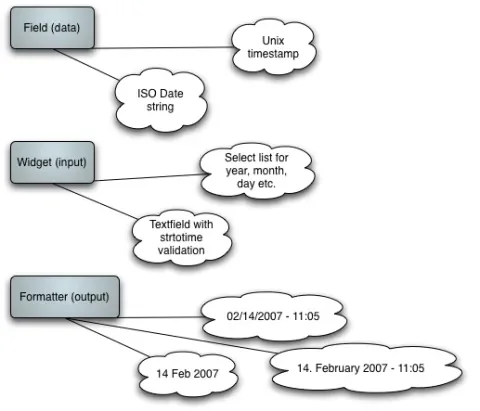
Fields are the tools with which you extend the data model of a content type. A field comes in three parts; its underlying data type, its input widget, and its rendered output. These three parts are referred to as the field, the widget, and the formatter.
A good example of all these elements coming together is the date field. A date can have different underlying data structures (thus the choice between date and datestamp).
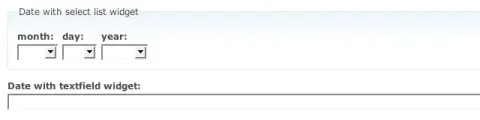
There are also many ways that a date can be input in a browser. A simple textfield is enough, if you can justify having your end users type in ISO standard date strings. A more comfortable solution is a separate input element, either text field or select list, for the various units of the date/time (year, month, day, hour, minute second). These are two different widgets; a textfield versus a number of select lists. Another possible widget is a JavaScript driven date picker. No matter which widget is used, the underlying data that gets stored in the database will be the same.
Finally, there are many options when it comes to displaying and formatting the date. This is the realm of formatters. Formatters will not be covered in this article, although they are similar to a theme function in that they are concerned with the rendered output of a field.
This separation of concerns within a field is diagrammed below:
Fields - adding new fields
So far I have enabled the content.module and created a new content type. If I try to add a field at Administer -> Content management -> Content types -> Add field I receive the following error message.
No field modules are enabled. You need to enable one, such as text.module, before you can add new fields.
This is because I have not enabled any modules which provide fields. One of reasons Flexinode became so popular was because of the relative simplicity with which people could add new field types. CCK is extensible in much the same way that Flexinode is, and it comes with three modules, the text, number and date modules, which define fields. In another article, I intend to show that creating your own custom fields is a straightforward process, granted you have an overview of what CCK is and how it does its business.
Go to Administer -> Site building -> Modules and enable text.module. The text module manages text-based fields.
To add a new field to an existing content type, go to Administer -> Content management -> Content types -> Add field (admin/content/types/test/add_field).
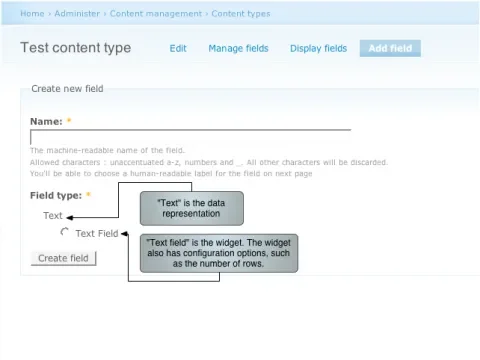
As soon as you create a new text field, CCK updates the underlying table in your database for that content type. Now look at the database schema for content_type_test:
mysql> describe content_type_test;
+--------------------------+------------------+------+-----+---------+-------+
| Field                    | Type             | Null | Key | Default | Extra |
+--------------------------+------------------+------+-----+---------+-------+
| vid                      | int(10) unsigned | NO   | PRI | 0       |       |
| nid                      | int(10) unsigned | NO   |     | 0       |       |
| field_example_text_value | longtext         | YES  |     | NULL    |       |
+--------------------------+------------------+------+-----+---------+-------+
field_example_text_value shows up in this table because I added a text field named "Example text".
Fields - global versus instance
Fields store global data plus per-instance data. The global configuration for the field goes into the node_field table. This includes the underlying data type, plus some data handling information specific to text fields, such as the input filter that should be used.
mysql> select * from node_field;Column nameValuefield_namefield_example_texttypetextglobal_settingsa:4:{ s:15:"text_processing";s:1:"1"; s:10:"max_length";s:0:""; s:14:"allowed_values";s:0:""; s:18:"allowed_values_php";s:0:""; }
required1multiple0db_storage1The global_settings column contains configuration data such as whether filtering is supposed to take place, what the maximum length is, and what the allowed values are. The data is in serialized form.
The node_field_instances table contains configuration information for the field that is specific to the the "test" content type. The fact that the "test" content type uses the "Example text" field is what is considered an instance of a field. Later I'll show that other content types can also use the same field. Each content type that decides to use it creates another instance of it, and each instance can, in turn, have different configurations. The data included at the per-instance level and stored in the node_field_instances table includes the label to be shown on the form, the widget that is to be used (textfield), and the number of rows that the form element should have.
mysql> select * from node_field_instance;Column nameValuefield_namefield_example_texttype_nametestweight0labelExample textwidget_typetextwidget_settings
a:3:{
  s:13:"default_value";
  a:1:{
    i:0;
    a:1:{
      s:5:"value";
      s:0:"";
    }
  }
  s:17:"default_value_php";s:0:"";
  s:4:"rows";s:1:"1";
}
display_settingsa:0:{}descriptionThis is an example text field for a Lullabot article.The per-instance settings include information about the widget that is to be used for capturing input (widget_type: text), the label for the input element ("Example text"), and the description ("This is an example text field for...")
Creating content
Now, with our extended content type, we can create some content. The data that is common to all nodes (author, published, created...) will be stored in the node and node_revisions tables, but the data that extends this content type will be stored in the content_type_test table. Here is what the content_type_test table looks like after creating a first "Test content type" node:
mysql> select * from content_type_test;Column nameValuevid1nid1field_example_text_valueHere is some example text! <div>Forbidden HTML will be stripped.</div>field_example_text_format1
Adding a second field
Now I'll add a second field to the Test content type, extending it even further. This time I'll add an Integer. The Integer field comes from the number.module (contained in the CCK download), so the first step is to enable that module. The number module defines two new data types, Integer, and Decimal. Each of them rely on the textfield widget by default. This clearly shows the independence of data types and widgets in the CCK architecture.
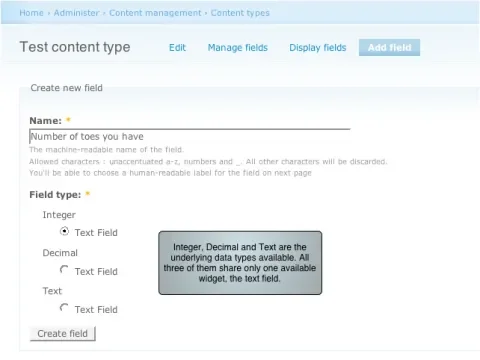
The configuration options for Integer and Text data are different. The reason that each needs different configuration is made clear when considering the validation requirements. An Integer is a much narrower set of values than Text, and to guarantee that only integers get stored in the database, the number module needs to do some extra work when accepting user input. Furthermore, there are possibilities for integers (such as minimum or maximum values) that don't make sense when considering free text. Karen Stevenson describes how the validation of user input is divided between the widget and the underlying data type:
In the current CCK model there are two layers of validation. The widgets provide their own input validation that is naive to the requirements of the data layer. The Data layer then validates what the widget produced as final output.
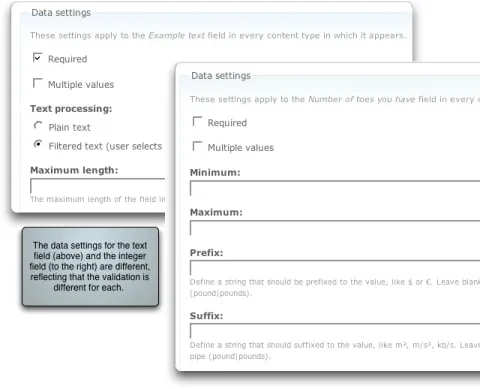
As you may have guessed, adding a second field to the Test content type results in further expansion of the content_type_test table. It is interesting to note that the storage requirements of each field are not the same. Text fields need the value and the format (for filtering), whereas our integer field only needs the data itself.
mysql> describe content_type_test;
+-------------------------------------+------------------+------+-----+
| Field                               | Type             | Null | Key |
+-------------------------------------+------------------+------+-----+
| vid                                 | int(10) unsigned | NO   | PRI |
| nid                                 | int(10) unsigned | NO   |     |
| field_example_text_value            | longtext         | YES  |     |
| field_example_text_format           | int(10) unsigned | NO   |     |
| field_number_of_toes_you_have_value | int(11)          | YES  |     |
+-------------------------------------+------------------+------+-----+
field_number_of_toes_you_have_value has been added to the content_type_test table by CCK because I added an Integer field named "Number of toes you have".
Multiple values
So far I've only demonstrated fields that have a single value per node. I've shown that such fields have their data stored directly in a table (content_type_test in the example) that is used to extend a content type. This paradigm changes, however, when a field is marked as "multiple".
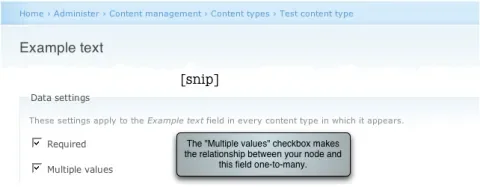
Once multiple values are enabled, many copies of the widget show up on the node form. If you fill them all up, submit, and then edit the node again, you will be provided with even more widgets for your use. The number of copies of the widget per node is not limited, so you could repeat the process indefinitely. This workflow is still a bit clumsy in CCK, but the groundwork has been laid for a very powerful system of managing one-to-many relationships between nodes and fields.
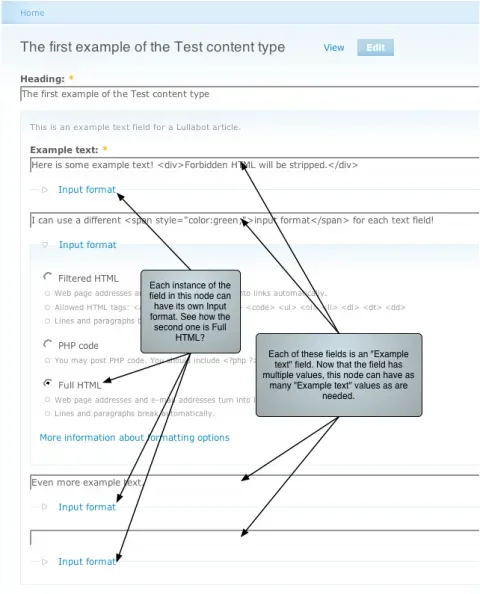
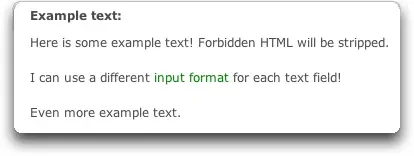
When a field can have multiple copies, it no longer has a one-to-one relationship with the node. Rather, it has a one-to-many relationship, and this must be mirrored at the database level. Let's see what happens when I go back to the configuration of the text field and specify that multiple values are supported.
mysql> describe content_type_test;
+-------------------------------------+------------------+------+-----+
| Field                               | Type             | Null | Key |
+-------------------------------------+------------------+------+-----+
| vid                                 | int(10) unsigned | NO   | PRI |
| nid                                 | int(10) unsigned | NO   |     |
| field_number_of_toes_you_have_value | int(11)          | YES  |     |
+-------------------------------------+------------------+------+-----+
content_type_test has again been modified by CCK: this time fields have been removed.
Where did the field_example_text_value and field_example_text_format columns go? They're now in their own table:
mysql> describe content_field_example_text;
+---------------------------+------------------+------+-----+---------+-------+
| Field                     | Type             | Null | Key | Default | Extra |
+---------------------------+------------------+------+-----+---------+-------+
| vid                       | int(10) unsigned | NO   | PRI | 0       |       |
| delta                     | int(10) unsigned | NO   | PRI | 0       |       |
| nid                       | int(10) unsigned | NO   |     | 0       |       |
| field_example_text_value  | longtext         | YES  |     | NULL    |       |
| field_example_text_format | int(10) unsigned | NO   |     | 0       |       |
+---------------------------+------------------+------+-----+---------+-------+
In order to handle a one-to-many relationship between a content type and a "Multiple" field, CCK creates a new table for the field.
mysql> select * from content_field_example_text;vid delta nid field_example_text_value field_example_text_format 101Here is some example text! <div>Forbidden HTML will be stripped.</div>1 111I can use a different <span style="color:green;">input format</span> for each text field!3 121Even more example text.1 The data storage of a "Multiple" text field.
Semantic meaning and sharing fields between content types
One of the primary goals of CCK is that the fields have semantic meaning. What does this mean? It means that a field called "Age", while being in principle identical in nature to a field called "Number of toes you have", is intended to convey a different meaning. Both fields store data as an integer. Both should be configured to only allow positive numbers. Age, however, should always be understood to refer to the length of time something has existed and the number of toes you have, while still a number, should be understood to have a totally different meaning.
Furthermore, it is often the case that a particular field with a particular semantic meaning needs to be used for more than one content type. For example, a content type called "Person" may have an Age field, and a content type called "Animal" may also have an Age field. Semantically, these fields should have the same meaning. CCK solves this problem by letting you use existing fields with any number of content types.
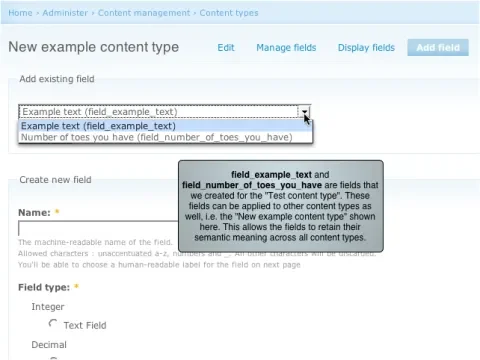
As soon as a field is used in more than one content type, its values are no longer stored in the content-type-specific tables. A new table is created to store the values for that field across content types. This is the table that got created when I added the "Number of toes you have" field to a second content type:
mysql> describe content_field_number_of_toes_you_have;
+-------------------------------------+------------------+------+-----+
| Field                               | Type             | Null | Key |
+-------------------------------------+------------------+------+-----+
| vid                                 | int(10) unsigned | NO   | PRI |
| nid                                 | int(10) unsigned | NO   |     |
| field_number_of_toes_you_have_value | int(11)          | YES  |     |
+-------------------------------------+------------------+------+-----+
The table structure for an Integer field named "Number of toes you have". This field is being used by more than one content type, which is why CCK uses a dedicated table to store its data.
This information will no longer be stored in the content_type_test table. In fact that table has now been reduced back to its original state:
mysql> describe content_type_test;
+-------+------------------+------+-----+---------+-------+
| Field | Type             | Null | Key | Default | Extra |
+-------+------------------+------+-----+---------+-------+
| vid   | int(10) unsigned | NO   | PRI | 0       |       |
| nid   | int(10) unsigned | NO   |     | 0       |       |
+-------+------------------+------+-----+---------+-------+
content_type_test has been stripped of its field columns altogether.
Summary
The Content Construction Kit is a carefully crafted tool that allows you to extend the data model for content types. The storage, retrieval and presentation of data is divided into the following parts:
- data: fields
- input: widgets
- output: formatters
Fields can have single or multiple values per node. This distinction also influences how the data is stored in the database - whether it is stored directly in a table for a content type when the relationship is one-to-one, or whether it is stored in a field-specific table that allows the one-to-many relationship to be modeled.
Fields have semantic meaning that is retained across content types. When you add a field to a second content type, the storage of that field will switch from being within the table for the original content type to storage in a field-specific table.